

Thank you for the quick response! I believe I have found an idea that could possibly solve this problem without the need for complex color analysis, through the use of multiple voxel layers. I separated the house in three different Z-Ortho files: one for the base, one for the roofing, and another one for the hay bale, like so: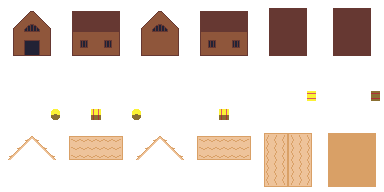
I loaded each of them individually in Pixzels, and then combined them in Photopea to demonstrate the shape I originally intended to make: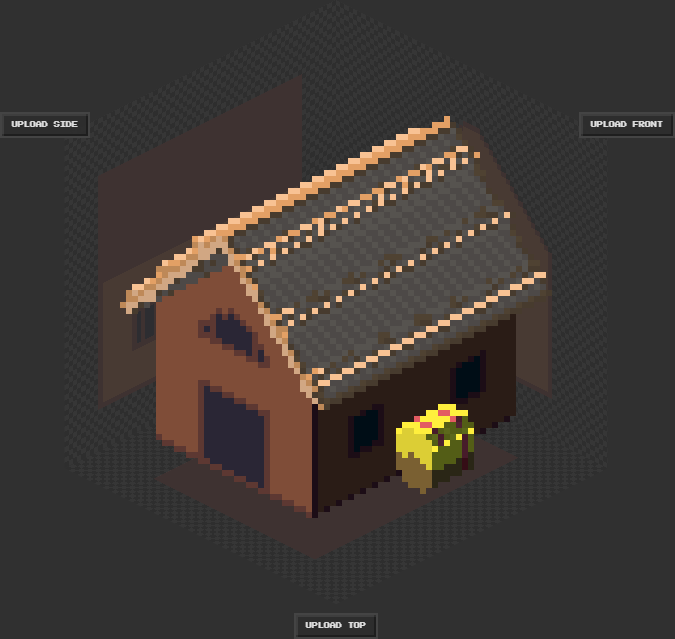
However, it would be amazing to have all shapes loaded at the same time in the program, so that they can cast shadows on one another, and to easily export several angles. Thanks again for your time and effort!
A member registered Feb 17, 2024
Recent community posts
Hello Pixel_salvaje,
First of all, thank you so much for developing this program.
It seems that the program struggles with depth, protruding ceilings in particular. For testing purposes, I drew a simple farmhouse with a hay bale on its left side. This is the Z-Ortho image file I used:
The goal was to have the beige roof extend slightly beyond the brown rectangle, and having a rounded hay bale on a single side. Instead, the result was the following: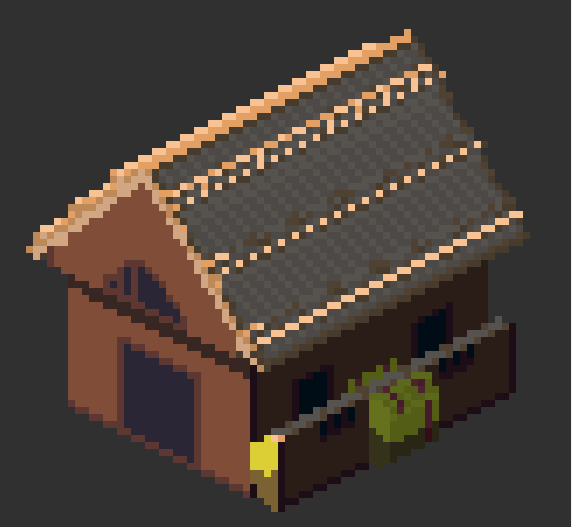
The hay bale was cut in half and the brown rectangle was extended beyond its intended limits, resulting in a displeasing protrusion. However, the fridge example you included by default does seem to have complex depth (the blue box inside the fridge that cannot be seen from the Z-Ortho file). How can one replicate such effect?