

Oooooh thank you so much for stopping by here, I remember now. Maybe I should have explained it better when I mentioned the lighting policies. Game engines usually use a lightmap for the meshes you import, and actually for all meshes in the game. The resolution of that lightmap can usually be adjusted.
The problem is that engines tend to use default values out of the box. In my engine the default resolution is 64, which is not that high by itself, but that same 64 resolution is applied even to a simple imported cube.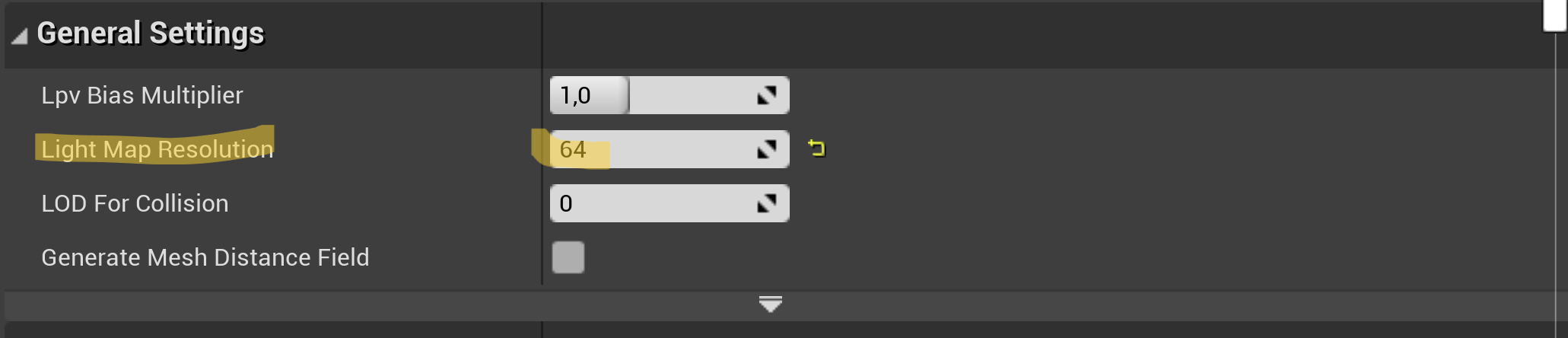
If I instance 34,000 cubes at 64 resolution, the game itself does not suffer in runtime because it is precomputed lighting, but the problem comes when precomputing it, and that is when performance really suffers.
In Unity I would know exactly which parameters control this, and also in Unreal, but in Bakin it is difficult for me to find the exact parameter. I hope I am not mistaken and that this helps you.
I think I got it. I left a boot event on perpetual loop every frame, not usually an issue when working from the Bakin editor, but a horrendous problem for the player running from the .exe.
AND Bakin, boots up every single Common Event used in the game at startup, after caching the shaders and engine. Which is why I'm stuck at the 2min load, after the fix, which it still horrible, but not the 5min torture cycle I put you through.
I have to figure out how to resolve that, and get closer to your boot speed; I can't have players bail before the game even starts.
I spent the night playing other Bakin games, and that seems to be an unresolved and common issue, some worse than others. Especially bad in mine bc I automate a lot through the Common Event system.
Great, really great. I’ve been looking into it, and your engine actually does something interesting: the Common Events automate the global logic. Structurally, I’m not entirely sure how it works internally yet.
I was also checking the wiki:
28: Set the number of materials to “2” in Material Reduction.
29: Assign a texture atlas resolution.
30: “(!) Placing multiple models with large texture sizes on a Bakin map will affect the processing speed of the editor.” Please determine the size you need for your project.
And also this parameter:
float shadowmapScale; // Dynamic resolution of shadow map
Have you already experimented with these kinds of parameters?
Anyway, this is very good news. Just let me know whenever you want, and I’ll test it.
🧡🧡🧡