Indie game storeFree gamesFun gamesHorror games
Game developmentAssetsComics
SalesBundles
Jobs
TagsGame Engines
(3 edits)

Bit more feedback: the bomb girls in Metal Underpass send out red projectiles on death, but said projectiles get lost in the also-red blood splatter and are often very hard to see. It took me killing several of them before I finally figured out what I was getting hit by, and even then, there were times where I couldn't see their death-shots even though I knew they were there. Please change the color of those projectiles. Also, minor grammar mistake in Paige's convo (also in Metal Underpass): she says sunlight "aren't" instead of sunlight isn't.

By the way, I did eventually figure out that reserve power-ups get sent to the inventory when you get a third, but to reiterate, my issue is that the boss's kneeling will abruptly send it forward into players if they're whipping the boss, giving them no time to react. Even if I had kept the float/sword combo that I went in with, I still would've taken the cheap hit since the sword is also close-range. Maybe you could have the boss kneel in the other direction, away from the player? It'd fix the cheap hit without you needing to draw new sprites or add that "!" zone.
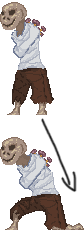


^like that.
(+1)

I like that idea for the boss, that should be a pretty doable.

All of the others are noted down on my todo list.

I've noticed some other issues that'll need fixing as well (updating the project to the latest version of Game Maker broke some stuff) so it might be a pretty large patch.

(6 edits)

Good to hear. By the way, can the first painting in Load-Bearing Grid be gotten by anyone other than Matt? I had assumed you wanted everything to be obtainable by every character, so if that's not the case...maybe you could tweak the mid-world convos to provide hints on who to bring where, so astute players know who to choose going in and aren't forced to go back, switch characters, and replay levels they've already beaten in order to get 100% (and maybe let players switch characters from the overworld's pause menu if it isn't too much trouble).

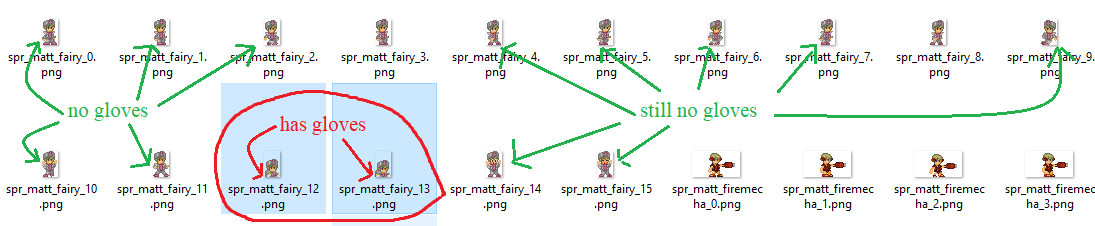
...and speaking of Matt, I noticed another minor graphical inconsistency: when he has the float power, he mysteriously gains white gloves when crawling that are absent in all his other frames:


EDIT: Wait, if updating breaks stuff, why not just use the older version? The game as-is works fine and plays well, and most--if not all--of my requests would only involve minor tweaks like recoloring sprites.

EDIT 2: Hey, did you mean for the Waste Disposal Plant to play the Nice Day theme? Normally, I would've just written it off as an odd choice, but given the other unintentional little issues, I thought I'd just make sure.

I try to stay on the most recent version of Game Maker since I need to make sure all my asset packs work whenever Yoyo changes things, but it didn't occur to me to check if all my games still work (it's been years since I opened the DDG2 project last so there's been a lot of changes in the meantime). Thankfully it doesn't seem to be a super complicated thing to fix.

I've been trying to avoid reusing the same theming for too many levels in a row so it might've been a weird choice, but I'll have to check if I need to re-evaluate it. (Nice Day is supposed to be the 'main' overworld theme that shows up whenever a level is just kinda generic even if it IS inside a themed world) 

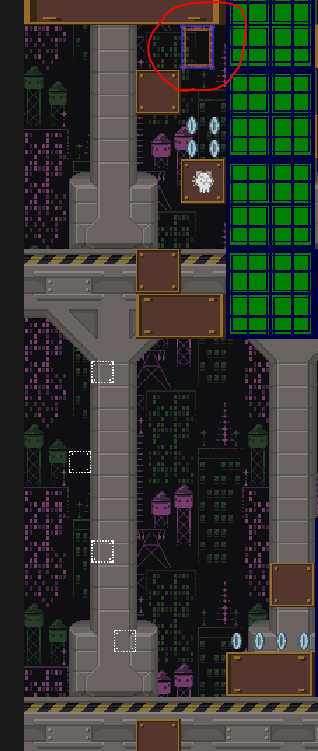
Anyone can get the painting, there's a sequence of invisible blocks below that are the "regular" way to get it.

(3 edits)

Oof, not a fan of invisible blocks being a requirement. I've hated that ever since Lost Levels 5-1, where for years I assumed the only way past was to take the vine to the World 6 Warp Zone. It wasn't until I stumbled across a YouTube video about a "world 9" that I'd never heard of that required beating the game without using warp zones to access and I was like "wait, how do I get past world 5 without the warp zone?" and looked it up that I discovered the truth, and to be honest, I'm still not over it; no wonder Nintendo of America reskinned Doki Doki Panic instead of localizing that title.

I didn't even know that invisible blocks were in this game until now, so I guess my recommendation would be...don't have them at all? Do something else instead? Maybe in the sequel, you can design the early levels in such a way to guide players into hitting them naturally and safely and/or having obvious clues like holes or markings on background objects to indicate their location, then slowly work your way up to having more subtle clues before finally having end-game level design like what you did here..but right now, as-is? No, you didn't earn that invisible block placement. 


By the way, I realized I misunderstood what you were saying about the boss powerup not overwriting the player's current powerup because I went into the first boss with the float power, which *did* get replaced even though I would have considered that to be a powerup as well (just not one with a weapon). It wasn't until I reached the Metal Underpass boss with the Reinforcement's bomb power and died that I realized it actually gives me the Fireball power instead. In that case, I think it might actually be a better idea to have the boss room powerup overwrite the player's current power anyway so, for example, players don't end up fighting the Sand Queen with melee weapons when the game would have given them the Mega Buster instead (I went in with the cat-claw power but happened to have a Mega Buster in reserve, so I just barely avoided the issue). The thing you brought up about letting players choose their own power still works since their current one would just go into reserve where they can simply bring it right back out.

Also, is it just me, or is the Gaping Abyss a bit of a difficulty spike for world 3 due to the instant death pit? I'm sure the boss could work as-is in a later world, after the difficulty has ramped up to match it...but the easier solution might be to cover the hole with spikes so the player only loses some HP for getting knocked off instead of dying outright.

EDIT: Okay, so apparently Caldera Keep was supposed to be world 3, but I think my point still stands. Also, in Yal's convo for Caldera Keep, he says "moment of surprise" instead of "element of surprise." Was that an attempt at characterization that I didn't get, or did you just forget the expression? Will he be corrected if I pick the right character the same way Sugar quips at Tomato in her Metal Underpass convo?

EDIT 2: Actually, after playing it a bit more, I think Caldera Keep is actually harder than Metal Underpass and they should have their painting requirements swapped to represent this. It feels like this world has more blind jumps/drops than average, where you can't see if there's a hazard or floor below you until you jump down. In particular, Dining Hall of Hell doesn't have certain platforms visible from a safe distance even if you hold down to pan the camera down...unless you bring in the cat claw power from another level and climb down certain walls. Maybe you were trying to indicate them with the chandelier chains, but just like with the invisible blocks, you need to build up to that, for example by having a preceding chandelier level that isn't so dark so the chains can be seen clearly. Still way better than Fun In The Basement, though.

EDIT 3: And while I'm at it, the camera takes too long to pan down after the player starts holding down. It kills the pace, especially with how frequently the player is expected to do it. It should only take around half a second.

(+1)

Yeah, overwriting the float cake is a special case because you need to have SOME means of attacking a boss for the fight to be possible (I forgot about that, it's been 6 years...)

The chains are supposed to indicate chandeliers (every chandelier has chains and there's no troll chains that just end in the middle of nowhere)

Frozen enemies instantly shatter and die when hit by melee attacks, though you'd need to either be in multiplayer or have a reserve whip to hotswap to in order to do this. (They also don't become solid if the player is partially inside them upon creation so if you're close enough you can slip through them, but it's hard to do that without being in contact damage range...)

I'll add "faster screen scrolling" and "tells for Icon of Sin" to the todo list. When refamiliaring myself to the game I also noticed its divekick attack has like zero warning so that'll also need some tweaks.


(So far a lot of the things you've suggested have been fixed and I've started to chip away at the compatibility issues)

(9 edits)

Dang, I was just about to add "or by keeping another weapon in reserve" to my killing-frozen-enemies comment because I JUST beat The Bay's Medbay where I figured that out--and then near the end of that level, I experienced a situation where I had my ice flower in reserve but got hit and lost my equipped sword power, once again leaving me no way to kill frozen enemies in those narrow halls. 

To be clear, the main thing I was trying to get at with my initial comment is that the ice power should have a way to kill enemies on its own, like how Metroid lets you keep shooting a frozen enemy with the ice beam to keep dealing damage. Maybe you could do the same thing with your ice power? EDIT: I know the New Super Mario Bros. games don't let you do this, but what those games DO let you do is grab and throw the frozen enemy to break them against a wall, and since your game doesn't have a grabbing mechanic, I went with the Metroid suggestion instead.


By the way, my issue with the chandelier chains wasn't worry over the possibility of troll chains, but rather that the chains don't stand out too well and that the ones for secret-path chandeliers are placed right beside the chains for the platform you're already on, so you won't really notice them unless (and sometimes even if) you know ahead of time that's what you need to look out for. That's why I thought I had to use the cat claw power at first (because I straight-up didn't see the chains for secret-path chandeliers on my first playthrough) and why I suggested having that level be preceded with another chandelier level where the chains stand out better, because it COULD work as-is if it was properly built up to. ...though I guess you could also just directly make the chains in that level stand out better; that'd probably be easier. What if you recolored them to be bright yellow to match the chains in the level's overworld icon? I think that could work.

Oh, and thanks for responding to me. Not all developers do this.


EDIT: I also had some clipping-off issues with the vertically-moving blocks in Torrential Tower, including one time where I swung the sword while standing on one of the sets of three blocks beside the third painting and ended up falling straight through it. I tried reinstalling the game in case something happened on my end, and while a quick replay didn't reproduce any of the floaties' issues in Water Gun Warzone, I did still clip off a block once during my second Torrential Tower playthrough. EDIT 5: To add a bit more detail, it always seemed to happen when I fell pretty much directly on the left-half or right-half of a 2x2 block (such as the beach balls or vertically moving blocks); it didn't happen if I was closer to the center (or at least it not as often), though the time I fell through the longer floaty, I was in front of what would be its second tile from the left.

EDIT 2: In Brickwork Pipeworks, it's very easy to off-screen the fireball demons' fireballs before they get launched, to the point I did it unintentionally a couple times.

EDIT 4: Umi-Bozu's hands appear in pretty much the exact spot I am when I jump to throw my axes at its face, so I suddenly take damage when there was nothing there before. Maybe you could have his hands come in from the bottom or top of the screen instead of just abruptly materializing? Maybe you could have a harmless black cloud appear and then have the hand scale into the screen from the cloud before becoming harmful?

(+1)

I noticed the Umi-bozu unfair hand damage during test playing other bugfixes and fixed that already. 👍

I'll see what I can do with the collision issues (the current version of Game Maker has a completely different collision engine so maybe it'll be fixed because of that). The floaties are only ever approached from the top so for them I could probably cheat and make them a lot taller than they are visually so it's not possible to clip through them. I've not observed the issues with falling through 2x2 blocks myself so I gotta look into that... maybe the sword is the answer, since it could affect your hitbox (melee animations use a different sprite from everything else and while they SHOULDN'T affect collision masks, "shouldn't" and "won't" aren't the same thing...)

Coloring the chains yellow gold would be possible, I don't think they're used anywhere else where it could clash.

Enemy projectiles being destroyed offscreen is a feature so I don't wanna fix it even if it IS a cheese, generally if something is unfair in the player's favor it's OK as long (as it doesn't trivialize the game)

Still not sure about the best way to handle ice blocks, it's gonna be frustrating for the player if it's too easy to destroy them accidentally when a puzzle requires you to freeze an enemy to use as a platform.

(2 edits)

To clarify about the clipping: most of the time, I clipped OFF of the 2x2 blocks, not through them. I'd be about to land, then suddenly my position would jump one or two units to the left and I'd fall off beside the block. It's also not just the sword power because the one time it happened on my replay, I had the fireball power. ...but I guess it's moot if the engine update fixes things on its own.

For the ice power killing frozen enemies on accident, you could do what NES Metroid did and make it weaker than your base powers, so it'd take two hits to kill an enemy that would otherwise instantly die from jumping on it once, three hits to kill an enemy that'd normally take two, etc. You could maybe also make it so that the first shot that freezes the enemy doesn't deal damage itself.


Anyway, I noticed that the second painting in Dismemberment Ward is blocked by a wall of bricks, but the only powerups in that level are the green Mega Buster and an Ice Flower, so nothing that can actually break through a wall of bricks. All of the previous levels DO have the powerups necessary to get their paintings, so again I ask: was this intentional? I had saved and quit right before this level, so I went in without a power and had to back out and replay it after pulling a sword carrot from my inventory.

Also, it'd be nice if the penguin cop let us know that the rock power isn't used by pushing the attack/run button, but instead by pushing down; that took me a minute to figure out.

EDIT: Would be nice if it was easier to figure out which paths lead to the paintings in Teleporter Maze since you can't go back once you enter a teleporter. All the other levels let you backtrack if you realize you missed a painting.

(+1)

I don't remember my intentions from 9 years ago on a level-by-level basis, but I do remember having a bit of a general troll outlook on the powerups given in levels: they shouldn't be the best tool for the job, they should be the worst powerup for the job whenever possible (outside of the levels that introduce a new powerup that should show them off in a positive light) so that you don't end up having a trivial experience because you always get the powerup you need right when you need it. The only real exception to this is giving you the cat sunflower / balloon cake when there's a climbing / tricky jumping section coming up, but even there I would often hand them out before a combat section (or have a second powerup that replaces the active one right before the part you need to climb, etc) so there's still a bit of challenge involved in getting the powerup to where it needs to be.

(That said, I replaced the mega buster in that level with a bomb now)

The teleporters are implemented in a way that's absolutely horrible (destination coordinates are hardcoded numbers in the sending teleporter, the receiving end can't be traced back without checking every possible sender) so I don't know what I can reasonably do here. (When test playing I got lost for like 20 minutes trying to figure the exit path out, lol)

(3 edits)

Revisiting the off-screening of objects, it actually can go against the player in certain situations, such as the falling jet platforms in Flying Battery: I had an instance where I clipped off of one of them as well, right at the exact moment when it shifted from shaking to falling, so I thought "I'll just jump right before the transition happens" except that off-screens them entirely, causing me to fall to my death. I guess just increase the killzone to be a couple units past the screen instead of disappearing things immediately after they're not visible.

And speaking of Flying Battery, I wasn't a fan of how the last green switch in External In-flew-ences was placed over a pit, so you have to be to the left of the switch when you hit it in order to land on the platform. In retrospect, I think you intended for the player to see that shaft while going up the previous one, but in that case, you should put them closer together, maybe even only separated by a single-tile-wide column.

EDIT: Oh, and the blue rocket power could also use an explanation for how to use it since, just like the pink rock power, it also works differently from all the other powers and took me a minute of trial and error to figure out.

EDIT 2: It'd be nice if the coin trails in Very Long Fall didn't lead AWAY from the paintings, because that's another level where you can't really backtrack; the most you can do is go back to a checkpoint from the pause menu. I did appreciate how the level design at least lets you see that you missed it before you hit the next checkpoint, though.

EDIT 3: and speaking of Very Long Fall, I'd appreciate if you plugged up the hole in the lower-right. A previous Flying Battery level lets you duck in those thin tunnels from a jump just fine, but for that one, it never worked.

(2 edits)

If you're still reading these, I have a question about the second painting in Hellfire Mountain: it's preceded by a pit and a ghost cat, so I assumed the intention was for the player to bounce off of the ghost cat to reach the platform...except the player doesn't get enough height from bouncing on the ghost cat to reach said platform. I tried both holding the jump button and trying to press+hold it right when I landed on an enemy, but neither increased my bounce height. Plus, there don't seem to be any invisible blocks around, so once again, I felt I had to switch to Matt. It was only right now, as I was typing this message, that I realized your actual intention was for the player to freeze the ghost cat first. Would you be willing to replace the ghost cat and that lone solid tile above it with three flaming skulls? I think that would do a better job of conveying your intentions to the player, especially seeing as this is the first time freezing enemies is required to reach something.

I'm not sure if there's a better way to tutorialize freezing enemies to use as platforms given that there are alternate ways to get height (Matt's double jump, the rocket powerup, the hikkori powerup, Drake's uppercut) so there's no way to FORCE a player to do it to proceed.

(3 edits)

If you're still checking this thread, I have a couple more things to add:

1) The invisible block placement for Ominous Clock Tower's third painting is marginally better since it's first one is right next to a wall, but I still only found it by chance, so that level also isn't a great way to introduce them even if Caldera Keep was meant to be before Metal Underpass.

2) If you're willing to make more drastic changes, I'd like it to be possible to kill frozen enemies in ways besides jumping at them from below. The first level after Caldera Keep's Reinforcements has lots of narrow halls, so when I tried out my brand new ice power, I ended up having to sit there and wait for the enemies to thaw before I could progress.


EDIT: Also, the Icon of Sin has a similar issue as Patient Zero did: it should have some indication of how far its melee flame attack will go, especially since the boss room gives the player the short-range sword and the Reinforcements give the player the longer-but-still-melee green whip. Since you don't want to do ! zones, maybe you could show its flame being drawn out during its wind-up pose so players can actively see its length increasing and realize how far they'll need to run away to avoid getting hit.

EDIT 2: The collision on the floaties in Water Gun Warzone is spotty. Sometimes I'd land directly on a beach ball and just clip off of it suddenly, and one time, I did a running jump off of the platform by the third painting and fell straight through one of the longer rafts, into the water.