

Hi, for the interieur folder. I cannot find any tile to connect to the left or right side when trying to build the inside of a house. I can only find corner pieces.
Hi! Sorry for the late reply. If I understand you correctly, you have problems with the walls of the A4-Tilesets?
The centers of the tiles repeat, thus forming the wall to connect the corners. RPG Maker automatically repeats this part of A4-tileset when they are placed in the A4 slot in the Tileset-Options. For other Engines you may adjust the graphic.
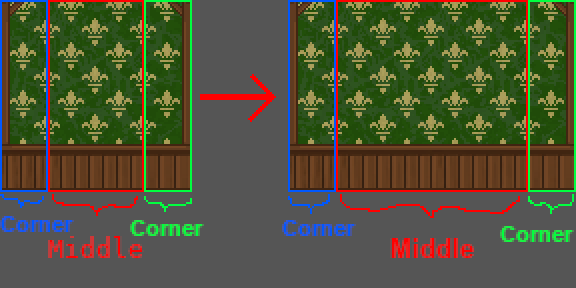
Width of the Corners: 24px. Width of the Middle: 48px.
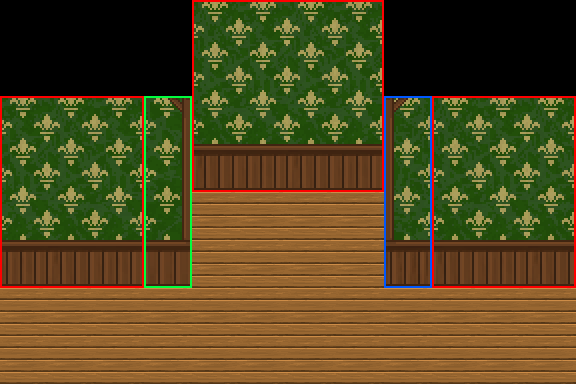
Same goes with the height of the Wall. The "roof" works similar.
I hope this helps. If not—or if I misunderstood the problem—please let me know.
Thank you very much for the explanation. I've encountered a very annoying itch error that does not let me upload my picture so I will have to describe my problem.
In the third illustration picture from bottom to up on the website, you've created a horror room concept. I don't know how to recreate the upper part of the wall. All the wooden part on top of the concreate wall, also the left and right side.
I've searched through the tileset but all I see is corner pieces that does not have any way of creating a vertical or horizontal wall.
In short, I can only recreate the concrete wall when looking upfront but not the left, right side or the upper wooden part of the wall.
By the way, this is undoubtedly one of the best tileset I've found. Thanks very much for letting us use it for free.
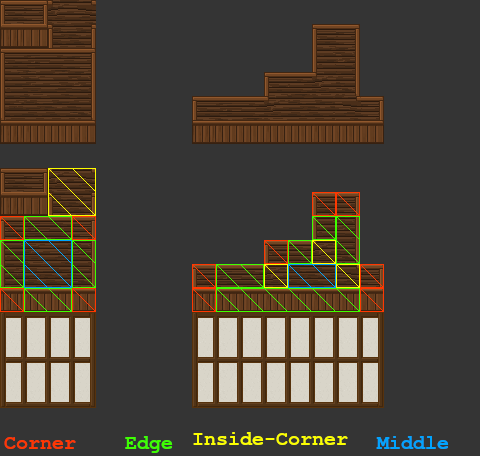
Ah, okay. The corner pieces contain everything needed and work similarly to the wall tiles. I made a graphic to show how these are cut.
-The 24x24 pixel pieces in the corners are the actual corners (red).
-The 48x24 pixel pieces between the corners are the edges connecting the corners (green).
-The middle 48x48 pixel piece is used to fill the space between the edges (blue) and can be cut in 24x24 pieces.
-The upper-right square contains the inside corners (yellow). 24x24 pixel for each corner.
RPG Maker uses the upper-left corner for the preview in the editor.
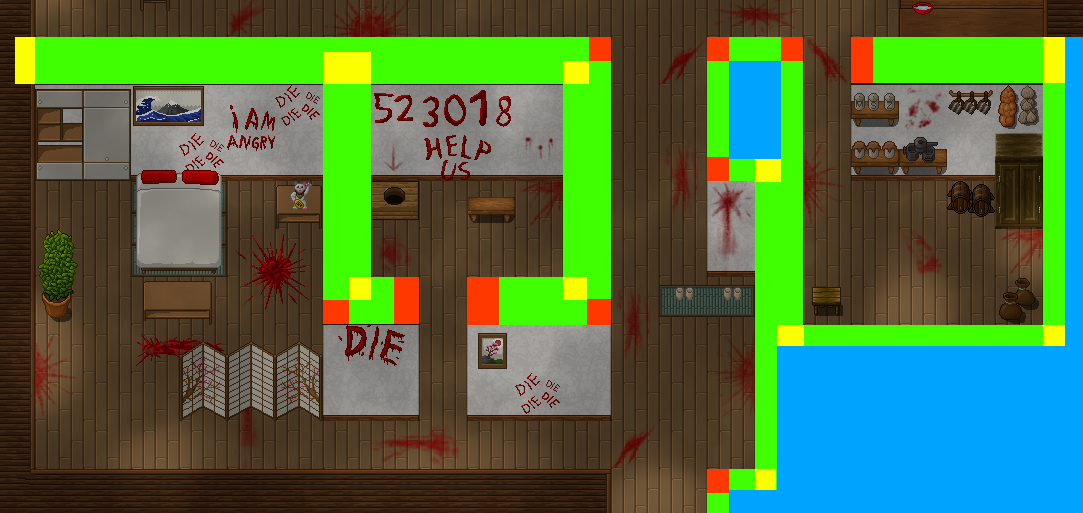
On a map it works like this:
And thank you very much! Hope this helps and have fun with the tilesets :3