Indie game storeFree gamesFun gamesHorror games
Game developmentAssetsComics
SalesBundles
Jobs
TagsGame Engines

Don't worry asking questions, I really appreciate them! They tell me that you guys like my stuff :)

My plugin does not add a "new" layer, that would be too complicated. Instead, I designed it to follow RPG Maker's 6 layers world (i.e. A lower, A upper, B lower, B upper, shadows, region tiles).

I briefly tested this pattern, and it worked for me. I was able to first build the window (line 6), and then the flowers (line 7) on top.
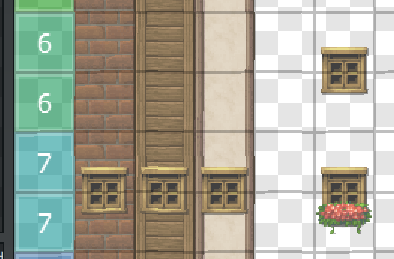

Tell me whether this fits your needs!

Thank you!! when you did that, were the walls layer 1, the window layer 2, and the flowered window the 3rd layer?

Heres an example im strugglin with, the first layer I have walls, the 2nd is the window/variant for each wall/window, and the 3rd layer id like to allow to place the vine overtop of the window for example although its not allowing me too haha, Im confused what I did differently compared to the source map you sent a bit ago

*Edit* Apologies I forgot to mention I do have a line with just walls that allowed me to place the window over the wall just fine, its applying the 3rd layer to objects Im struggling with ^.^

@Aerosys I got it!! Im seeing now how it works for the layering and how you did it, thank you so so much for all your help!! your plugin is absolutely amazing