
Indie game storeFree gamesFun gamesHorror games
Game developmentAssetsComics
SalesBundles
Jobs
TagsGame Engines
(3 edits)

I tried everthing you listed still game crashed first i forgot to turn of smart app protection so it said failed to load il2cpp idk if its important after i turned that off to and downloaded again it just started to crash i even formated my laptop to try again but there was no changes

Windows Version: 25H2

Game Folder :
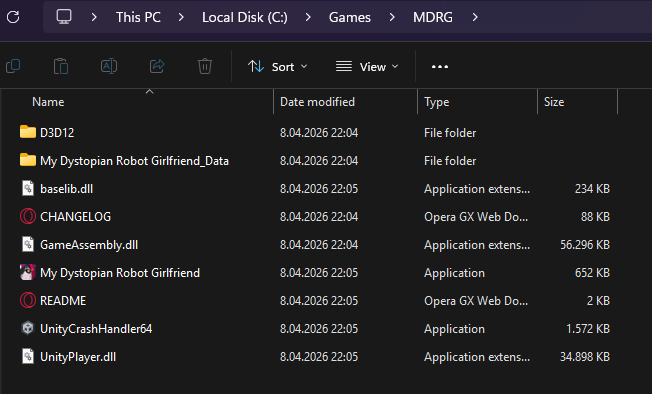
image.png

i dont use any external mods

and sry for late reply

(1 edit)

Have you tried these yet?
You should try the number 5, Launch the game as Administrator.

  • 1. Extract the game properly
    • Make sure you fully extract the downloaded .zip file
    • Do NOT run the game directly from inside the zip
  • 2. Move the game folder
    • Place the game in a simple path like:
      • C:\Games\MDRG\
    • Avoid folders like Desktop, Downloads, or folders with special characters
  • 3. Check antivirus / Windows Defender
    • Your antivirus may be blocking or deleting files silently
    • Try temporarily disabling it or adding the game folder to exclusions
  • 4. Install / update required runtimes
    • Install:
      • Microsoft Visual C++ Redistributables (both x86 & x64)
      • .NET Runtime
  • 5. Run as Administrator
    • Right-click the game .exe β†’ Run as Administrator
  • 6. Check for corrupted download
    • Re-download the game from the official page
    • Make sure the file size matches

yes i did everthing you listed

  1. im sure i extracted it properly
  2. i moved it to a simpler folder like you said
  3. i disabled windows defender and i dont use any other antivirus and i disabled it while downloading to
  4. i installed both microsoft visual C++ and .NET Runtime
  5. i tried to run it as administrator several times
  6. i did download it from the offical page 3 to 4 times when it didnt work and made sure file size matches and when i extract it it goes up to 1,15 GB i cant confirm if it should be this much bc i couldnt find any confirmation abt it in the official page

Thank you for providing all the details, this helps a lot.

Since you have already:

  • Extracted properly
  • Moved to a clean path (C:\Games\MDRG)
  • Disabled antivirus
  • Installed VC++ and .NET
  • Tried running as admin
  • Re-downloaded multiple times

πŸ‘‰πŸ» This is no longer a basic setup issue

πŸ” Most likely causes at this point:

1. ⚠️ Windows Security / Smart App Control (VERY likely):

You mentioned earlier:

β€œfailed to load il2cpp” after Smart App Protection

Even if you turned it off, Windows may have already blocked or quarantined files

πŸ‘‰πŸ» Please check:

  • Windows Security β†’ Protection History
  • Look for anything related to:
    • GameAssembly.dll
    • UnityPlayer.dll
    • the game .exe

If found: πŸ‘‰πŸ» Restore the file and add the game folder to exclusions

2. ⚠️ Missing / blocked game files:

From your screenshot, your folder looks correct, but:

πŸ‘‰πŸ» The key file is:

  • GameAssembly.dll

If this file is:

  • Missing
  • 0 KB
  • Or corrupted

πŸ‘‰πŸ» The game will instantly crash like you described

3. ⚠️ Extraction issue (very common on Windows 11):

Even if you extracted it:

πŸ‘‰πŸ» Try this:

  • Delete the entire game folder
  • Re-download again
  • Use 7-Zip or WinRAR (NOT Windows default extractor)
  • Extract to:
C:\Games\MDRG\

4. ⚠️ File size confirmation:

You mentioned:

β€œit goes up to ~1.15 GB”

πŸ‘‰πŸ» That is normal after extraction
So your download is likely not the issue

❗ Important conclusion:

Since:

  • Web version works
  • Fresh install didn’t fix it
  • You even formatted your PC

πŸ‘‰πŸ» This strongly points to:

Windows blocking or interfering with Unity IL2CPP files

πŸ‘‰πŸ» Final thing to try:

    • Disable:
      • Smart App Control
      • Windows Defender (temporarily)
    • Re-download + re-extract using 7-Zip
    • Add this folder to exclusions:
    C:\Games\MDRG\
    
      • Run the game again

      πŸ’¬ If it STILL crashes:

      Please send:

      • Screenshot of Protection History
      • Screenshot of GameAssembly.dll properties (size)
      • Confirmation if Smart App Control is OFF

      We’ll go deeper from there πŸ‘πŸ»