
Indie game storeFree gamesFun gamesHorror games
Game developmentAssetsComics
SalesBundles
Jobs
TagsGame Engines

❤️‍🔥 Moaning Mod - Moaning and Expressions for Jun by @IkariDev Sticky

A topic by IkariDev created 47 days ago Views: 80,040 Replies: 111
Viewing posts 21 to 39 of 39 · Previous page · First page

Mod itself is amazing work i hope u can add them to washing too it would be awesome, creator made great expression in it
(+2)

Seems to be a bug, if anyone wants to chime in and validate whetever this is true please post here:
https://github.com/IkariDevGIT/MDRGMoanMod/issues/11

Of course id be thankful for any PRs too.

(-3)

i downloaded and installed it correctly, and it worked fine the first time apart from the game having a lag spike which i assumed was cuz i just installed the mod. However the second time i opened the game all my save files were gone :( And it hadnt crossed my mind to back up my save files before installing the mod :(

(+2)

The mod does not interact with saves, this is not a Moan mod bug.

(-3)

Could be caused by melon loader then

(+2)

Not really.

(-2)

Oh well, doesnt really matter anymore. Let bygones be bygones as they say. Its a great mod i have to commend you.

(-3)

why does it say there is no game in the selected directory

(+2)

You installed it wrong, follow the installation instructions correctly please.

(-3)

Android is hopeless.😭

(1 edit)

@IkariDev has already stated multiple times that this mod will not be ported to the Android version of the game.
Please understand that this is a final decision.
We kindly ask that you refrain from repeatedly asking about an Android version of this mod.
Thank you for your understanding.

Thank you for your

(-3)

when I downloaded the game, the file was downloaded as a zip instead of an exe

MDRG for PC always comes in the ".zip" file format.
Just unzip it into any Folder you want.
That is how you install this game.

(-2)

When I downloaded the mod the game stop recognizing my save files, they still exist but whatever I do I can't actually get them in the game, any help? 

(3 edits)

This is a known base game issue that can occur in rare cases.

It usually happens when the game is closed or interrupted while the loading process is still ongoing.
In that situation, the game may fail to properly load the existing save data and can end up overwriting it with a new empty save, which makes it appear as if your saves are gone.

However, your save files are often still recoverable.

💾 How to recover your save:

  1. Close the game completely
  2. Go to:
    C:\Users\%USERPROFILE%\AppData\LocalLow\IncontinentCell\My Dystopian Robot Girlfriend
  3. Open the Saves folder
  4. Look for a Backup folder inside it
  5. Find a file named something like:
    save.mdrg.backup 
  6. Copy that file into the main Saves folder
  7. Rename it to:
    save.mdrg 
  8. Launch the game again and load your save

If that does not work, you can also try restoring individual slot files (e.g. M1.mdrgslot) by replacing them after creating a new save slot in-game.

📝 Important:

This issue has been fixed in version 0.96, so for the next incoming update, this issue will never happen again.

Also, avoid closing the game while it is still loading to prevent save corruption.

(-3)

this mod can't work with version 0.95.16?

This mod is created for the game version 0.95.16.

(-2)

I followed all the instructions on GitHub, but this error keeps appearing. "Failed to initialize a .NET domain"
I also tried  to reinstall .net 

Watch this and follow the video:

(-2)

the error persists

That error ("Failed to initialize a .NET domain") usually means something is preventing MelonLoader from initializing properly.

Since the issue persists after following the guide, you can try the following:

  • Make sure you are using a compatible MelonLoader version (for 0.95.16, versions like 0.7.2 or specific 0.7.3 nightly builds are recommended)
  • Completely remove MelonLoader and reinstall it cleanly
  • Delete any leftover MelonLoader files/folders before reinstalling (such as MelonLoader, Mods, UserData, etc.)
  • Ensure you are installing it into the correct game directory
  • Temporarily disable antivirus or add the game folder as an exception
  • Make sure your system has the required .NET runtime installed (latest supported version)

If you are not on Windows (for example Linux or Mac), this error can also happen due to lack of native support.

If the issue still continues, please provide:

  • Your game version
  • Your MelonLoader version
  • Your operating system

 my melon loader says this when i open the game: plthook_open error: Cannot get module 

That error usually means MelonLoader failed to hook into the game correctly.

This is commonly caused by one of the following:

  • Using an incompatible MelonLoader version
  • Game version mismatch
  • Missing or corrupted MelonLoader files
  • Antivirus blocking MelonLoader

Things you can try:

  • Make sure you are using a compatible version of MelonLoader (for 0.95.16, versions like 0.7.2 or certain 0.7.3 nightly builds are known to work)
  • Reinstall MelonLoader cleanly
  • Launch the game once after installing to generate files
  • Temporarily disable antivirus or add an exception
  • Make sure you are installing it to the correct game directory

If the issue persists, feel free to share more details about your setup.

Linux user here (Mint), and I can't seem to get the game to use MelonLoader even though it shows up in ldd. I don't get the terminal window that shows in the tutorial vid and the in-game mod menu is empty.

The mod will not appear in the in-game Mods menu, as it is an external mod loaded through MelonLoader, not the built-in mod system.

Regarding your issue:
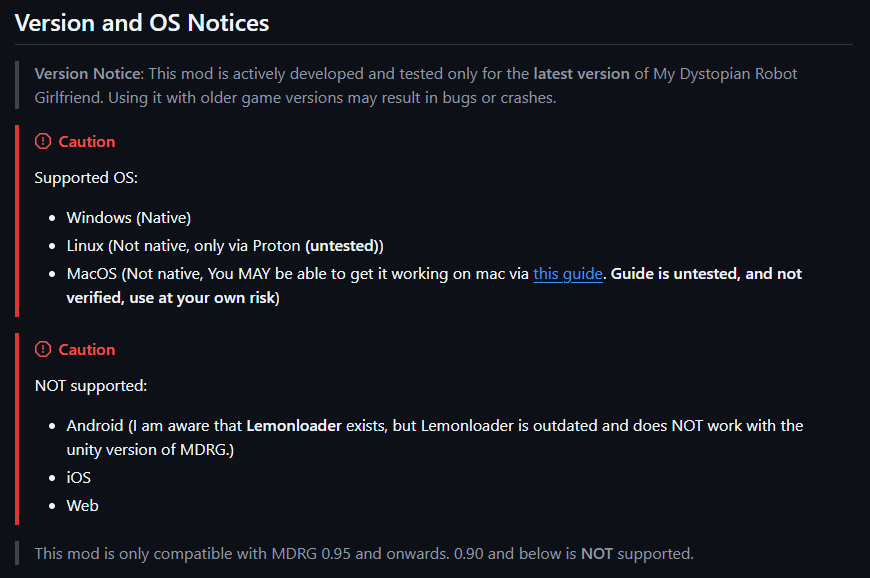
The mod and MelonLoader are officially supported only on Windows (native).
On Linux, it is not natively supported and only works through Proton, and even then, it is considered untested.

If you are not seeing the MelonLoader console/terminal window at launch, it usually means MelonLoader is not loading correctly.

Things you can check:

  • Make sure you are running the game through Proton
  • Ensure MelonLoader is installed correctly into the game directory
  • Try launching the game once after installing MelonLoader to generate the required files
  • Check if Proton version compatibility may be affecting it

Since Linux support is not officially tested, behavior may vary depending on your setup.

Right, sorry. Must've missed that. Thanks

(1 edit)

Another Linux user here (Pop!_OS). Did you manage to get this to work via Proton? I followed the tutorial for installing via Melon Loader, and everything seemed to go as intended except for that when I launch the game, I don't see any sort of terminal window for Melon Loader (like you described). I tried to follow some guide online for launching games via Proton, but I couldn't actually get the game to launch with this method.

(2 edits)

This error usually happens when MelonLoader cannot connect to its servers, so it’s not able to download the required files.

Please check the following:

  • Make sure you are connected to the internet
  • Try disabling any VPN, firewall, or antivirus temporarily (they can block the connection)
  • Run the installer as Administrator
  • Try again later in case the server is temporarily unavailable

If the issue still persists, you can try downloading MelonLoader manually from its official source and installing it again.

(1 edit)

Eu ia por o mod mas..

Li que não tem pra mobile 😢 ...

(Quando vai ter por gentileza?)

Translation:
I went there because of the mod, but…

I read that it’s not available for mobile 😢…

(When will it be available, please?)

@IkariDev has already stated multiple times that this mod will not be ported to the Android version of the game.
Please understand that this is a final decision.
We kindly ask that you refrain from repeatedly asking about an Android version of this mod.
Thank you for your understanding.

Translation:
@IkariDev já afirmou várias vezes que este mod não será portado para a versão Android do jogo.
Por favor, entenda que esta é uma decisão final.
Pedimos gentilmente que evite perguntar repetidamente sobre uma versão Android deste mod.
Obrigado pela compreensão
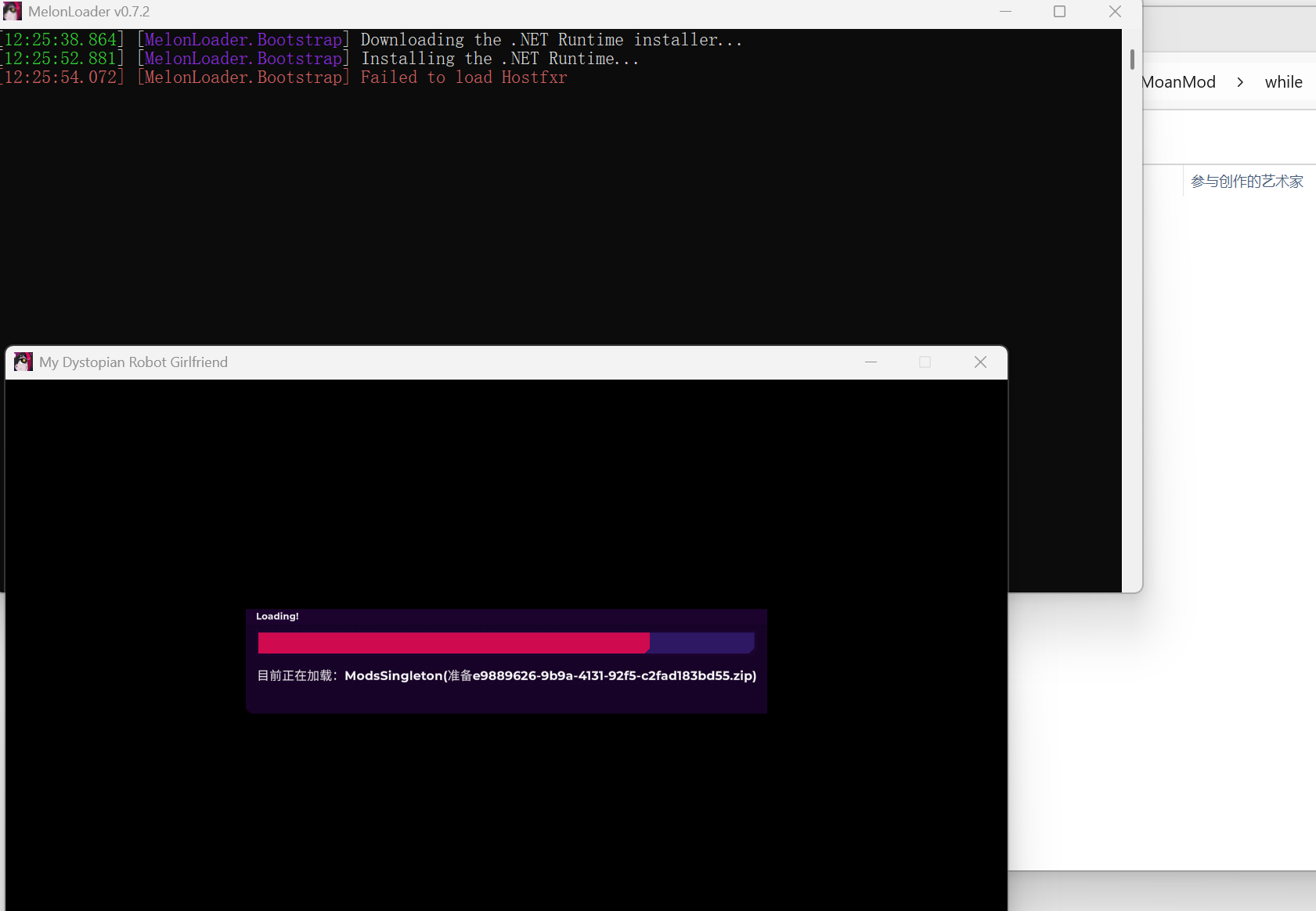
I would like to ask how to resolve this situation. I installed MelonLoader version 0.7.2 according to the video tutorial, and the game path is in pure English, but after launching the game for the first time, this situation occurred, and then the game window automatically popped up, and the mods did not take effect.

(1 edit)

👉🏻 “Failed to load Hostfxr” = .NET runtime problem (not mod issue)

The error shown in your screenshot:

“Failed to load Hostfxr”

means that the required .NET runtime was not installed correctly, which is why MelonLoader is not working.

This is not caused by the mod itself.

Please try the following:

Also note:

  • If the MelonLoader console shows this error, mods will not load at all
  • The game may still launch, but MelonLoader will not function properly

If the issue still happens, please let me know your Windows version and whether you installed the x64 runtime.

Thank you. I downloaded the latest .NET Desktop Runtime using the link you sent, and it perfectly solved the problem. I had previously tried downloading version 6.0.36 x64 of the .NET Desktop Runtime, but it still didn't work — perhaps because that version was too old? Thank you very much; the issue has been resolved.

(1 edit) (-3)

Hi, I saw that this mod doesn't support Android, but I'm trying to figure out if an AI could solve the problem, but so far nothing. I wanted to ask if there's a possibility of an AI I know that you might not be able to solve this problem, or respond directly to the point, and yes, I know you still can't do that, which is why I asked If you think an AI is capable of solving this, which AI could solve it? Thank you for reading and for your patience.

(+2)

This has to be ragebait.

(-2)

 this is not a provocation, I'm sorry if I made you think that.

(+1)

Putting cheddar cheese on frozen pizza is not a crime.

(1 edit)
I would like to ask: why does an error message—"Failed to Download Cpp2IL"—appear when "M…Loader v0.7.2" is running simultaneously with the game?
(2 edits)

👉🏻 “Failed to Download Cpp2IL” means: MelonLoader couldn’t download a required component from the internet.

The error:

“Failed to Download Cpp2IL”

means that MelonLoader was unable to download one of its required components (Cpp2IL).

This is usually caused by:

  • No internet connection during installation
  • Firewall or antivirus blocking the download
  • Network restrictions (VPN, region, or DNS issues)

📋 Try the following:

  • Make sure you are connected to the internet while launching the game for the first time
  • Disable VPN (if you are using one)
  • Temporarily disable firewall/antivirus or add an exception for the game
  • Run the game as administrator

🔧 Alternative solution:

If the download keeps failing, you can:

  • Reinstall MelonLoader
  • Or manually install required components (advanced users only)

This issue is not caused by the mod itself — it is related to MelonLoader setup.
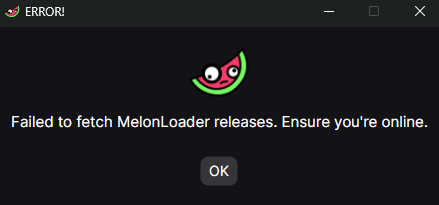
When MDRG natively supports linux, and MelonLoader natively supports linux, is there some technical reason why this mod does not runs natively ? I am struggling to make MelonLoader work under Proton. For it to even start I need to set version.dll to load native, then buildin. Then loader gets stuck on contacting API, when I set force_offline_generation = true in Loader.cfg to skip that step, I get “Failded to process UnityDependencies” error popup on startup.

Would be hella simpler if it just worked natively…I guess this is less mod problem and more MelonLoader problem…

For anyone trying to get this working on linux I figured it out with the help of claude. It's working for me on Nobara but should work on any distro I'd imagine.

Steps

  1. Install MelonLoader using the Linux installer Download the Linux installer from https://github.com/LavaGang/MelonLoader.Installer/releases/latest/download/MelonLoader.Installer.Linux and run it. Point it at My Dystopian Robot Girlfriend.exe in your Windows game folder. Select version 0.7.2 and do not enable nightly builds.
  2. Add the game to Steam In Steam: "Add a Game" → "Add a Non-Steam Game" → Browse to My Dystopian Robot Girlfriend.exe
  3. Force Proton Right-click the game in Steam → Properties → Compatibility → Check "Force the use of a specific Steam Play compatibility tool" → Select Proton Experimental
  4. Set launch options In Properties → Launch Options, add: WINEDLLOVERRIDES="version=n,b" %command%
  5. Launch the game once The first launch will take a few minutes while MelonLoader sets itself up. You should see a terminal window pop up with MelonLoader output. If the game is stuck on a black screen, alt-tab — the terminal is likely behind the game window. Let the game reach the main menu, then close it.
  6. Install the mod Download Mods.zip from https://github.com/IkariDevGIT/MDRGMoanMod/releases and extract into the game's Mods/ folder so it looks like:
    1. Mods/MoanMod/
    2. Mods/MoanMod.dll
  7. Relaunch the game, you should get a notification at the main menu about the mod which indicates it is now installed. You should also see "1 mod loaded" in the MelonLoader terminal.
Viewing posts 21 to 39 of 39 · Previous page · First page