

That's unfortunate! I was trying to find the cause of the issue but it's really hard to pin down, and I only found some info about it possibly being a bug with RPG Maker itself. It happens sometimes on my end too now, though it seems that resizing the window to fullscreen and back to normal window makes it not-stuck most of the time. Can you try that?
it did work!!! however it takes a lot of trial and error to get the game to load to completion. i was having a lot more success by minimizing the game for a few seconds! is there any possible way to generate a log that might help you better understand why it happens/fix it?
also just saw there was an update pushed and it unfortunately still occurs on 0.3.2!
I'm so glad to hear that this worked for you! I'm able to somewhat consistently reproduce the issue now on my laptop (it only seems to happen extremely rarely on my main PC that I use for developing the game mostly but on my laptop I can get the bug to trigger about half of the time), and it's actually really strange behavior as even in my debug/playtesting mode, there are no errors or logs when it happens. It seems the game doesn't even properly start loading when it happens.
I've been looking around and asking around with other RPG Maker devs, and the reasons why it happened to them seem to vary (and not all of them were able to fix it) but I have some ideas of things I can try to find the reason. Since I'm focusing heavily on technical issues and behind-the-scenes optimizations for the next update, this is something I'm definitely going to try to get to the bottom of again.
I had hoped changing the preloading of assets would have fixed it, but that doesn't seem to have been the problem. I'll have to really comb through the game's assets and custom code thoroughly to see if anything failing to load silently is holding up the process so extremely. I'm also looking into upgrading/downgrading to a different version of NW.js and pixi.js, since those came up as possible causes a couple times in other devs' cases.
For now I really appreciate your reporting, maybe one more thing that could help me pinpoint why different PCs are affected so differently: Could you share your hardware specs? Specifically this info, which you can access from the system settings (my system is in German, but we have the same Windows version so your menu entries should be about the same regardless of language)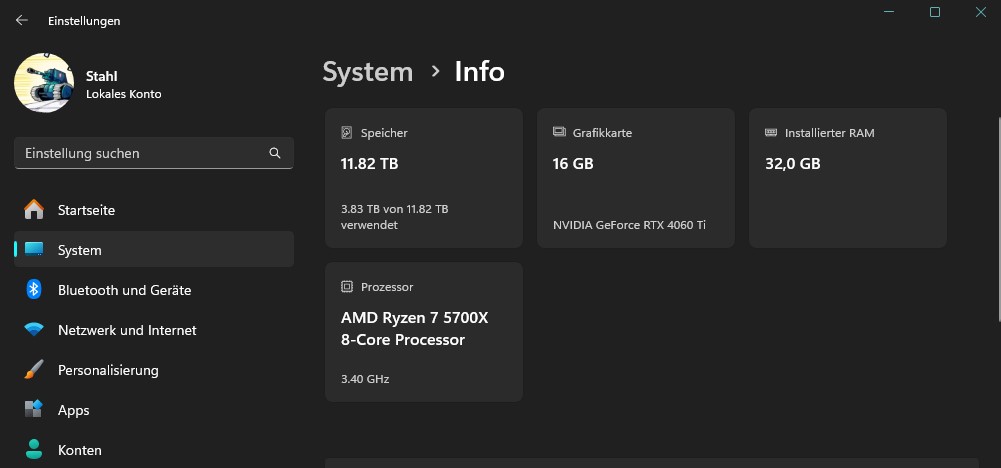
Quick note: In the near future I will swap the comment section of this page over to be a discussion board, to make the reporting of bugs and asking questions or giving suggestions more organized.
I apologize so much for the delay in my response. I had seen this while I was at work and thought to myself, “I’ll do this when I get home, I’ll remember to!” and then promptly forgot </3
I think I’m on a slightly different version of Windows 11 than you are, so I just went ahead and wrote down my specs for convenience!
Windows 11 24H2 (build 26100.3476)
AMD Ryzen 7 7700 8-Core Processor
32GB RAM
NVIDIA GeForce RTX 3060, 12GB VRAM
500GB SSD (main/OS drive), 2TB SSD (program/game drive)