Indie game storeFree gamesFun gamesHorror games
Game developmentAssetsComics
SalesBundles
Jobs
TagsGame Engines

The Daily Spell

Drop letters into place to unscramble today's magical headline. ✨ New puzzle and story daily! · By jamwitch, Celia

šŸž Bugs and feature requests Sticky

A topic by Celia created Dec 06, 2025 Views: 796 Replies: 39
Viewing posts 1 to 16
Developer (16 edits)

Please share any bugs you run into or feature requests to improve the game!

Known bugs

  • If you navigate to the Next puzzle too quickly after solving, it can reveal the next headline. šŸ™ Working on this one.
  • If you see any unexpectedly long solve times, it could be a timer bug. I think I might have fixed this but please let me know.
  • Itch.io specific, not present on the-daily-spell.com:
    • Completion data isn’t saved in Safari because of how the browser treats embedded content. Use the ā€œUnlock all puzzlesā€ button.
    • The results copy button doesn’t work in some browsers for the same reason. You can select and copy the text instead.

Feature ideas list

  • Layout and styling tweaks - fix the purple showing if you scroll down on some phones, scale the puzzle slightly to fit better on phones, improve the animation.
  • Update the archive, probably to be organized by month. A search box to find text in previously solved articles?
  • Update navigation so you can use browser back/forward to switch puzzles.
  • Sound (and music? Or at least a success jingle.)
  • More specific options for validating and revealing letters, in a menu.

In the far distance

  • Make your own puzzle and share it with friends.
  • Accounts to permanently save progress.

Thanks everyone for your support and ideas. šŸ’œ

(+1)

Heyo, would you consider making a blank/make your own puzzle Version of this? I feel like it could be really cool as a puzzle for DnD or something :D

Developer (1 edit) (+1)

Got time for a couple tiny bug fixes, hopefully more fixes and improvements soon!

  • When you click the Replay button, the screen will scroll up to the top to ensure the puzzle shows.
  • Added a message to make it clearer if you complete a puzzle incorrectly: ā€œNot the expected headline. Check again.ā€
  • Changed the Reveal button to ā€œReveal errorā€ when the puzzle is filled in. It will remove one incorrect letter from the puzzle.

Thanks for everyone giving feedback, both small and big stuff helps. Castanea, re: puzzle creator - I really like the idea, will think about it longer-term!

it would be cool to have an 'add word' button (with limited use obviously) if you're having trouble with the headline...

Developer

Oh, can you explain more? If you mean revealing one of the words as a hint, does the Reveal a Letter button work for that? Or do you mean something different?

so the reveal a letter works for me, i just think that having a button where you can know the whole word would be nice. it's not a requirement though.

Developer

Got it! There’s probably not room for it as a new button in the current layout, but I could definitely see it as part of a hint menu, along with checking if what you have so far is correct… Will keep this in mind, thanks!

Hi, Celia! Thank you for such a great series and for your continued updates. 

Just a data point: my save data was lost when I logged on this am.  I don't know if that was due to your update to the save system and expected or not. It wasn't a problem for me since I was caught up, but I wanted to let you know. (Chrome 128.0.6613.138; macOS 10.15.7) :)

Developer

No, it wasn’t expected! šŸ™ Thanks for letting me know. It’s supposed to copy over the old save data to the new structure. The good news is the old save data should still be there so I can fix the copying if I can identify the problem.

It’s working okay for me in Chrome on Windows, so it’ll be hard to debug if something is particularly broken on Mac… If you have time/interest to help me debug by inspecting your localStorage, feel free to ping me on Discord, I’m celia14. But no pressure.

(+1)

Cool game!

I can sometimes summon letters from other puzzles. I seem to most reliably get this to happen by going the tutorial puzzle and toggling back.

Developer

Aw man, I thought I'd escaped adding the tutorial without introducing any bugs, but that was just wishful thinking. šŸ˜… It was a quick fix, should be working correctly now. Thanks so much for letting me know!

(+1)

All us developers know that no feature comes for free > <

Awesome game.

(+1)

Loving the game, thanks a lot! Nice level of difficulty to make it satisfying but not too long :)

Feature suggestion: a "check me!" button that gives you a red cross (or similar) if you have errors anywhere but not tell you where they are. (Maybe some people would want to know where they are but wouldn't want that as a default behaviour)

Developer

Thanks! So this would be something to use while you're mid-solve to confirm if you're on the right track? That's useful to hear that would be helpful. I'm thinking of eventually adding some more validate/hint options in a menu so will keep this one in mind! 

Hi! Tuesday's puzzle isn't loading in either Firefox or Chrome. Monday's solved screen gives a notice to refresh, but the new puzzle doesn't come up when I do.

Developer(+2)

Ahh this is fixed now. Everything was ready (and the-daily-spell.com was successfully updated), but I had failed to hit the button to publish Tuesday's puzzle to itch.io. šŸ¤¦ā€ā™€ļø Thank you so much for letting me know, it's a huge help!

Thank you! Off to go play!

Would it be p possible to add a confirmation before resetting the puzzle? I was on the last word and went to press "drop single letters" and fat fingered "reset puzzle" instead 🄲

Developer

Yeah, thanks for the idea, and this isn’t the first time someone mentioned that. I’ll come up with a more aesthetic solution later, but for now I just added a confirmation popup to the reset button.

Thank you so much!!

(+1)

Todays Daily Spell somehow locked up once during solving, so that it did not accept any input. After reloading it worked fine as expected though. I did not try to use any arcane magic to cheat, I swear!

Developer

Hmm, this is a new one, I definitely want to fix that. Are you on mobile? Click/tap to pick letters, or keyboard? Did you do anything other than enter letters, like open the How to Play pop-up in the midst of solving?

(+1)

This was on Firefox. I used the keyboard and the freeze happened while navigating with the arrow keys. The cursor was about to jump over a blank space when it froze. It seemed to be stuck at 100% CPU usage and did not accept any keyboard input or mouse interaction after that.

Developer(+1)

Super useful details, thank you! I found it. (Infinite loop when using the arrow keys but there's no other square to move to.) It should be fixed now, thanks again for the report.

Developer (1 edit)

Just to share, here's a couple updates from this weekend:

  1. Timer pausing
    1. The pause timer now pauses if you switch to a different day, open a pop-up like About or How to Play, or minimize the browser tab.
    2. Also, for consistency, the timer now starts as soon as the puzzle is fully revealed (previously it was only when the first letter was moved.)
    3. If you see anything unexpected in your final solve time please let me know!
  2. Puzzle date in the url (this applies to the-daily-spell.com and does not affect itch)
    1. Adding ?d={date} to the url acts as a permalink to that puzzle. You can see it when viewing previous day's puzzles.
    2. This also means if you're viewing a previous day's puzzle and refresh the page, you'll stay there.
    3. Navigate to the plain URL or click "Today" to go back to the default view that always shows the latest puzzle.
  3. Style tweak for buttons. Let me know what you think.
  4. Fixed the next day's headline and article being revealed if you use the date navigation in the middle of the completion animation. Now it should cancel the animation and just show the next day's puzzle.

I'm working on a few more things, large and small. Thanks for playing and let me know if you have any feedback or run into any issues!

I appear to be solving next weeks puzzles? It is labelled as week 15 but is dated for the 23rd, and when I went into the thread for week 15. (All previous week puzzles are dated correctly.)

Developer (1 edit) (+1)

Shows me for trying to work ahead for next week, haha. Thanks for reporting!

I’ve removed the puzzles for next week, can you refresh and see if you still see the 23rd puzzle? You shouldn’t be able to see anything later than Feb 16th.

All good now, thanks!!

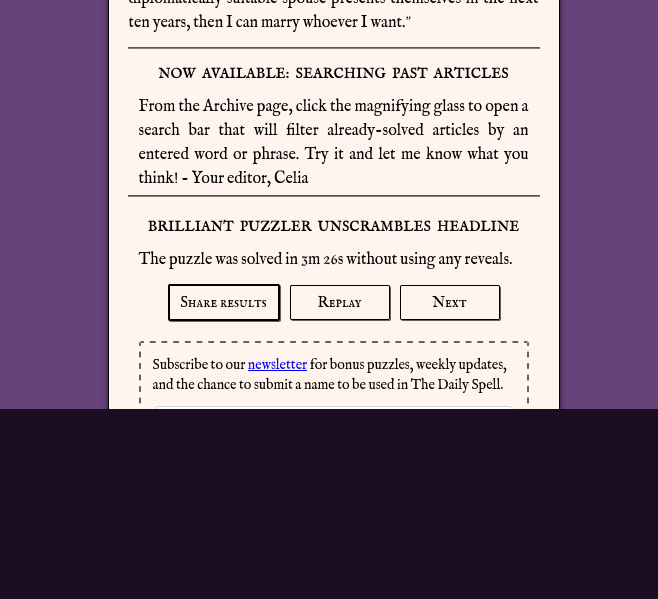
Not sure if this is a me problem or a webpage source problem. On the-daily-spell.com on desktop (firefox) the darker purple area that raises and lowers overlaps on a lot of completed puzzles, sometimes only a little, sometimes a lot like in the example.


Developer

Ah, thank you for reporting! I’ll take a look. The amount of overlap is just how long the newspaper content is (long today because of the announcement), but I need to fix so it’s not showing at all.

Developer

I couldn’t reproduce the problem without zooming way out - do you have the page zoomed? Or do you have a giant monitor by any chance?

I did go ahead and fully hide the puzzle area after sliding it down. I think that should take care of it overlapping - let me know how it looks now.

(1 edit) (+1)

I do not have the page zoomed, but I DO have a pretty big monitor (2560x1440 native resolution). Also yeah, the puzzle area fully descends now after solving a puzzle.

(1 edit) (+1)

Hi Celia, after discovering this great game recently I have been enjoying working through the archives to get up to date on the story. 

I think there might be a tiny issue with the list of week numbers at the top of the archive selection window: Now there are so many, they overflow the box they are in. at the end.

Its not a big issue at all, scrolling through the headlines below is a perfectly fine way to find the next one to do, thanks for making such an excellent website!

Developer

Ah, I was hoping I’d have one more week before worrying about that! šŸ˜„ What device are you on, so I can test it? And.. does the ā€œTodayā€ button in the article navigation bar also overflow?

Will update the layout!

(2 edits)

The today button is off my screen's edge in portrait; its only visible in landscape, I can't see anything else that is off the edge, although "How To Play" is cramped . I may be a bit of an edge case. I am on an iphone mini.

Developer

Thanks! I’m currently working on a UI update that will make things more responsive - should be out by the end of the week hopefully - and I’ll make sure to test iPhone mini.

Minor text mistake in the Bonus, in the start of the second paragraph

> As you soon as you step onto the top

should be

> As soon as you step onto the top

Developer

Fixed, thanks!

Typo in today’s story, ā€œurgent threadā€ should be ā€œurgent threatā€.

Developer

Dang it, that’s not scary at all! Thanks for letting me know, fixed.