
Indie game storeFree gamesFun gamesHorror games
Game developmentAssetsComics
SalesBundles
Jobs
TagsGame Engines
(1 edit) (+1)

Hi there!

Decker is definitely intended as a drawing program! And it usually works fine with  tablets. I draw all my art directly in Decker with a tablet for my projects here on itch. (And I have an old speedpaint of doing exactly that, made while recording my display tablet)

So the problem isn't inherent to the program... and I really hope we can find a fix for you and your tablet.

If you don't mind, as a starting point... Your image didn't load for me so I gotta this ask for clarification:

Are you experiencing line delay while using Wigglypaint in the Decker application (wigglypaint tools, drawing on the wigglypaint drawing area)?

Or are you experiencing this while using the general Decker drawing tools (selecting the drawing tool from Decker's menu or toolbars and using it to draw directly on a card)?

(Or both?)

And also what operating system are you using?

(There will probably be follow-up questions from me or others but this is helpful info for people to start with) 
(+2)

For some reason the image did not stay when I posted the question.

For the record, I was talking about the general decker tools in the initial post, by activating the toolbar and drawing on a blank card, but it seems to be happening in both decker and wigglypaint.

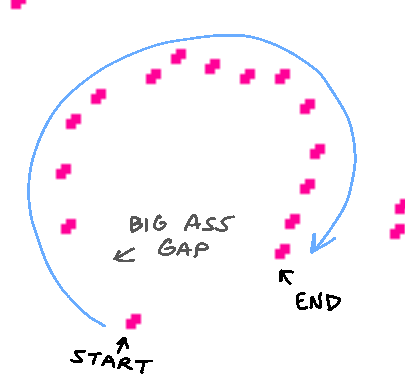
I opened wigglypaint in the actual decker application to test if it had the same problem, and indeed encountered this issue again. The html version does not seem to have the issue, but it is overall slower which makes sense. But there is no weird line jumping. It's a little hard to tell using the regular line tools, but using a marker I could see this really weird delay very clearly when I tried to draw a circle:

If this image doesn't load, here's a link: https://imgur.com/a/4p8VxiS
My tablet runs on windows, it's basically just a touchscreen computer. It's not an ipad or anything. I don't think I've encountered this issue before in other programs, but my memory is unreliable. Either way, this is currently the only program I'm experiencing this issue with.

(+2)

Thank you :D And yeah, I think it was itch's forum software that did you wrong. There was definitely an <img> in the post, it just didn't point to anything for some reason.

I'm still doing a little bit more reading on possible fixes for tablet issues (in general, when they don't seem to be getting along with specific programs) but it might be a good idea to go into your Wacom Center and set up a profile for Decker so you can tweak how your tablet interacts with it specifically.

I have a Huion so I'm not completely sure what's possible, but I'm thinking of things like turning off Windows Ink for Decker's profile so your computer will switch to the Wintab API instead. But there may be other options in there that could be helpful for bridging the gap like turning off pen pressure. (Decker doesn't currently support pen pressure, so you wouldn't be losing anything. The handful of variable-width brushes we have in the supplemental "all about brushes" deck and in wigglypaint use other methods.)

(+2)

Welp, that solved my issue! Thank you so much for the solution! I was wondering if I would end up having to do some windows ink thing but I didnt realize that could be turned off in the wacom center. Very helpful.
Apparently Wacom just likes WinTab more, I guess. Something to do with drivers, idk.

(+2)

Glad to hear it :D Thank you for bringing up the issue and coming back to say what worked. It's really, really helpful.

I hope you have fun trying Decker!