

Do you have a tumblr..... I want to see the art...................
A member registered 30 days ago
Recent community posts

For some reason the image did not stay when I posted the question.
For the record, I was talking about the general decker tools in the initial post, by activating the toolbar and drawing on a blank card, but it seems to be happening in both decker and wigglypaint.
I opened wigglypaint in the actual decker application to test if it had the same problem, and indeed encountered this issue again. The html version does not seem to have the issue, but it is overall slower which makes sense. But there is no weird line jumping. It's a little hard to tell using the regular line tools, but using a marker I could see this really weird delay very clearly when I tried to draw a circle:
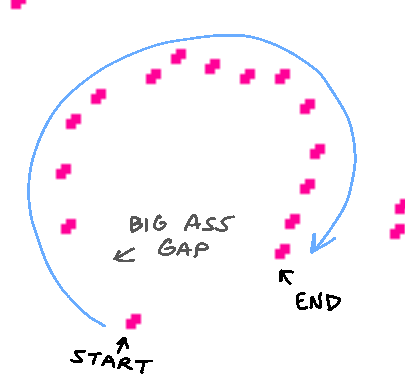
If this image doesn't load, here's a link: https://imgur.com/a/4p8VxiS
My tablet runs on windows, it's basically just a touchscreen computer. It's not an ipad or anything. I don't think I've encountered this issue before in other programs, but my memory is unreliable. Either way, this is currently the only program I'm experiencing this issue with.
Hello! I'm pretty new to decker but I've used Wigglypaint before and my dad reminded me of its existence, (and informed me of Decker's existence,) after seeing your blog post about copycats.
I downloaded Decker, and when drawing with a tablet, (Wacom touchscreen,) it does this annoying thing where there's a small delay between my first input and the rest of the stroke, which creates a straight line "jumping" from one spot to the next. It's easier to notice when drawing quick, small lines. Here's a poor example to show this issue.
I don't really know what causes this and I don't know much about coding. Usually I see this problem on websites, but not on PC applications. It could be a me issue, but I think it's likely just not made to work with pens?
To be fair, I am looking to use it for drawing purposes, which I don't know if its intended for, but it would be a nice fix so I could continue to use it a little more comfortably.
Thanks for reading! Love what you do