
Indie game storeFree gamesFun gamesHorror games
Game developmentAssetsComics
SalesBundles
Jobs
TagsGame Engines

Hi there,

Thank you very much for purchasing PixelAfterAll and for your kind words!
I am truly sorry for the trouble you're experiencing with the function.

To help me investigate the cause, could you please provide a few more details?

  • Template: Which template were you using when the issue occurred?
  • OS: What is your operating system?
  • Input Image: Could you describe what kind of image you are processing? If you are comfortable sharing the image (or a similar sample), it would be a huge help for my investigation, but please don't feel obligated to do so.

Thank you for your patience and cooperation!
The templates used were Mixel Pixel (High-res Pixel Restoration) and Pixelate Goat Animation as Video. The input images were both specified by default (Mixel-Pig and SpriteSheet-goat). Also, manually placing Pixel Unfake did not work. The OS used was Windows 11, and the version of PixelAfterAll was 1.0.3.

I had the same problem here. It seems that these functions are not working.

Thank you for the report.

Could you please check if another application is already using 8000 port?

If you find a conflicting process, please try closing it and launching the app again. I’d appreciate it if you could let me know if that solves the issue!

Sorry for the trouble you're having with PixelAfterAll.

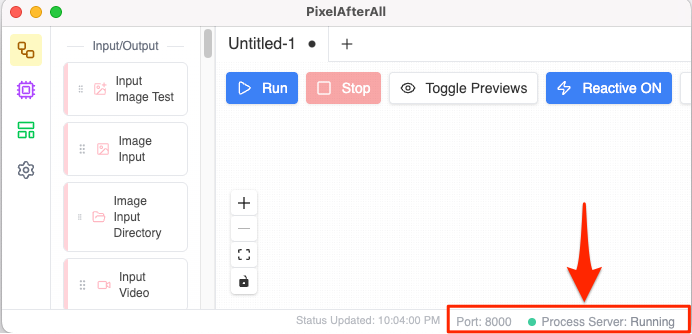
Some filter nodes in the app rely on a Process Server at port 8000.
Could you check if you see this running in your system (refer to the attached image)?

In my own Windows environment, I've noticed the server occasionally fails to start. I suspect it might be a port conflict with another application. To fix this, I'm planning to implement a port configuration setting and stop/restart functions in the upcoming version 1.0.4.


Thank you for looking into this. It's true that access to the server has been stopped here. I look forward to an update.