


This is the place to post bug reports or requests for technical support. Feature requests or general discussion / comments should be posted in their respective topics.
Hi @organictrain, sorry to hear you’re running into trouble.
Could you please tell me what version of Aseprite you’re using and the palette name you tried to import?
This error typically occurs when Lospec sends bad data to the extension, or generally means the palette info was mangled somehow.
You may also want to check that your firewall isn’t blocking traffic from Lospec, as some users have found that.
For now, please try removing and reinstalling the extension.
I have the same issue as you and yes I'm on Linux and Install Aseprite through Steam.
So when I run aseprite from steam it will throw me `lospec-palette-importer.lua:344: unexpected end of input` error
After add some debug check and I found out that it logged this.
/usr/bin/curl: .../SteamLinuxRuntime/.../libcurl.so.4: version
`CURL_OPENSSL_4' not found (required by /usr/bin/curl)
That means when Aseprite (launched under Steam runtime / a sandbox) runs /usr/bin/curl it ends up picking up the runtime's libcurl which is incompatible with my system curl binary. The curl binary therefore prints an error instead of JSON, causing the JSON decode failure.
[Desktop Entry]
Name=Aseprite
Comment=Play this game on Steam
Exec=/home/(your-user-name)/.local/share/Steam/steamapps/common/Aseprite/aseprite
Icon=steam_icon_431730
Terminal=false
Type=Application
Categories=Game;
You can take a look at this:
It works fine for both Windows and Linux, not sure about Mac, but it would just fall back to use default one if not Linux
https://github.com/JRiggles/Lospec-Palette-Importer/commit/9b4a4494a234896eef4ae...
first message
second message
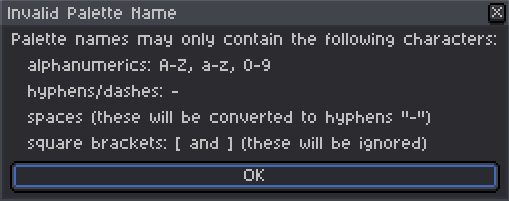
Hi, having some issues with the extension, the daily Palette says the name is invalid and if I try to open any other Palette it keeps sending the first message. Can this be because the extension is installing on the wrong disk as Asprite is on another one? if so were should I move it?
Hi @hinehole@ Can you answer a few questions for me please:
/palette-list/ in the lospec.com URL)?There are otherwise zero issues on Linux I've encountered so far.
Is the palette name in general sanitized? It looks like there are some other crazy symbols that are also disallowed on Windows, e.g. the pipe, like this palette: https://lospec.com/palette-list/fourlines-22
Glad to hear it! Some Linux users have reported that the extension trying to use curl is broken for them - I haven’t nailed down a good fix, and my Linux setup is just a separate partition on this MacBook, so it’s maybe not 100%.
The palette name (as provided by the user) is “sluggified” using a lua port of Skeddles’ own “sluggify” that he uses for Lospec proper, but (as far as I remember) the raw name is used for saved palette files - I’ll look into sanitization for those too.
FWIW, I tried a different r/place palette and encountered the same issue, so I think you’re right on about the slash being the issue:
And I didn’t have any issue saving “|||| 22 PALETTE” on MacOS, so I’ll chalk that up to platform-specific shenanigans.
What I might do is fall back to saving the palette using its slug if using the actual name fails (and if that fails, something else is up).
Thanks for the report!
Hi Delphonse, sorry to hear you’re having trouble with the extension. Have you tried removing and reinstalling the extension? If that doesn’t work, let me know and we can go from there.
You can also try registering the Lospec.com “Open In App…” handler manually by running the .reg script here:
"%appdata%\Roaming\Aseprite\extensions\lospec-palette-importer\WindowsHelper\"
Just go to that path and double-click on "RegisterURIHandler.reg" and follow the prompts.
Hi Mushrooms! Sorry to hear you’re having trouble, but it seems unrelated to the importer itself. Imported palettes are saved in .GPL format by default which is typical for Aseprite, so they should behave just like any other palette. You may need to click the lock button to the upper-left of the palette list (or press “A”, which I think is the default shortcut) to enable “Edit Color” mode if you want to modify colors that already exist in a palette.
I just tried modifying a couple of imported palettes and things worked as expected. Let me know if you still have issues!
Hi again Mushrooms, thanks for your patience while I looked into this. I just tried the current version of the extension on my PC under Windows 11 and it doesn’t appear that the extension is saving imported palettes as read-only, and I am still able to add new colors to imported palettes as normal.
As an additional test, I opened my palettes folder and deliberately set one of my imported palettes as read-only and I was still able to modify it in Aseprite.
Here are some steps that might be worth trying:
FWIW, I noted that at least on my machine the palettes directory shows that the folder is at least partially read-only (the checkbutton in the Windows properties dialog is dashed), but none of the palettes I had imported via the extension were marked as such.
Sorry I don’t have anything more concrete for you at the moment.
