
Indie game storeFree gamesFun gamesHorror games
Game developmentAssetsComics
SalesBundles
Jobs
TagsGame Engines

[11:26:26] 100%

[11:26:32] To honour the JVM settings for this build a single-use Daemon process will be forked. For more on this, please refer to https://docs.gradle.org/8.2.1/userguide/gradle_daemon.html#sec:disabling_the_dae... in the Gradle documentation.

[11:26:33] Daemon will be stopped at the end of the build

[11:26:36] FAILURE: Build failed with an exception.

[11:26:36] * Where: Build file 'E:\RM��������\AG-APK-OFFLINE-VERSION\AG-APK-Builder-win32-x64\resources\base_module\app\build.gradle' line: 2 * What went wrong: An exception occurred applying plugin request [id: 'com.android.application'] > Failed to apply plugin 'com.android.internal.application'. >

[11:26:36] Your project path contains non-ASCII characters. This will most likely cause the build to fail on Windows. Please move your project to a different directory. See http://b.android.com/95744 for details. This warning can be disabled by adding the line 'android.overridePathCheck=true' to gradle.properties file in the project directory.

[11:26:36] * Try: > Run with --stacktrace option to get the stack trace. > Run with

[11:26:36] --info or --debug option to get more log output. > Run with --scan to get full insights. > Get more help at

[11:26:36] https://help.gradle.org. BUILD FAILED in 10s

[11:26:37] Error invoking remote method 'build-apk': Error: CMD FAILED 1

[11:26:44] Signing method: Auto Signed

By Anaryx Plugin

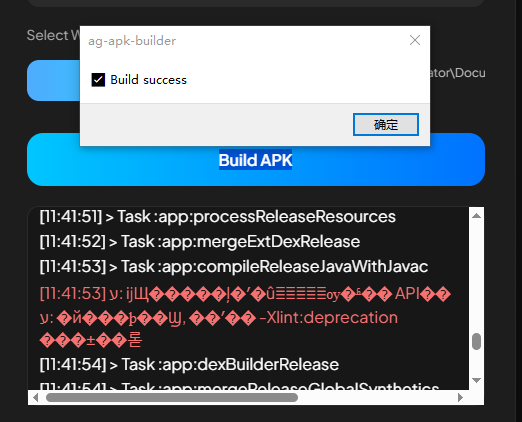
An error occurred while packaging the APK using AG-APK-OFFLINE-VERSION; the option "Step 4 – Open AG APK Builder" was missing.
Thanks for the report 🙏

The issue is caused by non-ASCII characters and spaces in the folder path.

Example of problematic path:

E:\RM��������\AG-APK-OFFLINE-VERSION\...

Android Gradle on Windows cannot reliably handle special/corrupted characters (like �) and spaces in paths.

Please move or rename the project to an ASCII-only path and avoid spaces.

If you need separation, use hyphens (-) instead of spaces.

Recommended example:

C:\AG-APK\

D:\RPGMaker\AG-APK-Builder\

After that, rebuild the APK/AAB. This should resolve the issue.

The APK was successfully packaged, but on the problematic phone, after installation, the game keeps spinning and cannot be launched. Inspection revealed missing assets, which are not present in the game. Using other APK packaging tools, the game can be installed and launched normally.

Thank you for your feedback 🙏 To help me identify and reproduce this bug, please include the following information:

1. Device name 

2. Model Android version 

3. RPG Maker version used (MV/MZ, including version if possible) 


This information is very helpful for ensuring compatibility and fixing the issue in future updates. Thank you 🙏

redmi k60       

Android 13       rpg maker mz 1.91

Hello, thank you in advance. I really regret this bug; it might occur in MainActivity.java, because the latest WebView version is very sensitive and its security is very strict. I have already replaced the download file but still with the same version because this is just a small bug. If you are lazy to download the file because the size is large, you can modify MainActivity.java yourself.

Here is the file:

\AG APK Builder-win32-x64\resources\base_module\app\src\main\java\com\xxx\yyy\MainActivity.java

Replace all of this:

package com.xxx.yyy;
import android.os.Bundle;
import android.webkit.WebSettings;
import android.webkit.WebView;
import androidx.appcompat.app.AppCompatActivity;
public class MainActivity extends AppCompatActivity {
    @Override
    protected void onCreate(Bundle savedInstanceState) {
        super.onCreate(savedInstanceState);
        WebView webView = new WebView(this);
        WebSettings settings = webView.getSettings();
        // Aktifkan JavaScript
        settings.setJavaScriptEnabled(true);
        // Aktifkan akses file
        settings.setAllowFileAccess(true);
        settings.setDomStorageEnabled(true);
        // Tambahan penting untuk Android 11+ agar WebView bisa load file lokal
        settings.setAllowFileAccessFromFileURLs(true);
        settings.setAllowUniversalAccessFromFileURLs(true);
        // Load index.html dari assets/www
        webView.loadUrl("file:///android_asset/www/index.html");
        setContentView(webView);
    }
}

replace with the legacy version, remember not to duplicate

package com.xxx.yyy; 
import android.os.Bundle;
import android.view.View;
import android.webkit.ConsoleMessage;
import android.webkit.WebChromeClient;
import android.webkit.WebSettings;
import android.webkit.WebView;
import android.webkit.WebViewClient;
import androidx.appcompat.app.AppCompatActivity;
public class MainActivity extends AppCompatActivity {
    private WebView mWebView;
    @Override
    protected void onCreate(Bundle savedInstanceState) {
        super.onCreate(savedInstanceState);
        // ===============================
        // ENABLE WEBVIEW DEBUG (ADB)
        // ===============================
        WebView.setWebContentsDebuggingEnabled(true);
        // ===============================
        // INIT WEBVIEW
        // ===============================
        mWebView = new WebView(this);
        // Fullscreen immersive (RPG safe)
        mWebView.setSystemUiVisibility(
                View.SYSTEM_UI_FLAG_LOW_PROFILE
                        | View.SYSTEM_UI_FLAG_FULLSCREEN
                        | View.SYSTEM_UI_FLAG_LAYOUT_STABLE
                        | View.SYSTEM_UI_FLAG_IMMERSIVE_STICKY
                        | View.SYSTEM_UI_FLAG_LAYOUT_HIDE_NAVIGATION
                        | View.SYSTEM_UI_FLAG_HIDE_NAVIGATION
        );
        // ===============================
        // WEB SETTINGS (MV & MZ SAFE)
        // ===============================
        WebSettings settings = mWebView.getSettings();
        settings.setJavaScriptEnabled(true);
        settings.setDomStorageEnabled(true);
        settings.setAllowFileAccess(true);
        settings.setAllowContentAccess(true);
        settings.setAllowFileAccessFromFileURLs(true);
        settings.setAllowUniversalAccessFromFileURLs(true);
        settings.setMediaPlaybackRequiresUserGesture(false);
        // Android 9+ (WAJIB untuk local file + JS)
        settings.setMixedContentMode(WebSettings.MIXED_CONTENT_ALWAYS_ALLOW);
        // CACHE FIX (API BARU)
        settings.setCacheMode(WebSettings.LOAD_NO_CACHE);
        // Performance (MZ butuh ini)
        settings.setLoadWithOverviewMode(true);
        settings.setUseWideViewPort(true);
        // ===============================
        // WEBVIEW CLIENT
        // ===============================
        mWebView.setWebViewClient(new WebViewClient());
        // ===============================
        // WEBCHROME CLIENT (JS ERROR LOG)
        // ===============================
        mWebView.setWebChromeClient(new WebChromeClient() {
            @Override
            public boolean onConsoleMessage(ConsoleMessage msg) {
                android.util.Log.e(
                        "WEBVIEW",
                        msg.message()
                                + " [Line " + msg.lineNumber()
                                + "] " + msg.sourceId()
                );
                return true;
            }
        });
        setContentView(mWebView);
        // ===============================
        // LOAD RPG MAKER
        // ===============================
        mWebView.loadUrl("file:///android_asset/www/index.html");
    }
    // ===============================
    // KEEP FULLSCREEN
    // ===============================
    @Override
    public void onWindowFocusChanged(boolean hasFocus) {
        super.onWindowFocusChanged(hasFocus);
        if (hasFocus && mWebView != null) {
            mWebView.setSystemUiVisibility(
                    View.SYSTEM_UI_FLAG_LOW_PROFILE
                            | View.SYSTEM_UI_FLAG_FULLSCREEN
                            | View.SYSTEM_UI_FLAG_LAYOUT_STABLE
                            | View.SYSTEM_UI_FLAG_IMMERSIVE_STICKY
                            | View.SYSTEM_UI_FLAG_LAYOUT_HIDE_NAVIGATION
                            | View.SYSTEM_UI_FLAG_HIDE_NAVIGATION
            );
        }
    }
    @Override
    protected void onResume() {
        super.onResume();
        if (mWebView != null) {
            mWebView.onResume();
            mWebView.postDelayed(() -> mWebView.requestFocus(), 200);
        }
    }
    @Override
    protected void onPause() {
        if (mWebView != null) {
            mWebView.onPause();
        }
        super.onPause();
    }
}

I hope this can help fix your problem. If your problem isn't resolved, I would like a screenshot of the error from the built APK. Thank you.