
On Sale: GamesAssetsToolsTabletopComics
Indie game storeFree gamesFun gamesHorror games
Game developmentAssetsComics
SalesBundles
Jobs
TagsGame Engines
(1 edit) (+1)

Hi Zoey,

Thank you for the awesome script! I just played the demo and I noticed the profile picture at the top and the text at the bottom goes outside of the phone screen, is this intentional? If so how do I make anything outside of the phone screen cut off? Or at least scale them in a way so they fit in the first place? Thank you so much in advance!
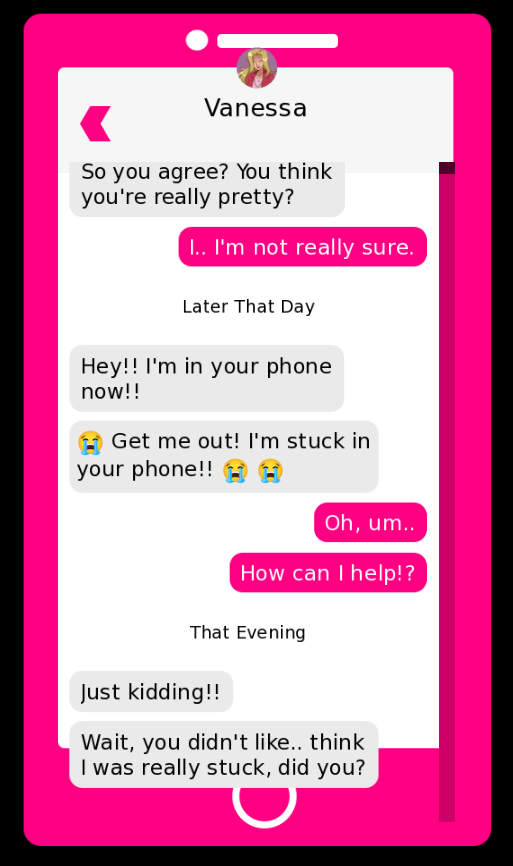

(+1)

Hi! Is it possible you could show a screenshot of what you mean? I'm not sure I see that on my end in the demo. Also, your device and resolution may help, in case it's a scaling issue. Thanks :)

I'm on Windows 11 Desktop, and using resolution of 1920 x 1080. Here's a screenshot:

Did you change anything at all in the demo? That's so strange, I don't have that happening on my end. It looks just like a z-order issue with the phone case being too low. Does changing the window's aspect resolution impact it at all (ex. shrinking the window make it go away)?

The only thing I changed is renaming the inner folder to Game so Renpy can run it, and putting the game in the same folder as my other renpy project. though I re-downloaded and it's still the same thing. But I think I figured it out. in the message_viewport, you defined the ysize to be 750, so I removed that line and it somehow auto-scaled on its own with the correct ratio O_O

Hmm, strange. I'll have to take a look at that line of code. So does it all work as intended now?

Yes, it all looks good for now, thank you!!