Thank you very much !
For the font, there are a few features with Godot that make the switch quite easy.
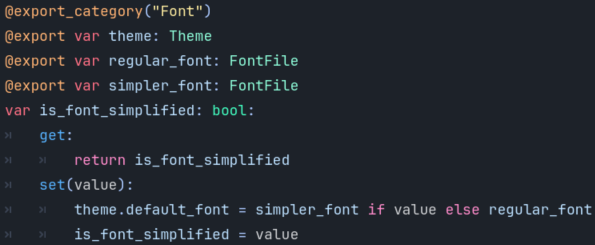
First, I'd recommend using a theme (see the documentation for Theme if you're unfamiliar with it) and simply changing its default font via code when you press a button - it's just as easy as changing any variable.
To make things simpler and more mangeable (and keep coherence), I'm using the same base theme everywhere on a parent control and adding more specific tweaks with new themes on children controls.
You can also use containers like vbox and hbox to keep things aligned correctly.
This is what made everything work so well in this project at least (with the exception of the quote at the beggining which required to move every control on font change).
I would also recommend using fonts with a similar size, or maybe trying to tweak the font files to get a better match (haven't had to try that yet).
You can also change the default size with the theme, but it would not work if you're changing it locally.