

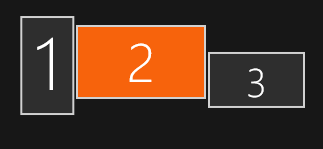
#1: 1080x1920 | #2: 2560x1440 | #3: 1920x1080 | OS: Windows | Mode: Extended Desktop
And whats going wrong is: Game uses dimensions of Monitor 2, because thats primary main monitor under windows settings, but game pulls position from first monitor number 1 and puts the game window position in topleft corner of monitor 1.
solution: make your game pull position coordinates not from first monitor in the array, instead check what is the main monitor. For dimensions your game allready does this, but for some reasons not for position.
solution 2# maybe: just make a big transparent window and always put character in the middle of that window. And then you drag and move char you also move the window with it, so chars stays always centered in that window, this way you not fixate on making an overlay on only just 1 monitor, atleast that is what MateEngine does, tho with a smaller window around char, but you guys probably need bigger window for extending the draw range for the items and minigames.