
Indie game storeFree gamesFun gamesHorror games
Game developmentAssetsComics
SalesBundles
Jobs
TagsGame Engines
(1 edit)

We are aware of the issue when using multiple monitors - it works on some, but one person reported similar issue recently when using 3 monitors, do you have 2 or 3 monitors? Could you provide their respective resolutions? Are you using Linux or Windows build?

I will add this to known issues in game description as i discovered it only recently. Game is still in early access, it is stable in general but some issues will pop up  and we try to fix them along the way. The demo works the same as the full version minus activities and minigames that's why we released a free demo to test before purchasing full version. I will update the description to provide more specific details about contents of the full version to avoid confusion.

If you are really dissatisfied with the game you can issue a refund with the support team. (edited to handle this through dedicated method: with itch support team)
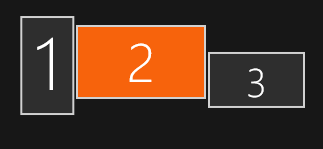
(1 edit)


#1: 1080x1920 |  #2: 2560x1440 | #3: 1920x1080 | OS: Windows | Mode: Extended Desktop

And whats going wrong is: Game uses dimensions of Monitor 2, because thats primary main monitor under windows settings, but game pulls position from first monitor number 1 and puts the game window position in topleft corner of monitor 1.

solution: make your game pull position coordinates not from first monitor in the array, instead check what is the main monitor. For dimensions your game allready does this, but for some reasons not for position.

solution 2# maybe: just make a big transparent window and always put character in the middle of that window. And then you drag and move char you also move the window with it, so chars stays always centered in that window, this way you not fixate on making an overlay on only just  1 monitor, atleast that is what MateEngine does, tho with a smaller window around char,  but you guys probably need bigger window for extending the draw range for the items and minigames.

Thanks for the feedback!

I will look into it, and try to replicate the issue, it should use main monitor's position and dimensions but for some reason it does not in this case.

Solution 2# would work, the game worked this way in early builds but we had to change it to allow Linux support (it handles windows differently and would not allow moving the window outside of display boundaries which basically prevented larger character size and ability to move around significantly) and yeah, also minigames and activities, especially planned ones.