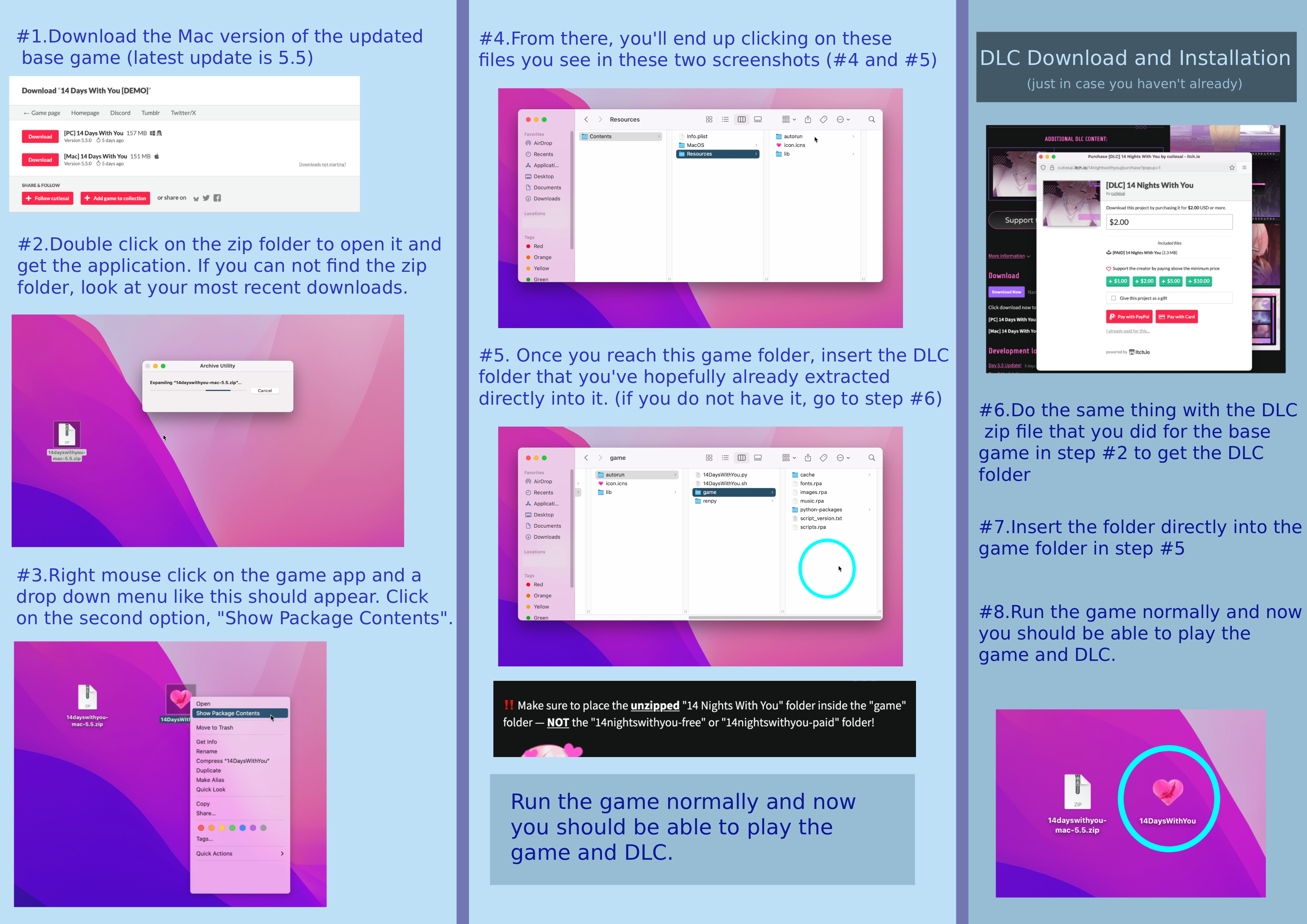
Can anyone tell me how to installed DLC verison of the game I already pay DLC verison i try to follow the direction to installed MacOS I can't do it techology wasn't my thing somone give steps by steps how installed DLC lapstop MacOs ??? what do i need to buttons into get the DLC verison ??? I'm so lost :(
249 days ago(+2)(-1)
I got itttt
Here are the instructions
To download and install the 14 Nights With You DLC for 14 Days With You on a Mac, you must manually place the DLC files into the game's directory after downloading them from the official itch.io page.
Step-by-Step Installation Guide
Before starting, ensure you have the latest version of the base game 14 Days With You downloaded and installed on your Mac.
Download the DLC:
Navigate to the official 14 Nights With You DLC page on itch.io.
Download the appropriate file for your macOS device. You may need to pay a price or select the "Just take me to the downloads" option if it is a free version.
Unzip the File:
Locate the downloaded zipped file (e.g., 14nightswithyou-paid.zip or similar) in your Downloads folder or chosen location.
Double-click the file to unzip it. This will create a new folder. Inside that folder, locate the specific folder named "14 Nights With You".
Locate the Base Game's 'game' Folder:
Find the 14 Days With You application in your Applications folder or wherever you saved it.
Right-click the 14 Days With You app icon.
Select Show Package Contents from the context menu.
Open the folders in this specific order: Contents → Resources → autorun → game.
Install the DLC:
Place the unzipped "14 Nights With You" folder (from Step 2) inside the game folder you opened in Step 3.
Do not place the initial downloaded zip file's parent folder into the game folder; make sure you're moving the exact folder titled "14 Nights With You".
Verify Installation:
Run the 14 Days With You game normally.
A notification should appear in the top right corner of the main menu screen to confirm that the DLC has been successfully installed.
I don’t know how much better I can explain through text but I’ll try to be as specific as I can.
Part 1. When you download the DLC (Mac) you’ll need to un-zip the file by double clicking on it. You’ll get the DLC folder you’ll need for later in part 2.
Part 2. With your mouse, hover over the 14DWY base game app you should have already installed onto you computer and right click on it. A menu will pop down with a bunch of different options. The second option from the top should be called “show package contents”. Click on that one.
From there you’ll be brought to a new folder called Contents. Click on it and go to the folder Resources and then to the folder auto-run and then, finally, the game folder.
(click folders in order: contents > resources > auto-run > game)
Once you get to the game folder, take the folder you got from un-zipping the DLC and place it directly inside the game folder.
After that, you should be able to play the game with the DLC installed.