

Testing this with a simple sliding door. On frame 1 the door is closed. On frame 12, the door is offset 45 pixels to the right. Frames 2 through 11 are empty. I select the 12 frames, and create a straight tween. The result is that it creates frames 2 through 11 in which the image moves 2 pixels per frame, which is obviously not enough. I'm not sure what I'm missing.
265 days ago (+1)
Hi werzaque, thanks for the detailed explanation. The setup you described is actually correct. It should read the cel in Frame 1, read the cel in Frame 12 (offset 45px), and generate proper in-between frames that smoothly interpolate the movement.
Since I’m currently away from my computer, I can’t test this exact case right now, but based on recent reports from other users, this behavior may be related to Aseprite version changes.
Tweencel was developed and tested on Aseprite v1.3.14-beta1, and some changes introduced in v1.3.15 may affect how cel positions are read by scripts. If you’re on 1.3.15 or higher, this could explain why the interpolation is incorrect.
When I get back to my machine, I’ll test your exact scenario and update Tweencel if needed.
In the meantime, could you let me know which version of Aseprite you’re using? That will help me confirm whether it’s a version-related issue.
Thanks again for reporting this, your feedback is a huge help.
265 days ago (+1)
Hi Werzaque, I tested your exact setup on my end using both Aseprite v1.3.15.5 and Aseprite v1.3.14-beta1 to confirm, and Tweencel is generating the correct in-between frames.
Here’s the setup I used:
- 12 frames total
- Frame 1: door image (closed)
- Frames 2–11: empty
- Frame 12: same door image moved +45px to the right
- Applied Position Straight Tween > Hit "Create" button
The tween interpolated the movement correctly from Frame 1 to Frame 12.
I also recorded a GIF demo to show how it looks on my end. https://postimg.cc/3ycWCZG5
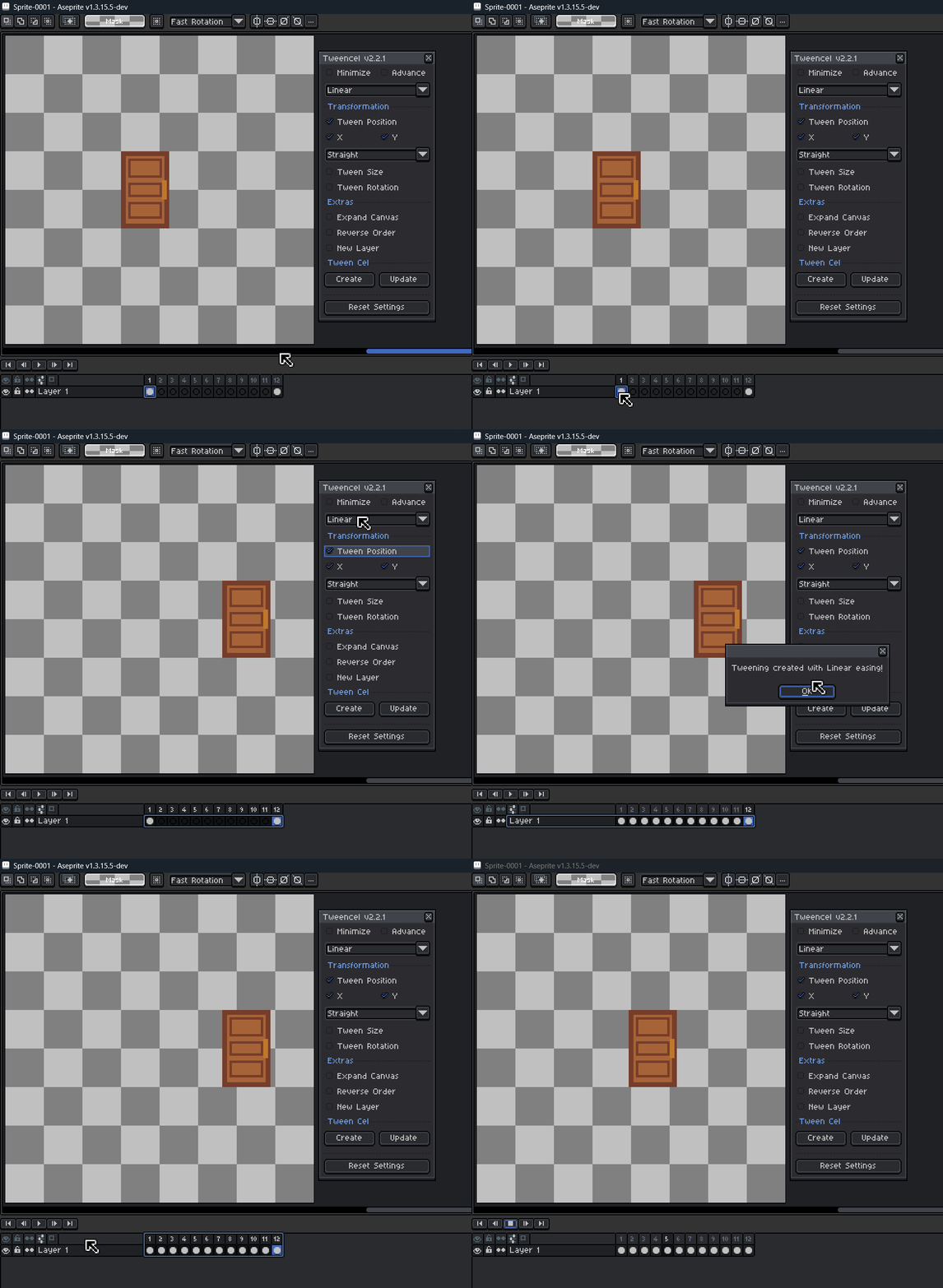
Since things are working correctly here, your setup might be behaving differently for a reason I can’t see yet.
Could you share a short GIF of how you’re doing it on your side? And also let me know which Aseprite version you’re using?
Seeing your exact steps will help me understand what’s causing the different result.
Thanks again for reporting this, I appreciate your help in improving the tool!
263 days ago(+1)
Thanks for the reply. Hmmm... can't see to view your GIF. But in any case, I got it to work when I kept the selection marquee turned on (instead of pressing Esc to deselect after copying it to frame 12) and in that case it did work.
EDIT: I'm trying again today and it works now exactly as advertised and I can't seem to reproduce my earlier problem... Will report again if I bump into it, but maybe I didn't reboot Aseprite after loading your script. Not sure if that makes sense but...