

I can't seem to get the tiles to generate using the .tres files. I tried creating a folder called "LaPetiteTile_Maps" and importing the textures into there, but it doesn't work and when I try to draw terrain using the given instructions, nothing works. Can you provide more clear instructions on how to use these files?
229 days ago (+1)
Hello! Sorry for your difficulties.
Normally, it's very simple to use. If you purchased the Godot version, you should have a .zip file called “LaPetiteTile_Maps_Godot” containing a folder of the same name. Extract the contents of the .zip file (the folder named “LaPetiteTile_Maps_Godot”) into your Godot project (anywhere) and you should be able to use the tilemaps. The easiest thing to do from there is to duplicate the scene /Scenes/TemplateScene.tscn and you will be able to use the terrains of the scene there.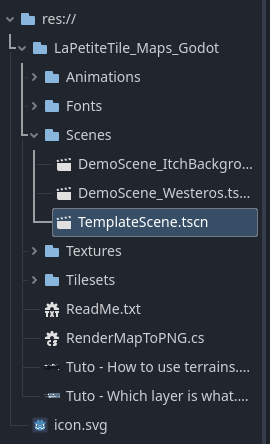
All the .tres files for the Tilesets are already included in the /Tilesets/ folder, you should have nothing to generate!
In the TemplateScene scene (or any DemoScene), if you have trouble selecting the tool to paint the terrains, you can follow these 6 steps: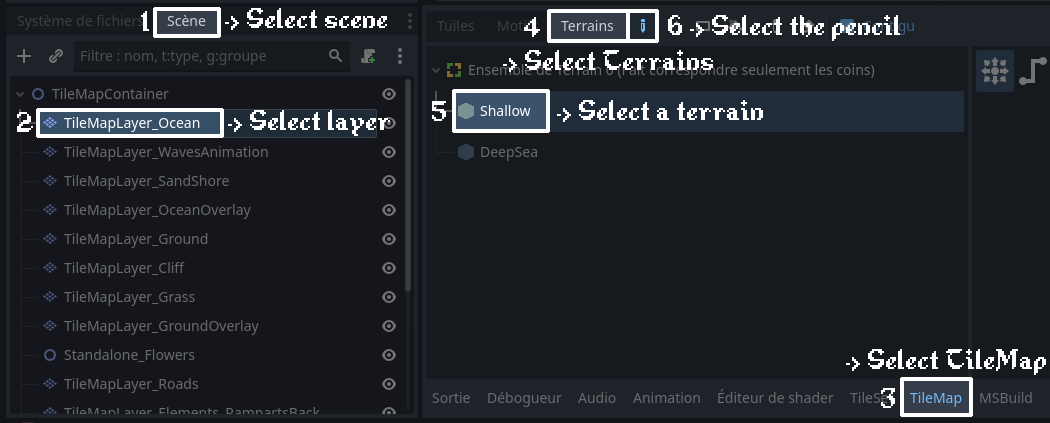
If you want to create your own scene (not duplicating TemplateScene.tscn), you have to create several TileMapLayer nodes (as it is in the TemplateScene and DemoScenes) and add the given Tile Set files to each, they are already included in the /Tilesets/ folder.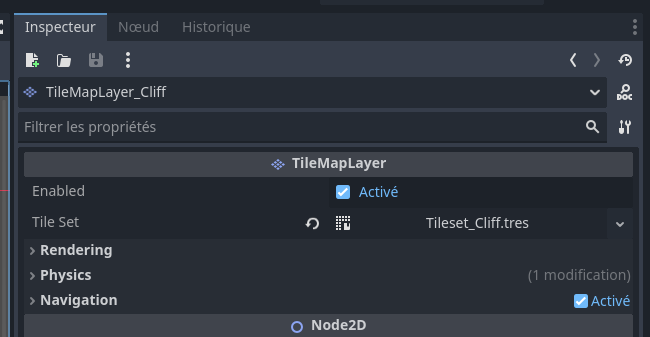
It's a bit longer and redundant so the easiest way to include a map to your scene is to import a copy of TemplateScene.tscn as a node in your own scene, just as you would with any scene in Godot.
If the .zip file you purchased is named only “LaPetiteTile_Maps” and not “LaPetiteTile_Maps_Godot,” it means you purchased the less expensive (3$ instead of 5$) version that does not include Godot integration and contains all assets in .png format only. In this case, you have to create the tilemaps and terrains yourself.
It works on both GDScript Godot and C# Godot versions. Does your Godot version include the new tilemap system? I used Godot 4.5.1 to create the tilemap, but any version 4.3+ should work (and possibly 4.2+, but I'm not sure).
I'm giving you general advice because I didn't quite understand what your problem was. Could you give me more information? (The version of LaPetiteTile_Maps, your godot version, whether you added the complete folder to your project, whether you're using TemplateScene or not...)
227 days ago(+1)
I did follow your instructions for the Godot version of the files and it works perfectly now, thank you! I am excited to be able to use your artwork, it looks so good!! I will create a wonderful overworld map for my game now. You're the best! Thank you again!!!
I just discovered during the map-making process, I don't know how to add vegetation and rocks and stuff to the map - can you give ideas on how to achieve that? Aside from that, I think I have mastered the tools you've provided for map-making! I see containers for those things, but don't know how to add them yet.
To add trees, buildings, or mountains, the easiest way is to use the layer TileMapLayer_Elements. Inside, you will find 3 terrain sets: one for trees, one for mountains, and one for buildings, each containing a multitude of terrains. From there you can paint the ground elements!
If you don't see what each layer corresponds to (you will find the terrains inside), I invite you to look at this image or see how I made the map of Westeros or the background of Itch.io in the scenes DemoScene_Westeros.tscn and DemoScene_ItchBackground.tscn.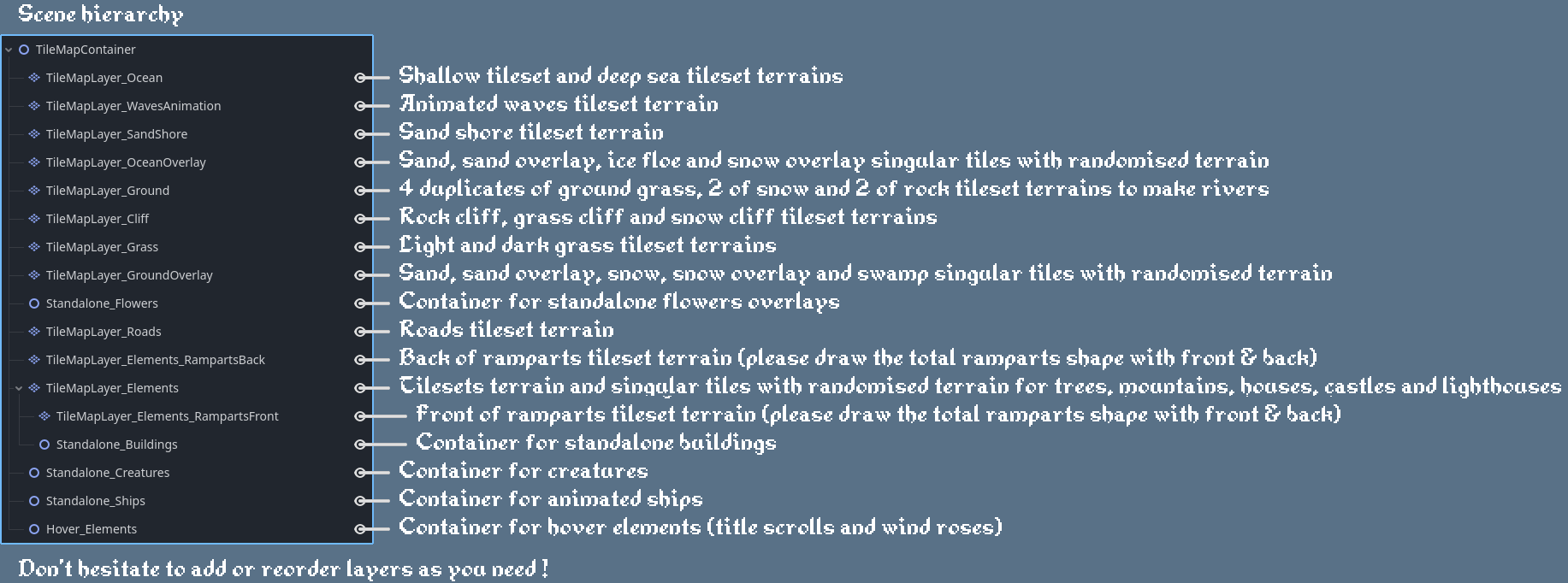
Personally, I proceed as follows (but you can do everything in whatever order you like!):
1. first, I paint the continents with TileMapLayer_Ground, TileMapLayer_Cliff, and TileMapLayer_SandShore;
2. then I paint the ocean and shallows with TileMapLayer_Ocean;
3. next, I paint the forests, mountains, and buildings with TileMapLayer_Elements;
4. next, I paint the roads (TileMapLayer_Roads), bridges (.png to drag & drop into the Standalone_Buildings container from the /Textures/Standalone_Buildings/ folder), grass (TileMapLayer_Grass), ground and ocean overlays (TileMapLayer_OceanOverlay and TileMapLayer_GroundOverlay), creatures (.png files to drag and drop into the Standalone_Creatures container from the /Textures/Standalone_Creatures folder);
5. and finally flowers and other small elements adding detail to the ground (.png files to drag and drop into the Standalone_Flowers container from the /Textures/Standalone_Vegetation folder).
6. At this stage, the shores of my continent are no longer moving much, so I add wave animations. This is quite simple: I repaint the ground of the continent with TileMapLayer_WavesAnimation.
7. For ships, you can directly drag and drop the /Animations/ShipPrefab.tscn file into the scene, into the Standalone_Ships container node. You can then choose the direction from the animation tab.
8. For the city/location name banners, these are .png files located in /Textures/Parchment&WindRoses/Parchments/. You can either use the ‘Complete’ png files or assemble them yourself using the Left, Centre and Right parts. Then I put two text labels offset from each other, one for the text (#4b4535) and one for the shadow (#948053). I put this and the wind rose in the Hover_Elements container node.