

I just discovered during the map-making process, I don't know how to add vegetation and rocks and stuff to the map - can you give ideas on how to achieve that? Aside from that, I think I have mastered the tools you've provided for map-making! I see containers for those things, but don't know how to add them yet.
To add trees, buildings, or mountains, the easiest way is to use the layer TileMapLayer_Elements. Inside, you will find 3 terrain sets: one for trees, one for mountains, and one for buildings, each containing a multitude of terrains. From there you can paint the ground elements!
If you don't see what each layer corresponds to (you will find the terrains inside), I invite you to look at this image or see how I made the map of Westeros or the background of Itch.io in the scenes DemoScene_Westeros.tscn and DemoScene_ItchBackground.tscn.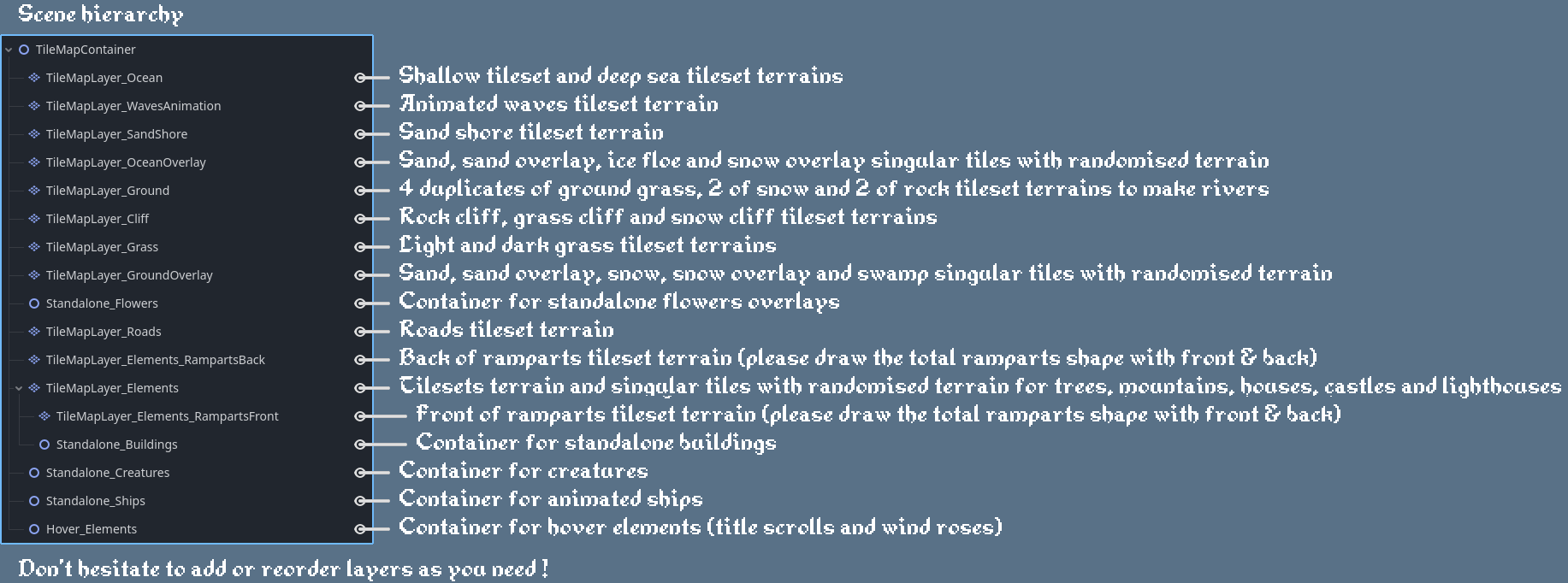
Personally, I proceed as follows (but you can do everything in whatever order you like!):
1. first, I paint the continents with TileMapLayer_Ground, TileMapLayer_Cliff, and TileMapLayer_SandShore;
2. then I paint the ocean and shallows with TileMapLayer_Ocean;
3. next, I paint the forests, mountains, and buildings with TileMapLayer_Elements;
4. next, I paint the roads (TileMapLayer_Roads), bridges (.png to drag & drop into the Standalone_Buildings container from the /Textures/Standalone_Buildings/ folder), grass (TileMapLayer_Grass), ground and ocean overlays (TileMapLayer_OceanOverlay and TileMapLayer_GroundOverlay), creatures (.png files to drag and drop into the Standalone_Creatures container from the /Textures/Standalone_Creatures folder);
5. and finally flowers and other small elements adding detail to the ground (.png files to drag and drop into the Standalone_Flowers container from the /Textures/Standalone_Vegetation folder).
6. At this stage, the shores of my continent are no longer moving much, so I add wave animations. This is quite simple: I repaint the ground of the continent with TileMapLayer_WavesAnimation.
7. For ships, you can directly drag and drop the /Animations/ShipPrefab.tscn file into the scene, into the Standalone_Ships container node. You can then choose the direction from the animation tab.
8. For the city/location name banners, these are .png files located in /Textures/Parchment&WindRoses/Parchments/. You can either use the ‘Complete’ png files or assemble them yourself using the Left, Centre and Right parts. Then I put two text labels offset from each other, one for the text (#4b4535) and one for the shadow (#948053). I put this and the wind rose in the Hover_Elements container node.