

omgg how did u do it cause i tried multiple times and im so confused ive never done this and im llike gonna be dumb for asking this(i also use windows but im confused).
basically u have to redownload and play through killer chat again (if u deleted it), (and download the dlc aswell) , make sure to unzip both folders or it wont work, once u unzip make sure to minimize and split screen the folders, (both the original killer chat and the new dlc) once unzipped, then hold left click to bring it into the 'game' folder , once u did all that i think you have to re complete the original so when you click overkill on the loading screen and it brings u to saves click on auto saves and click on the very last one n that should work
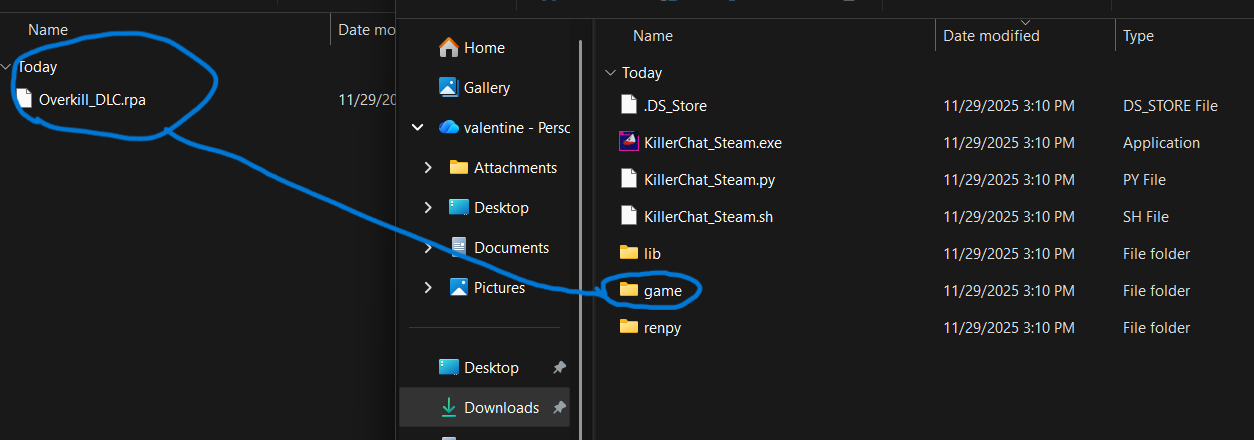
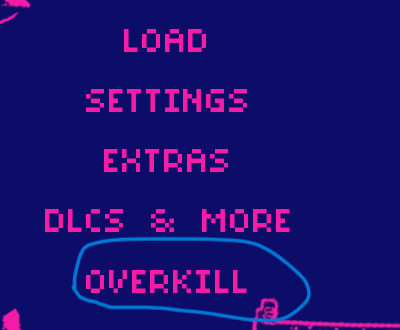
when you download the overkill dlc go to ur folder and click on downloads make sure it says overkill dlc zip thats where it says overkill dlc and make sure ur downloading the newest fixed version, this is unfortunately the only way so if u still dont see it i suggest requesting a refund and buying the game on steam instead