

I did some pondering and tried to come up with an approach that minimizes the amount of scripting needed:
http://beyondloom.com/decker/goofs/petquiz.html
The structure of the deck is as follows:
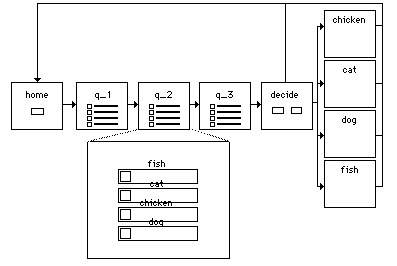
- Question cards are named with a "q_" prefix.
- Quiz results each have their own sensibly-named card.
- The options on question cards are each a checkbox whose name corresponds to the name of one of the result cards.
- The checkboxes can appear in different orders on each question cards, and not all possible results must be present.
- The checkboxes on question cards are marked as volatile, so that they can all be reset with "deck.purge[]", as a convenience.
- Clicking a checkbox simply advances to the next card. Since they all have the same behavior, we can put the following in the card script for each question (or, if we're feeling feisty, we could even define it once in the deck-level script):
on click do
 go["Next"]
end
When we get to the last card of the quiz, the user clicks a button to discover their result. The script there will find all the question cards based on the "q_" naming convention, look at all their checkboxes, and count up the number of checks for a given result name. The name which had the most checks will be the name of our result card:
on click do
 cards:extract value where value..name like "q_*" from deck.cards
 counts:sum each card in cards
  raze select key value..value where value..type="button" from card.widgets
 end
 go[first extract key orderby value desc from counts]
end
This is probably a bit daunting. Using the Listener, we can break this script down step-by-step; assume we're on the card "decide" and we've already filled out our quiz responses.
Find the question cards:
cards:extract value where value..name like "q_*" from deck.cards
# (<card>,<card>,<card>)
For now, consider only the first card. Find the button widgets and form a table from their names ("key") and checked status ("value..value"):
select key value..value where value..type="button" from cards[0].widgets
# +-----------+-------+
# | key       | value |
# +-----------+-------+
# | "chicken" | 1     |
# | "fish"    | 0     |
# | "dog"     | 0     |
# | "cat"     | 0     |
# +-----------+-------+
Razing a table forms a dictionary mapping its first column to its second column:
raze select key value..value where value..type="button" from cards[0].widgets
# {"chicken":1,"fish":0,"dog":0,"cat":0}
We'll need to do this process for each card, not just the first one:
each card in cards
 raze select key value..value where value..type="button" from card.widgets
end
# ({"chicken":1,"fish":0,"dog":0,"cat":0},{"fish":0,"cat":1,"chicken":0,"dog":0},{"dog":0,"chicken":1,"cat":0,"fish":0})
If we sum a list of dictionaries, we'll get a dictionary with the union of the keys in each dictionary and the sum of all the corresponding values:
counts:sum each card in cards
 raze select key value..value where value..type="button" from card.widgets
end
# {"chicken":2,"fish":0,"dog":0,"cat":1}
To find the key with the largest value, we'll sort the keys by the values (descending):
extract key orderby value desc from counts
# ("chicken","cat","fish","dog")
The first element of that list is our answer:
first extract key orderby value desc from counts
# "chicken"
So we can go[] to the corresponding card by name:
go[first extract key orderby value desc from counts]
This query doesn't care about how many results exist, how many questions are in the quiz, or how many answers are available for each question; you can easily add to the quiz or make an entirely different quiz without modifying the query.
(Note: this quiz won't work right if your checkboxes are named inconsistently. If you seem to get goofy results, you can try the above step-by-step in the Listener to see if you get any unexpected options in this result list!)
Does that make sense?