
Indie game storeFree gamesFun gamesHorror games
Game developmentAssetsComics
SalesBundles
Jobs
TagsGame Engines

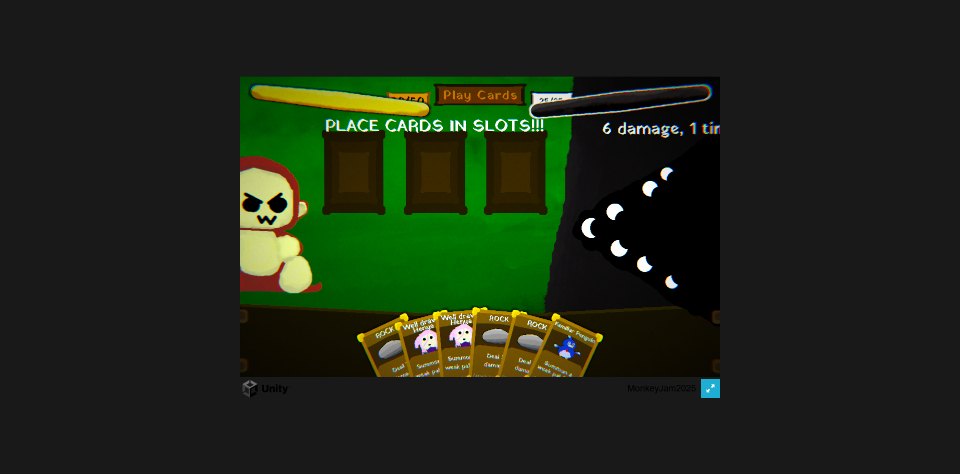
pretty cool! some charm to the aesthetic. cdawg difficulty did get a laugh out of me, it'd be great to get the streamer reaction on that. the default viewport is weirdly small and messes with the ui, i'm surprised no one has mentioned this so it could just be me.... but if it isn't i feel like you could just set a better standard viewport? idk how it works...

thought well drawn henya meant card drawn and not, art drawn, and that was a little amusing to find out. biblical sunflower greed was fun joke though besides the greed part i kinda feel like the ability could've been more, aligned to what sunflowers even do (having too much of something?)

pretty impressive system though. the movement with the cards was slick but in future you might wanna be careful about how the overlapping cards can cover part of the text on the one you're looking at, wasn't an issue at this scale but idk it was on my mind. the lose screen is funny.

my toopid brain kinda glazed over the "x damage, x times" texts partly because the tiny viewport cut part of it off but also because i hadn't intuited what it meant, my brain can be a bit slow without icons. is there an incentive to ever skip the cards? maybe if the buff is specific to another card you don't use so you'd rather not skew the rng? but idk i didn't get that.
(+1)

oh interesting sorry to hear the viewport got messed up for you! I didn’t have a ton of time to test it either different monitors so I guess something went wrong there my bad! Ah well the biblical greed was meant to basically be a high risk high reward card since that pretty much what 3 rows of sunflowers is lol. Ok gotcha next time till have the cards spread out a bit more! Skipping cards was just an option if you wanted to avoid filling your deck up with too many cards (which is usually something you have to play around in other deck builders) probably since the game is so short it doesn’t become a useful mechanic. Thanks for playing! 

(1 edit)

yeah idk i think i have a normal screen?? it's fine when i set it to fullscreen i just don't automatically set these games to fullscreen and didn't realize at first that i should change it. here's how it looked in my browser.

(+1)

ah ok well im glad it worked in full screen at least! My best guess is just that a lot of the objects arent UI except for the health bar and the incoming damage text which i likely forgot to set their anchors and to have their scale not change with resolution.  I probably only tested in the fullscreen which is why I didnt notice my bad! Thanks for pointing that out ill make sure that doesnt happen in my future games!