Indie game storeFree gamesFun gamesHorror games
Game developmentAssetsComics
SalesBundles
Jobs
TagsGame Engines


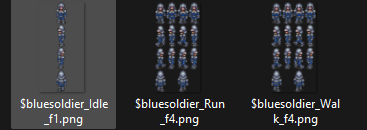
The problem is (was) that no matter I did, there was flashing and not recognising of the files being part of the same set.

You should specify that even with different animation f values, the sprite sheets should match in canvas size - that almost took care of it.

(3 edits)

The first file has 3 frame, so you need to fill the other columns, maybe with the same sprite of middle column and rename to f3. This is an RPG Maker limitation and rule that we need to follow. The plugin expand starting from 3 frames, meaning you have to have at least 3 frames. Also canvas size doesn't matter, you can have it differently, just need to respect 3 frames rule of RPG Maker and it'll all be fine.

Do watch this tutorial to see how I setup my character. All files here have 8 frames but you can have it in different frames, aka, different canvas size. Like: Run 4 frames, Idle 8 frames, Walk 9 frames, as long as they have at least 3 frames. To get real time support, please visit the Discord server, I'll be there.

yes thats the "stand still" column, I can't really make a proper idle animation 

If you can't draw idle yet then simply just clone the middle column to the other columns.