


Play idle game
Evergrowing Video Store Idle's itch.io pageResults
| Criteria | Rank | Score* | Raw Score |
| Fun | #4 | 3.800 | 3.800 |
| Graphics | #7 | 3.800 | 3.800 |
| Overall | #8 | 3.500 | 3.500 |
| Gameplay/Design | #11 | 3.400 | 3.400 |
| Audio | #18 | 3.000 | 3.000 |
Ranked from 5 ratings. Score is adjusted from raw score by the median number of ratings per game in the jam.
What would you like feedback on?
The progression system, talent tree, the mechanics for spawning bosses, the talent tree.
What did you update?
The updated talent tree, more content, a new mechanic for spawning bosses with a progression tree.
A skin unlocking mechanic
Leave a comment
Log in with itch.io to leave a comment.
Comments
Yo! The game feels too easy, even on Hardcore. An on Hardcore there is a message about ending the Demo, popped up during I've tried to spend my Skill Points. WOW! On Classic mode, no End Demo message popped up.
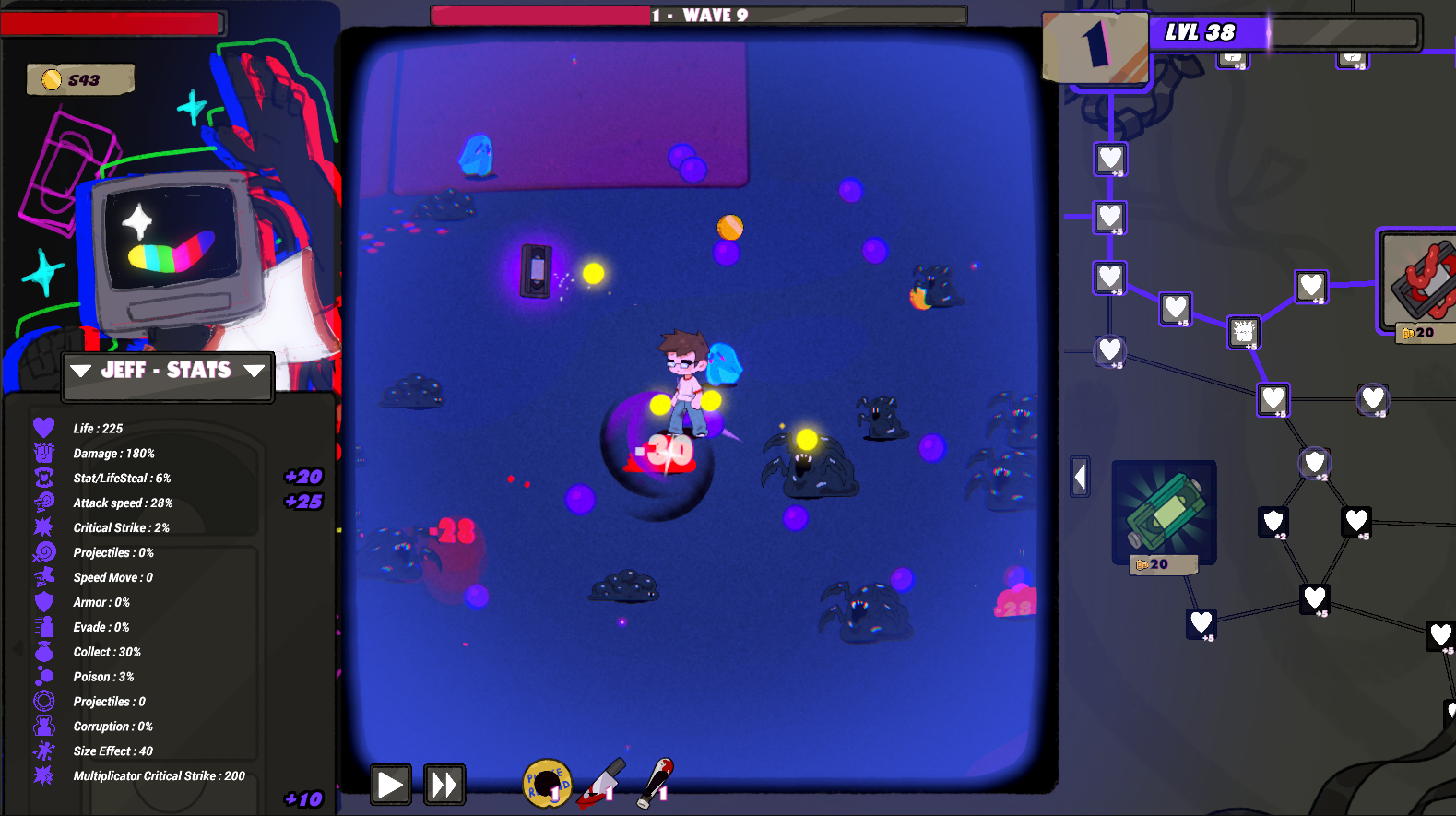
When hovering on an upgrade in the tree, the preview numbers of what it does that shows on the stats are misaligned (looks to be showing about 1 row below where it should be). When unhovering, the preview numbers of what it does don't disappear.
Haven't seen any "bosses", whatever it should be. Are the bosses ever spawn, or they are so unnoticeable? UPD: oh yes, it is! A bit larger slime that was too OP cuz I was not prepared, lol :D
Some stat has broken names (or is that just a disorder of words). "Stat/LifeSteal" seems to be a"Life Steal", "Critical Strike" surely stands for "Critical Rate", "Projectiles: 0%" looks like supposed to be "Projectiles: +0" (amount), "Speed Move" is obviously "Move Speed", "Evade" is "Evasion" (noun) or rather wording as "Dodge Rate", "Collect" seems to be "Drop Rate". "Poison" is unclear. "Damage over Time" maybe? Or "Poison" is the only effect present, so it stands for "Poison Damage". I could say to make it "Damage over Tme" and make many effects like Poison, Bleeding, Burning, etc. Hmmm... one more "Projectiles" stat, but this time with "+0"? OK, but the upgrade that says "Projectiles +1" showing its bonus to +%. Instead, "+" is given by "INVOC_LIFE". whatever that is supposed to mean. Looks like it is a mess to be fixed. No idea what "Corruption" is, please explain. "Size Effect" seems to be "Area of Effect" (this included the size of any weapon around the character in original "Vampire Survivors" title), and "Multiplicator Critical Strike" is a "Critical Damage". Better to write the value as "+100%" (100% of basic damage, plus 100% crit.damage stat = 200% total damage). And don't forget to localize the enumerators: AVERAGEGOLDPERMINUTE and INVOC_LIFE looks weird. Note that UMETA(DisplayName(TEXT = "Text")); works only in editor. I had the same problem with unlocalized enums, resulting in my character was called "VE_REIMU" in the packaged build despite of being called normally in Editor... Oh wait, your game uses Unity... OK, good luck to figure out how that works in your engine then, so you will be able to fix it, lol :D
Also, many nodes in the talent tree have the wrong group. Frankenstein set, for example, counts as "VHS Spell", Acid Fluids are "Eyes of Corruption", and green tentacles are "Ancient Relic".
And lastly, the UI font is not so good for numbers - I was not sure how many Gold I have, some digits looks messy similar in that font.
TLDR: Please fix your game!
Thank You for attention! Please keep up the Great Work!
Fun idle game, but please add Audio sliders.
(note: I already played the gmtk version a month ago)
I like the new features. The skin collection makes sense and is nice to have, although it feels a bit useless right now other than being able to view the different artworks as it has no impact on gameplay. Maybe there could be unique effects associated to each skin?
The new enemy progression tree also adds further depth in the strategy, although it wasn’t clear at first how you’d gain the blood drops (took me quite some time to notice it was at every wave), highlighting it with a feedback could be nice. In its current state, it feels a bit lackluster compared to the talent tree as it’s very linear with few choices or strategy to do and the effects of each upgrade can be a bit unclear.
As to balance, I played in Hardcore mode (not sure of the diffs?) and like Dragon’s Isle Software below, I stopped a bit after wave 50 as enemies’ health was scaling way too much compared to the damages (as it took minutes to clear waves). The VHS God upgrade seems quite op, especially with its 40% evasion.
Also, a small bug when you hover on an upgrade, if the upgrade gives 1 or 3 different stats, the +X texts in the stats ui don’t align properly (it’s fine with upgrades that give 2/4).
This was addictive. I played until progress stopped about 1/3 of the way through wave 51. It kept spawning enemies, but no gold or XP were gained. I was at level 179, with just under 13,000 gold.
It could use a bit more of a tutorial or info on the game page about what everything does. I was unsure what the skull and surrounding icons did, and was too busy exploring the main tree to click on them until I was well in and did not want to click on a skull to see what it did. I waited until things stopped progressing to try them, and them had enough to get anything on that tree.
There were some points where I was unsure how much longer I could last, but then I found the LifeSteal skills and focused on them, along with more defense and high health, and from then on it was pretty easy and I started using the higher game speed. The game speed buttons could use with some indication of which is selected, and the same hover effect used on other buttons.
When hovering on an upgrade in the tree, the preview numbers of what it does that shows on the stats looks to be showing about 1 row below where it should be.