hey again, did some gaming for ya!
--start of report--
logs still give null reference errors-
ERROR: System.NullReferenceException: Object reference not set to an instance of an object.
at ContractGeneratorService.GenerateContractPool() in F:\Godot Projects\space-junker\scripts\services\ContractGeneratorService.cs:line 101
at GameStateManager.RefreshContractPool() in F:\Godot Projects\space-junker\scripts\autoload\GameStateManager.cs:line 71
at GameStateManager._Ready() in F:\Godot Projects\space-junker\scripts\autoload\GameStateManager.cs:line 54
at Godot.Node.InvokeGodotClassMethod(godot_string_name& method, NativeVariantPtrArgs args, godot_variant& ret)
at GameStateManager.InvokeGodotClassMethod(godot_string_name& method, NativeVariantPtrArgs args, godot_variant& ret) in F:\Godot Projects\space-junker\.godot\mono\temp\obj\ExportRelease\win-x64\Godot.SourceGenerators\Godot.SourceGenerators.ScriptMethodsGenerator\GameStateManager_ScriptMethods.generated.cs:line 108
at Godot.Bridge.CSharpInstanceBridge.Call(IntPtr godotObjectGCHandle, godot_string_name* method, godot_variant** args, Int32 argCount, godot_variant_call_error* refCallError, godot_variant* ret)
at: void Godot.NativeInterop.ExceptionUtils.LogException(System.Exception) (:0)
C# backtrace (most recent call first):
[0] void Godot.GD.PushError(string)
[1] void Godot.NativeInterop.ExceptionUtils.LogException(System.Exception)
[2] Godot.NativeInterop.godot_bool Godot.Bridge.CSharpInstanceBridge.Call(nint, Godot.NativeInterop.godot_string_name*, Godot.NativeInterop.godot_variant**, int, Godot.NativeInterop.godot_variant_call_error*, Godot.NativeInterop.godot_variant*)
on lag, audio will stutter. example: load into an area on a device that has a moderately strength cpu and a slow disk r/w speed
music has a bad loop
game window does not fit screen- see image

controls do not adapt to active controller- see image (the image is dark because I was paused)

on scan, game fills log with many repetitions of-
BaseToolUIComponent.UpdateFromToolData called on ScannerUIComponent
NotifyUIStateChanged from ScannerTool, subscriber count: 1
during me finding out how the gravwell works, my game froze for a moment. no errors in log.
gravwell also overfills log-
BaseToolUIComponent.UpdateFromToolData called on GravWellUIComponent
wasChargingPrev: True _isCharging: True gwData.IsPulling: False
NotifyUIStateChanged from GravWell, subscriber count: 2
GravWell: chargeLevel 0.20555557
when I first put scrap into the salvage ship, it loaded a bunch of code and froze my game for a moment-
Salvage Debug - Mass: 1.0kg (Small: True), ValuePerMass: 175, BaseValue: 175, EffectiveValue: 175, Efficiency: 100.0%
Salvage Debug - Mass: 1.0kg (Small: True), ValuePerMass: 75, BaseValue: 75, EffectiveValue: 75, Efficiency: 100.0%
Salvage Debug - Mass: 1.0kg (Small: True), ValuePerMass: 75, BaseValue: 75, EffectiveValue: 75, Efficiency: 100.0%
Salvage Debug - Mass: 1.0kg (Small: True), ValuePerMass: 75, BaseValue: 75, EffectiveValue: 75, Efficiency: 100.0%
Salvage Debug - Mass: 1.0kg (Small: True), ValuePerMass: 75, BaseValue: 75, EffectiveValue: 75, Efficiency: 100.0%
Salvage Debug - Mass: 1.0kg (Small: True), ValuePerMass: 75, BaseValue: 75, EffectiveValue: 75, Efficiency: 100.0%
Salvage Debug - Mass: 1.0kg (Small: True), ValuePerMass: 75, BaseValue: 75, EffectiveValue: 75, Efficiency: 100.0%
Salvage Debug - Mass: 1.0kg (Small: True), ValuePerMass: 75, BaseValue: 75, EffectiveValue: 75, Efficiency: 100.0%
Salvage Debug - Mass: 1.0kg (Small: True), ValuePerMass: 75, BaseValue: 75, EffectiveValue: 75, Efficiency: 100.0%
Salvage Debug - Mass: 1.0kg (Small: True), ValuePerMass: 75, BaseValue: 75, EffectiveValue: 75, Efficiency: 100.0%
Salvage Debug - Mass: 1.0kg (Small: True), ValuePerMass: 75, BaseValue: 75, EffectiveValue: 75, Efficiency: 100.0%
there is no tutorial :(
---end of report--
I had to stop here, as I was hungry and the laptop's battery was low. will continue later!
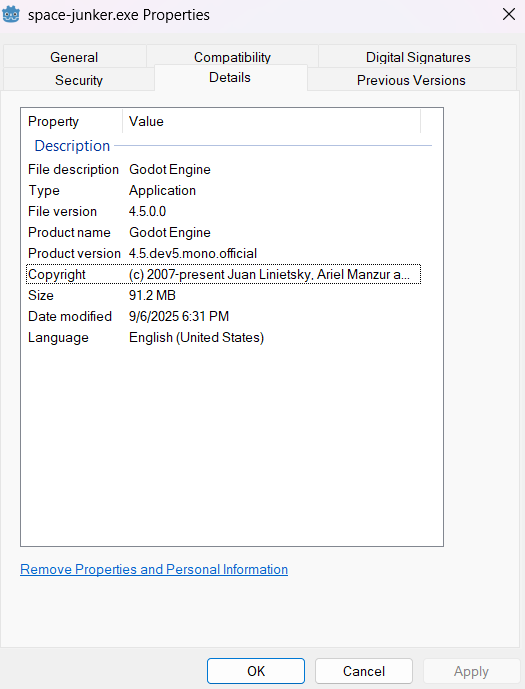
edit- also noticed that it uses Godot's icon for its icon