
On Sale: GamesAssetsToolsTabletopComics
Indie game storeFree gamesFun gamesHorror games
Game developmentAssetsComics
SalesBundles
Jobs
TagsGame Engines
(2 edits)

Hello, beforehand I want to say this is an awesome game!. The game runs smoothly with the generation by server.

I am having trouble setting up the local GPU generation, it mentions that KoboldCPP can't be loaded. Is there a tutorial to set this up?

Edit*: I manage to launch the kobold.exe by downloading the koboldcpp-oldpc.exe, the one that the game downloads never starts or anything.

Edit 2: manage to get the latest koboldcpp fromgithub working and I just changed the seal to make it work. If anyone needs help on how to get work reply to this message and I'll happily past the step by step tutorial :)
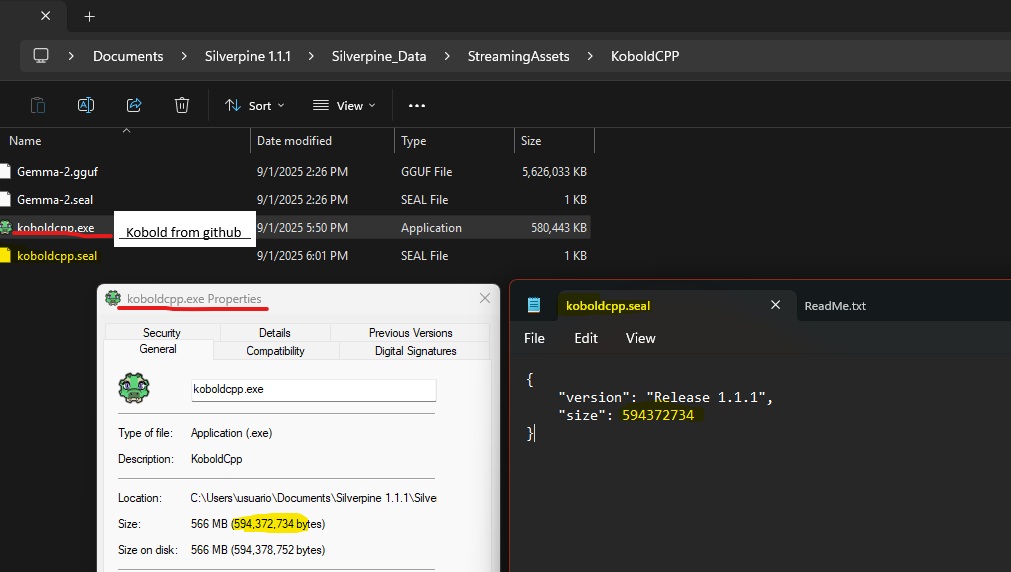
What GPU are you using? Maybe the version currently in use has a problem with the latest AMD/Nvidia drivers. I will change the automatic download to the newest version in the next patch.

(1 edit)

NVIDIA 4080super, but it seems that my AV was also messing with my download, as downloading the koboldCPP directly from github was getting blocked by it. got it working by disabling my AV while downloading the CPP and then doing the work around by overwriting the koboldCPP downloaded by the game and editing the .seal.
(Note: I tried disabling the AV and downloading the CPP from the game but for this, the workaround didn't work ^^;)

Also thank you for the quick reply!

Hi, I could use information how to use Kobolt form github page. Orginal, dowloaded by game dosen't work on my PC. Thanks

(1 edit)

You need to overwrite the kobold downloaded from the game, with the one downloaded from github, then you need to edit the kobold.seal file to match the size of the koboldcpp size downloaded from github. 

Thank you, works like charm. :)