
Indie game storeFree gamesFun gamesHorror games
Game developmentAssetsComics
SalesBundles
Jobs
TagsGame Engines

Fonts and links

A topic by A.C. Danvers created Jul 30, 2025 Views: 741 Replies: 5
Viewing posts 1 to 3
(+1)

A confusing wrinkle I tripped over while prototyping a new card: links in rtext cannot be other fonts than "body" except when within a field widget where the widget font property is set to something other than default.

I was very confused by this because RevInc was full of links with custom fonts, so when I was testing out some code involving the "link" event, I was surprised to find that highlighting one of the links to change the font also lost the link. Trying a different tack, I tried changing the font first, then selecting and adding a link ... and that switched the selection font to "body". If you try to brute force it from a script by calling rtext.make with both a custom font and a link argument, you get the even more confusing result of it ignoring the font argument but also not making a link, so you just get a string in "body" font. 

Only by setting the Font property of the widget to some other font can I then make links in that font, but only in that font. I presume this is because the Font property overrides "body" being the default font. RevInc used this a bunch, which is why I didn't realize it acted differently otherwise.

This also seems to have consequences for prototypes/contraptions with rtext attributes, because the form field in the properties dialogue obeys the default behavior, with "body" as the default font. I'm not sure it's even possible to override in that case, though I haven't really tested it. I know it doesn't work with Millie's colourText contraption, not that it matters anyway because of the way it works by drawing text fields to a canvas.
Developer(+2)

Every primitive widget type can be assigned a font, as by "Widgets -> Font...".

The default font of a field widget is the builtin font "body", unless the field widget is in "code" mode, in which case it will default to the builtin font "mono".

When spans within rtext specify no font (or a nonexistent font), the font of the field widget "shows through".

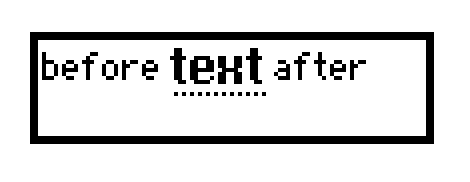
You can construct links in rtext with any font via scripting. For example:

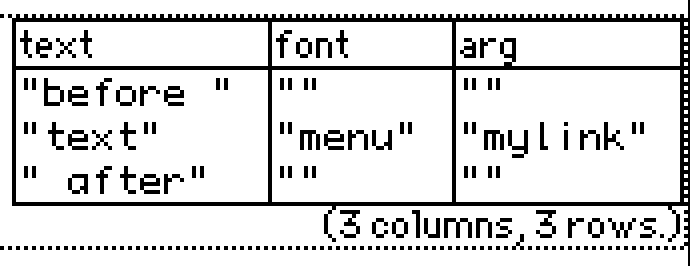
field1.value:rtext.make["before "],rtext.make["text" "menu" "mylink"],rtext.make[" after"]


The rtext table thus constructed:


The current behavior of the "Text -> Link..." menu item creates spans which do not specify a font, and thus manually-created links always use the font of the field widget. I'll make a note to revisit this.

Developer(+2)

Decker 1.58 revises the behavior of the text-span styling commands in the Text menu; It's now much easier and less confusing to create links which use special fonts.

(+1)

OMG! Colored text?! 

(+1)
You can construct links in rtext with any font via scripting. For example:

Huh. I stand corrected. I tried it from the listener and got the result I described, but maybe that's just an odd quirk of doing it from there instead of a proper event script. 

Developer

My above example was performed in the Listener. There should be no material difference either way; I'd wager you made a typo somewhere.