

I'm glad you enjoyed it!
If you mouse over the stat, a tooltip appears explaining the stat. It's not super obvious that this is possible though so I'll make a note and try to fix if it ever gets a proper release.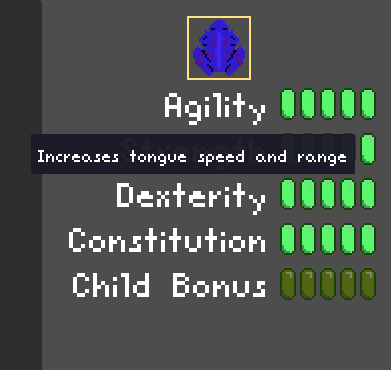
Yeah, I kinda wanted the player to feel like they had found an OP strat and broken the game. I put all my frogs in the center and take the last one wakeboarding to get tons of points.
I didn't use any plugins or anything. I don't want to make the source code public because if this does well, I might turn it into a full game. The unlock menu is inspired by Nodebuster, the other project may also be inspired by Nodebuster which would explain them looking the same. Maybe try asking them if they used a plugin.
But, I'm happy to explain how it all worked and help you make your own system.
The very simple version is this:
- There is the globally accessible resource `UnlockState` which has a dictionary of how many levels of each unlock the player has gotten. `@export var unlocked_count: Dictionary[Unlock, int] = {}` where `Unlock` is an enum. This is what gets saved.
- `UnlockState` can create `PlayerAttrs` which is just a resource containing a bunch of modifiers like `frog_max_health` and `frog_max_inventory`.
- Then for the UI, each unlock item has a resource with: `Unlock` (the enum used in `UnlockState`), `texture`, `costs` of each level, `title`, `description`. From there it's pretty easy to determine how many levels the player has unlocked from `UnlockState`.
- The requirements between the unlocks is actually controlled by the lines being drawn. Each line is just a `Line2D` which makes itself and the `dependent` visible if the `required` UI item's first level is unlocked.
Hopefully this is enough to get you started. Feel free to ask any questions, I like talking about this stuff.