
Indie game storeFree gamesFun gamesHorror games
Game developmentAssetsComics
SalesBundles
Jobs
TagsGame Engines

Howdy friend! First off, thank you so much for the kind words! I very very much appreciate them! I am glad you are enjoying the railroad mods so much!

Unfortunately, my mods will not be converted over to FS25 at launch. I do plan on converting them over eventually, but it will take some time as I will need some other scripts converted first. But they will be converted over eventually!

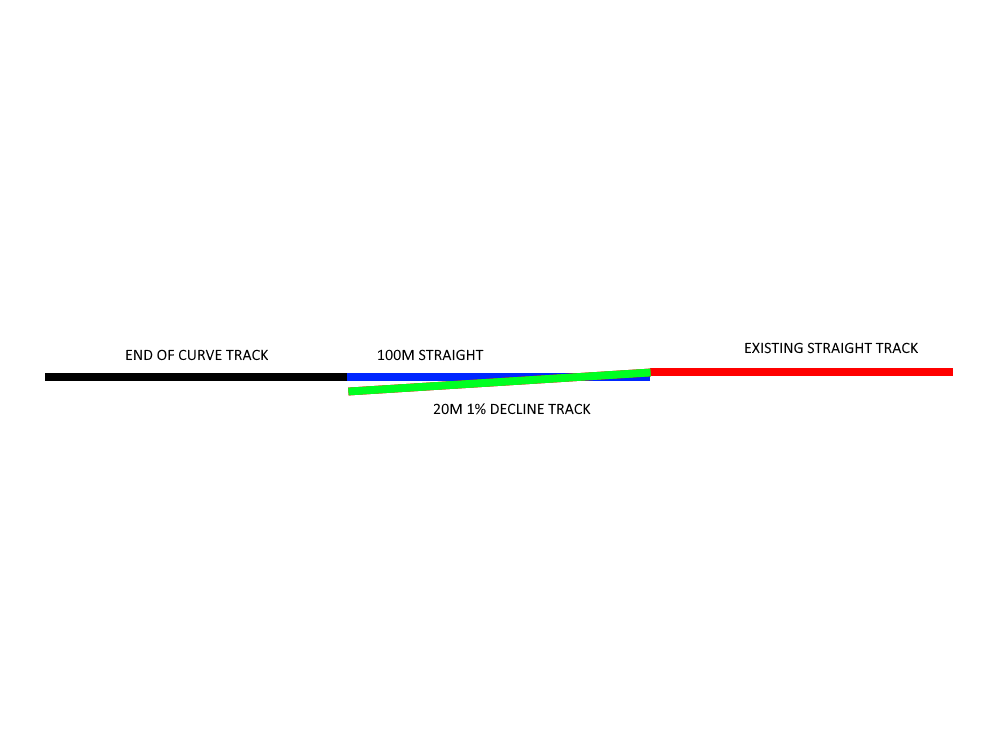
As for your issue, I believe I am understanding you correctly.. But if I am not let me know. So I have experienced that many times and I think I have the perfect fix for you! I suggest, placing another 100M piece of straight track after the end of the curved track at the same elevation. Then, place a 1% decline track from the existing straight track down to the new 100M straight track, but do NOT allow the 1% decline track to alter the terrain (turn on free placement). The 1% decline track will merge with the 100M straight that is at the lower elevation and that gives the locos and rolling stock a smooth transition between the different elevations! I hope I have explained this properly? I included a new drawing, similar to yours to try and explain what I am describing. It is much easier to line these things up on the straight tracks, that is why I suggest adding a 100M straight from the curve piece. I hope this describes it so that you can build it! let me know if I didnt explain something well?

Also, no need to apologize for your English! I thought that your English was EXCELLENT! I speak English because it is the only language I know, you are speaking English to me because it is the only language I know!
Thanks for your prompt reply,Jweezy!
Yes,you did gave me a solution to my problem,but partially.
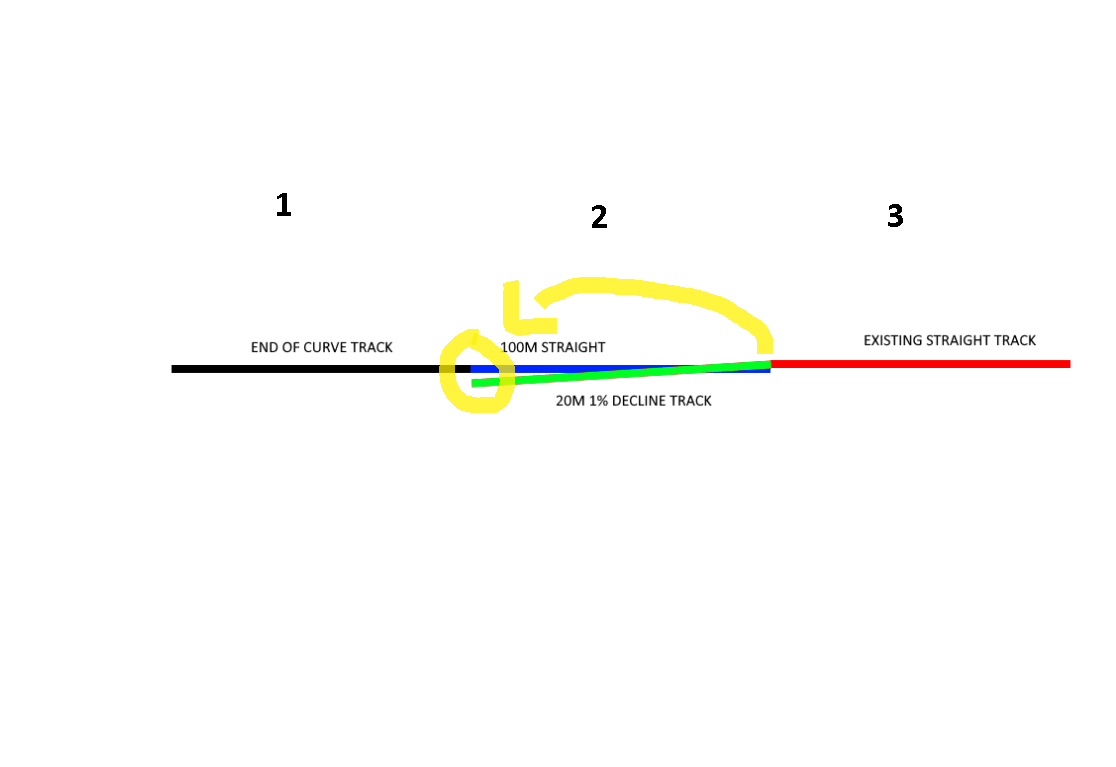
I will re-post your explained picture from your latest reply with a slight touch of explanation from my side(my case).
There are track NO1,NO2 and NO3,as showned by you.
In my case,the problem itself is between end of curved track NO1 and starting point(snap point) of straight track NO2.Between them it is that slight of level difference which I cannot flatten so locos and rolling stocks are "jumping"when crossing over it.
Yesterday night I've spent around 10 minutes to try and work it around and I've managed to pull my mouse cursor very very slowly so the track will go up and down by milimiteres to snap it perfectly.1 case is resolved,I have 7 more xD but somehow that cursor thing doesn't work in all cases.
All this text is explained in the picture I've posted below.
Thanks in advance,and I must mention:Im receiving strong and good vibes from you,man.I feel you are a good person and a humble guy so I wish you the best this world can give,man.You deserve it.
P.S:Let me know if you are going for a YT channel so I can follow you,as socials aren't necessarily my cup of tea xD
God bless.


Youre welcome! Oh okay, I think I understand the problem now. So youre problem is that after you place the 90 degree bend, the next piece that you try to place is not at the same level, because the 90 degree bend does not level the terrain when it is placed. Am I understanding the problem correctly now? I understand how you are correcting it now with the small movements to bring the elevation up, but I know that can be very difficult and time consuming so if I am understanding the problem correctly now, then I have a much easier fix! If so, then the best way I handle that is as soon as I place the 90 degree bend, I level the terrain all the way along the 90 by holding the "level" terrain tool from the beginning to the end of the curve without releasing the mouse button. That makes it so that the ground at the end of the curve is the same elevation as the beginning, so that when you place another straight piece it will be even! If I was able to explain that properly and if I was understanding the problem correctly now? If not, I can show a video if that helps


Also, thank you very much for the super kind words about me! I appreciate that so so much. I try to be humble as I can, and I try to be a good man in everything that I do. That is part of the reason I released all of these mods available completely for free. I want everybody to be able to enjoy these train mods as much as I have!

I will let you know if I do a YT channel or anything! haha no plans for that at this time, as my job can have hours that change or vary a lot. Only thing I really do right now is I post in a couple of Farming Sim facebook groups from time to time!

On point solution.Somehow the "level"tool worked wonders and now all my placeable railroad tracks are snapped smoothly.Even though i've used it before,now I do realize i've missed something all along.Thanks for your patience and time into replying and resolving this matter.
God bless,J!

Youre welcome friend! I am glad that worked, yeah sometimes the level tool can mess up and it causes that issue. glad it was a relatively easy fix though!