
Indie game storeFree gamesFun gamesHorror games
Game developmentAssetsComics
SalesBundles
Jobs
TagsGame Engines

Plugin not functioning

A topic by CreatureCola created 11 days ago Views: 20 Replies: 3
Viewing posts 1 to 2

The layout of this plugin seems awfully simple and there aren't many settings to adjust so idk how i could mess it up, but it appears to do nothing at all lol. it just keeps using the default selected sound from the system settings ( I tried turning it off, then it just plays nothing ) I thought maybe there was some sort of conflict with one of my other plugins so i tried moving yours around in the list, and turning all the others off but nothing made any difference. ^^;
Developer

Hi there!

It's hard for me to debug this without further information, but I will try my best:

1 - Are you using the latest version of EliMZ_Book (6.1.2)? If yes, it needs to be somewhere above all other EliMZ plugins.

2 - Are you using the latest version of this plugin(1.1.2)?

3 - Are you using RPG Maker MZ or MV?

4 - Are you using the latest RPG Maker core files version(1.10.0)?

5 - If you turned all other plugins off, and still got no results, I will assume this is not a compatibility issue. So is either a bad configuration or somehow my plugin codes does not work. So let's try some trial and error to find out the problem. Just keep in mind that this plugin changes the sound of items inside the menu. not outside.

it just keeps using the default selected sound from the system settings

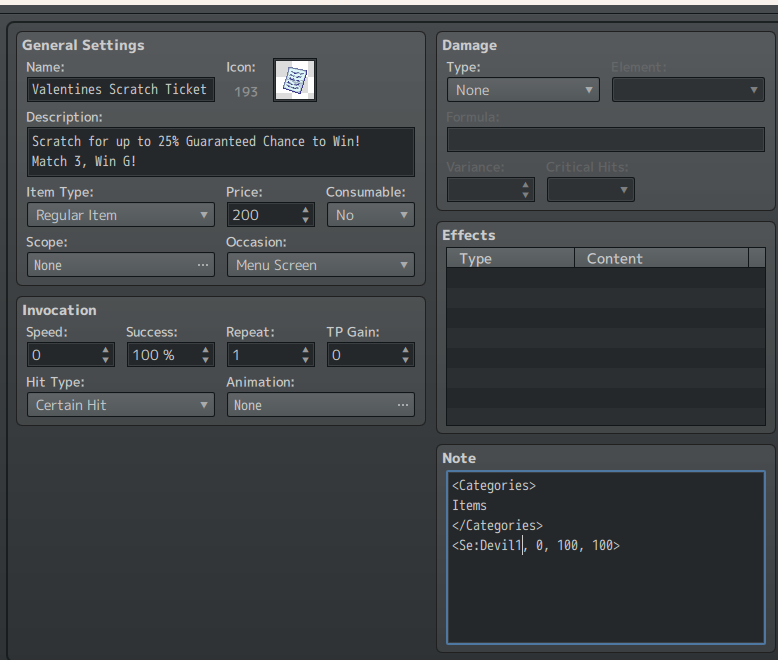
- What keeps using the default selected sound from system? An item on the menu? The regular items need to have a note tag on their note fields:

  • <Se: Name, pan, pitch, volume>

If you used that, can you show to me a screenshot?

But, if you are talking about the equipment, you can either use a note tag on their note fields or creates a plugin parameter to assign a sound for a piece of equipment. Note tags have priority over the plugin parameter list.

Let me know your answers to those questions so we can try to find the problem.

I actually didn't know another plugin was required to make this one work, as its not mentioned or linked anywhere within the plugin's information or instructions that i could see, however upon installing the " EliMZ_Book " plugin, its still doing nothing. its for item use in main menu, and i'm using MZ, which is up to date. I also just downloaded this plugin so i don't see why it wouldn't be the latest version too.  and yes, i did use the note tag, i even copied over the exact example to ensure my dyslexia wasn't causing me to write an error and not see it when trying to figure out why it wasn't working. I tried with and without the " Pan, pitch, volume " since it said in the instructions i didn't need those, neither version of the note tag worked.
I'm not super new to RPG maker, i genuinely don't see how i could be having an issue with it but at the same time i feel like i'm gas lighting myself and i'm 100% overlooking something obvious x"D

also quick question, can this be used to entierly remove a sound effect too or does it only replace the Se with another? I have a different item i wanted to remove the sound on because it calls a common event for character selection that you can cancel out of and i don't want it to sound like you used the item and then have the option not to lol 

Developer

If you do not use the EliMZ_Book, the rpg maker plugin manager will warn you about that, on the footer of the plugin manager window(where you install your plugins)

Your note tag seems right. Since you also tried with only EliMZ_Book and Item sounds ON, I guess I will need a sample project from you replicating the issue so I can take a look. Because I'm not being able to replicate the error on my side.

Just create a project, configure the plugin the way you are doing. And upload it somewhere and send me the link so i can download.