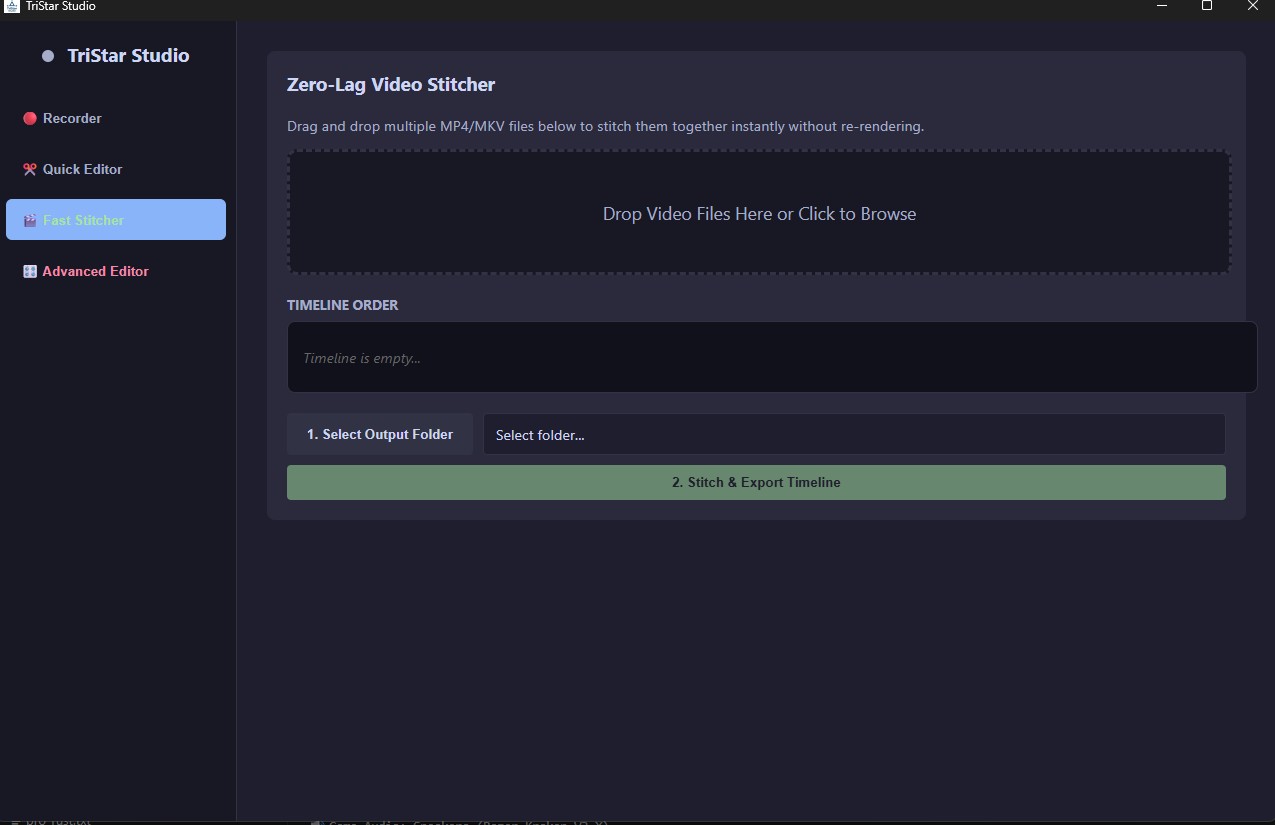
What is up, guys, 5th update in 2 weeks Hype. Today’s update brings a brand new tool to TriStar Studio: the Zero-Lag Fast Stitcher.
If your OBS crashes halfway through a long recording or stream, you end up with two separate video files. Dropping them into a normal editor just to stick them back together sucks because it forces your PC to re-render the entire video. If you're on a lower-end rig, that pegs your CPU at 100% and takes hours just to export a video that was already finished.
To fix this, I built a dedicated Stitcher tab that runs entirely on raw binary manipulation.
How it works: Instead of re-rendering frames, the custom Rust backend silently stitches the files using a direct data-copying method (-c copy).
- Zero Re-encoding: It literally just takes the raw data of Video 1 and glues it directly to the raw data of Video 2.
- Instant Speeds: You can stitch together massive, multi-gigabyte gameplay recordings, and TriStar will export the final file in about 3 to 4 seconds.
- Zero Lag: Because it's copying data instead of rendering, it uses almost zero CPU. You can run it in the background while actively gaming without dropping frames.
Just drag and drop your .mp4 or .mkv files into the dropzone, order them, and hit export.
TriStar Studio is still 100% Free. Grab the update over on the main page.