Indie game storeFree gamesFun gamesHorror games
Game developmentAssetsComics
SalesBundles
Jobs
TagsGame Engines

Trouble playing??

A topic by Topstonecal created 12 hours ago Views: 45 Replies: 2
Viewing posts 1 to 3

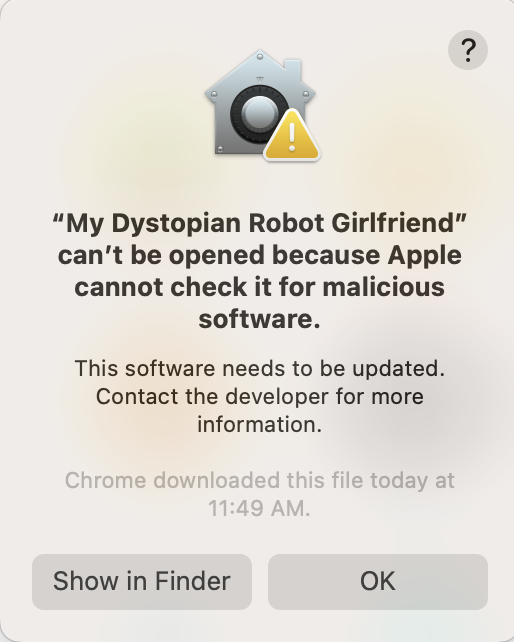
Im on mac and whenever i download this game, or any game for that matter.. it'll pop up a disclaimer when i try to open the actual game captioned "My Dystopian Robot Girlfriend” can’t be opened because Apple cannot check it for malicious software." And what lies beneath that reads: "This software needs to be updated. Contact the developer for more information" What do i do? because this never used to happen, now i just cant play any games i downloaded from Itch.
try turning off antivirus or the option that it needs to be checked or something like that maybe?

This is a macOS security feature (Gatekeeper), nothing is wrong with the game itself.

Apple blocks apps that are not signed by verified developers, especially when downloaded from sites like Itch.io.

✅ How to fix it:

Method 1 (Easiest):

  1. Try to open the game normally → let the error appear
  2. Go to System Settings → Privacy & Security
  3. Scroll down
  4. You should see a message about the blocked app
  5. Click 👉🏻 “Open Anyway”

Method 2 (Alternative):

  1. Right-click the game file (.app)
  2. Click 👉🏻 Open
  3. A new popup will appear
  4. Click 👉🏻 Open again

⚠️ About the message:

“This software needs to be updated”

This does NOT actually mean the game is outdated.

👉🏻 It just means:

  • The app is not signed/notarized by Apple
  • macOS cannot verify it automatically

💡 Important:

  • This issue can happen with any Itch.io game, not just this one
  • It may start appearing after macOS updates (Apple tightens security)

👉🏻 In short:

  • Nothing is wrong with the game
  • It’s just macOS blocking it
  • Use “Open Anyway” or right-click → Open