


Using the Equaliser
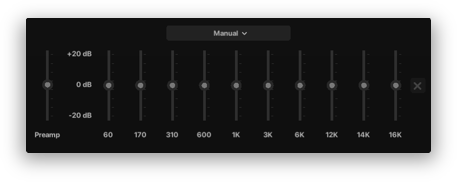
This is a tool used to adjust the volume of specific frequency ranges of the playing audio (bass, mids, treble, etc.) AJ Audio features a 10 band EQ. You can adjust the sliders for each frequency, to a maximum peak of -/+20dB
Editing the EQ
You can edit the EQ in the Settings page. Here's what it looks like:
Presets
The following presets are available:
- Bass boosted
- Classical
- Dance
- Electronic
- Hip-Hop
- Pop
- R&B
- Rock
- Treble boosted
The EQ is available for AJ Audio v2.1.1 onward.