


CS2 has an issue tracker that displays common errors and data type mismatches between signals. Let’s take a look at an example to learn how to read and use the issue tracker.
Below is a working component system. Each component has a tiny green light in its upper right hand corner to mean it’s functioning correctly.

The Adder component typically only works with numerical values. In the screenshot below I’ve changed one of the constant components values to a non-numerical field like a string.
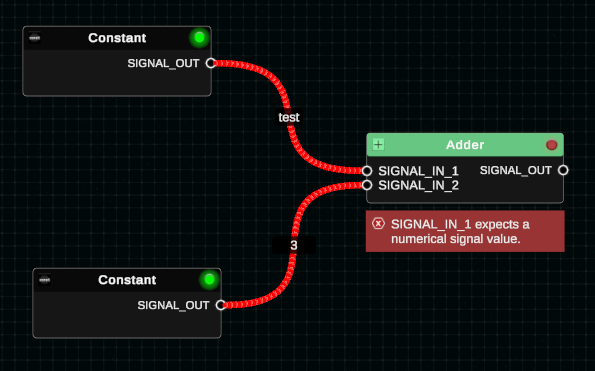
You can see that the green light in the upper right hand corner of the Adder component is now a red light. There’s also an error displayed beneath the component. Additionally, there’s an error that appears in the Issue Tracker window in the top left hand corner of the screen.

Clicking the arrow button on this error will take your camera to the screen position where the error component exists.
From there, you can make corrections as needed. This feature is simply meant for alerting you to when a signal doesn’t appear to be used correctly.