Indie game storeFree gamesFun gamesHorror games
Game developmentAssetsComics
SalesBundles
Jobs
TagsGame Engines

WoditorTrans2000

9
Posts
2
Topics
2
Followers
A member registered May 29, 2025 · View creator page →

Creator of

Recent community posts

Hello! Sorry no new release. But I'm hosting a Game Jam for us!

https://itch.io/jam/wolfrpgeditor-game-jam-1

Topic for questions and help.

This tutorial will allow WolfRPGEditor games to be played on a web browser.

1. Download BrowserWoditor.

Download Link

After downloaded and extracted, It will have, among other things, 3 folders. The most important are a folder containing a BrowserWoditor.dat file and the "public" folder.

CDN media

The folder named "BasicDataに入れる必要があるファイル", contains the .dat file.

r/Udita_wolfrpgeditor - Browser-Woditor: Tutorial on how to use and load custom fonts.

Put this file in the BasicData folder of your game.

r/Udita_wolfrpgeditor - The file must be together with other files.

2. Create the Game data

Now create the Game Data, make sure to encrypt all folders.

Copy the  .wolf game file and put it in the "public" folder.

r/Udita_wolfrpgeditor - The .wolf file is your game data.

3. Zip it and play!

Now zip the "public" folder.

Now let's make playable.

In Itch.io, when editing a game, The Kind of project must be HTML.

Upload the file and check the box:  
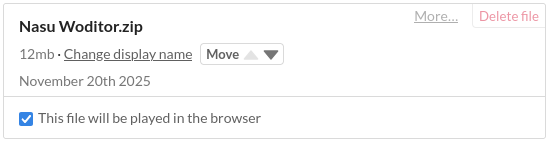
Change the Screen Size in Embed options.

Save and now you will be able to play on your web browser!

If you did all the steps above and tested the game, probably noticed the four buttons on the sides.

To disable it, edit the settings.js file. It's located in the "public" folder.

In the file, change to following config:

r/Udita_wolfrpgeditor - In the settings.js file will have the following parameters.

hideSideButtons:false -> true

There are other config, but I will not explain it, though their functions I believe are self-explanatory. 

4. Load font

To load your own font, add them into the "public" folder. Then insert the font name in the FontList.ini. file.

Must look like this:

[File font name]=[Font name]

r/Udita_wolfrpgeditor - Browser-Woditor: Tutorial on how to use and load custom fonts.

You can find the font name by opening the font file.

There are some other fonts in the file, but you don't need to do anything with them.

All right! That's basically it! This tutorial was meant to be simple, so let me know if I've made any mistakes.

WolfRPGEditor 3.662 + Sample Game 3.6 release!! Check it out and share it with others.

https://github.com/WoditorTrans2000/WoditorTranslationGallery/releases/tag/1st_S...

WolfRPGEditor 3.648 + Sample Game 3.6 release!! Check it out and share it with others.

https://github.com/WoditorTrans2000/WoditorTranslationGallery/releases/tag/v3.64...

WolfRPGEditor 3.626 release!! Check it out and share it with others.

https://github.com/WoditorTrans2000/WoditorTranslationGallery/releases/tag/v3.62...

(1 edit)

WolfRPGEditor 3.618-2 release!! I forgot to put here. Check it out and share it with others.

https://github.com/WoditorTrans2000/WoditorTranslationGallery/releases/tag/v3.61...

This version has improved translations and translations for the System variable.

If you are a Portuguese user, I recommend that you use this version, as the UI has been adjusted.

WolfRPGEditor 3.618 release!!  Check it out and share it with others.

https://github.com/WoditorTrans2000/WoditorTranslationGallery/releases/tag/v3.61...

Hiiii! For everyone who found this or is still here, version 3.6 of WolfRPGEditor has been fully translated! So check it out and share it with others.

https://github.com/WoditorTrans2000/WoditorTranslationGallery/releases/tag/v3.61...