On Sale: GamesAssetsToolsTabletopComics
Indie game storeFree gamesFun gamesHorror games
Game developmentAssetsComics
SalesBundles
Jobs
TagsGame Engines

WhiteDark0

15
Posts
1
Followers
5
Following
A member registered Dec 31, 2020

Recent community posts

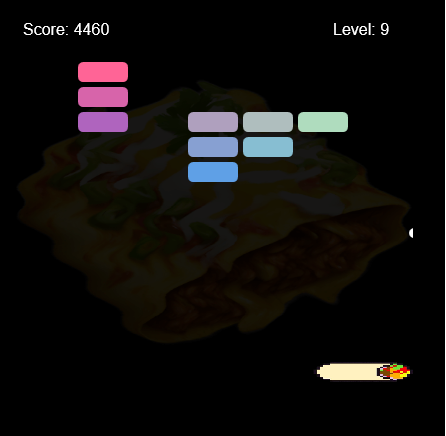
The ball sometimes gets stuck on the left or right border of the game, which causes the player to lose the game

The jump button is not working properly

Sadly, it happens every time

I checked with the DirectX Diagnostic Tool, and it shows that i have DirectX 12 installed

The healing is working, but it would be great to have this information mentioned in "Tips" section or in "Controls"/"How to play", rather than only in the game description

--- Found bugs and other stuff (06.29.2025) ---

  • - The player's health is not regenerating

That's all for now

--- Found bugs and other stuff (06.29.2025) ---

  • The game softlocks after reaching level 11, which forces you refresh the page or reopen the game file
  • The skeletons and boss do not deal damage to the player
  • While the boss is still beatable, the large number of monsters and the absence of a projectile speed upgrade make it harder to defeat him

That's all for now

--- Found bugs and other stuff (06.29.2025) ---

  • The game crashes immediately with error "LowLevelFatalError 
    [File:D:\build\++UE5\Sync\Engine\Source\Runtime\D3D12RHI\Private\D3D12Util.cpp] [Line: 1015]  Payload->Queue.D3DCommandQueue>GetClockCalibration(&LocalTiming->GPUTimestamp,  &LocalTiming->CPUTimestamp) failed at  D:\build\++UE5\Sync\Engine\Source\Runtime\D3D12RHI\Private\D3D12Submission.cpp:907 with  error E_FAIL"

That's all for now

(1 edit)

--- Found bugs and other stuff (06.29.2025) ---

  • - There is a chance that if the ball falls below the bottom of the screen, the game softlocks (you cannot bring the ball back)
  • Attempting to launch the .exe file causes the following error "Error: Couldn't load project data at path ".". Is the .pck file missing? If you renamed the executable, the associated .pck  file should also be renamed to match executable's name (without the extension))"

That's all for now

(1 edit)

--- Found bugs and other stuff (06.19.2025) ---

  • The "Steel" counter is missing
  • The "[R] Drill" text is missing
  • You can't switch between drill types in the "Drill Types" menu
  • The game randomly stops auto-mining (sometimes indicated by the disappearance of the "Iron" text), which forces the player to close and reopen the game manually to restore auto-mining
  • Clicking "d" key in the store, followed by spamming "h" key causes the heater to switch back to grey and not remaining red as expected

That's all for now

--- Found bugs and other stuff (06.18.2025 - Ver. 1.4.1) ---

  • Mantis is not appearing in the right hall, so there's no way to flash him and defend against him

That's all for now

--- Founded bugs and other stuff (06.18.2025) ---

  • Mouse is not locked in the game
  • The button is unresponsive
  • Missing instructions on how to play

That's all i could find for now

(1 edit)

--- Founded bugs and other stuff (06.17.2025) ---

  • I don't know if this is intended, but if you want to do anything with writing text, the terminal captures those inputs
  • Holding the "e" key causes UI freeze (you can't press any other buttons, but the game continues running) (sometimes happens, sometimes not)
  • Text "Shop" and "Build" are overlapping a text "Press a SPACEBAR" to mine a boulder, until SPACEBAR button is pressed
  • Holding the "d" key in shop (while having big amount of Rubble) causes UI freeze (you can't press any other buttons, but the game continues running)

That's all i could find for now

--- Founded bugs and other stuff (07.16.2025 - Ver. 1.3) ---

  • No option to quit a game without pressing Alt+F4 (if you have fullscreen activated)
  • None of the monsters (except Jawbreaker) are moving without players first move
  • Mantis and Gloop are not attacking (even if they are close to the room or if you are in the 
    same room as monsters)
  • Enemies do not despawn after the night is completed or after the player is jumpscared (except Daisy and Pig)
  • You can complete all challenges with everyone (expect Jawbreaker) doing absolutely nothing

That's all i could find for now

--- Founded bugs and other stuff (06.16.2025) ---

  • No option to quit to main menu without pressing Alt+F4 (after pressing new game or clicking on save)
  • No option to check what was chosen (challenge and monsters)
  • No option to quit monsters/challenge selection screen (except clicking on random option and clicking on or off option)
  • None of the monsters (except Jawbreaker) are moving without players first move (only if you didn't get jumpscared from Pig, then you must exclude Pig to have not moving enemies)
  • After getting jumpscare from Pig, when you begin a new game, a timer to Pig's jumpscare is still going (even if you did nothing)
  • Mantis and Gloop are not attacking (even if they are close to the room)
  • You can complete all challenges with everyone (expect Jawbreaker) doing absolutely nothing (only if you didn't get jumpscared from Pig, then you must exclude Pig to complete this)

That's all i could find for now