It isn't a deal breaker but I am curious as to whether this plugin 'disables' RPGMMZ's default battle processing. Each level I want one battle at the end that uses the default SV battle but for the rest of the fights in my game I would like something like this. So would it still be possible to use battle processing in one event on that last map of a level?
weekendrockstar
Recent community posts
Hey! Another plugin of yours that I love. I was using Community Lighting but all of the extra features was just making it cumbersome so I went with yours but the only thing I liked about CL was that I was able to get lights brighter. Is there any way to brighten the lights? Would it be just trying to brighten the lighting images?
And one thing I wanted to point out that isn't necessarily a bug but it can cause the game to 'crash' and there is no mention of the reason in the documentation or wiki to make sure that people know how to avoid it. The first scene when I used it crashed the game the first time I loaded it. The error was about not being able to get the _opacity of unnamed I think. May not be exact wording as I don't want to make it crash to get the exact wording haha For some reason I wanted to change the id/name of that Lighting Effect and then it worked. Then a few maps later I made a new Lighting Effect and the same thing happened. The only change I made that fixed it the first time was I went from House Fires to HouseFires. Made it one word instead of two with a space. On the second map when it crashed it was a map in the sewers and Sewer Lights was crashing but realizing that what fixed it the first time was the name change so I changed it the ID to SewerLights and no crash and was working again. Shoot..I just realized that I have an ID of Night Vision Goggles...3 words with two spaces and that one doesn't crash. I don't know if it would just be safest to make sure the ID is just one word even if you turn multiple words into one. Or perhaps there is something else that caused the error and doing the same thing twice somehow fixed it.
Quick edit/update: There is another difference I just realized when I checked to see why the ID with three words and two spaces worked. I don't know if it would be the difference between working and not but Night Vision Goggles is used as a Player Light and therefore is initialized by the player light plugin command whereas the two that crashed were called through comment tag method.
I made a demo 'game' and the only thing that wasn't triggering rumble seemed to be Battle Trigger. In my actual game what aren't triggering are Battle Trigger and Deal Damage. I did not try transfer but wasn't planning on using that in my game. I am running standard Battle Processing with no plug-ins affecting Battles. I was using a simple shop plugin but wasn't satisfied with it anyway so I disabled the plugin and used default Store Processing and the Buy/Sell rumbles are working. So in the demo and my actual game Battle Trigger wasn't working and only in my game was Deal Damage not working.
Here is what I have so far. The console result is:
GamepadHapticActuator {type: "dual-rumble"}
The console has reported NO errors while playing. The only parameter I changed was duration which I set too 600ms. Interestingly Take Damage IS working. While I will want slightly different durations for the other Autos I left them all the same as Take Damage since that was working. But none of the Autos are triggering rumble.
I added this plugin while I as working on a map and I had an event that I wanted to use rumble with and that worked properly. I used Rumble All as this is a single player game only and if that one person has two controllers hooked up then they can both rumble haha I kept the other settings the same that worked with Take Damage as well..duration and strengths. Not sure why the other Autos aren't working. Deal Damage can be kind of important especially since I have created grenade items to be used to deal damage and if it rumbles when an enemy punches my character then it should definitely when a grenade explodes =0) looking forward to any other feedback at least about the Autos.
Caveats: Yes my controller has rumble options and when I plug it in it rumbles. I wanted to make sure neither of those were the issue. I also unplugged it a couple of times after trying to use your plugin and had no effect.
I added the plugin via plugin manager and have it turned on. I currently have no switch assigned yet, once I have this issue figure out I will add a switch and a UI toggle to control the switch but needed to make sure it was working as-is first. I assigned values to each of the Auto Rumbles in the plugin. Save everything and playtest but no rumbling period. I am not sure why there is no rumbling haha
My apologies...I was stupid here and the console showed me. When I first set the plugin up I had gotten the the CanvasRendering error someone else had discussed previously because we left the starting Rep at 0 because it is default but that caused the errors because of the zero denominator. So I thought that this was related however it was a different plugin altogether and not even a plugin interfering with your Reputation plugin. Should have checked the console before posting I just really haven't had to use the console to debug errors yet. Live and learn!
Hello! I am doing a reputation per town. Max 100 Rep points per town. Each town starts with 1 rep point with Max set to 100. I have the same 5 ranks assigned to each town. In a particular town after earning 75 rep points with the last 25 rep points coming from an event on the last map of the town. But when hitting a transfer from the second-to-last to the last map I get the following error: Failed to execute 'createRadialGradient' on 'CanvasRenderingContext2D': the r0 provided is less than 0. Not sure this suddenly triggers when transferring the player from this one map to the next. I appreciate any thoughts!
I appreciate the response!
1. I figured that might be the case. I will just have to remove the shopkeeper's face from the shop scene. I wasn't sure how the scene overwrites work exactly and your explanation gives me a better idea.
2. That info does help. I just wasn't sure exactly what I was looking for. Was sure I would have to go in and edit the js which is fine and you've given me the information I need to make sure that I make the adjustments I want properly.
3. Casper would not be able to tell me as that plugin draws a little window above other scenes and the plugin allows the dev to add an entry with the Constructor of any other js plugins so that it will then show above the window that the other plugin creates. But he wouldn't know the Constructors of random plugins we add that create scene windows. As shown in the attached image if I use the shop without your plugin enabled it shows the Options window just above the shop window (letting players know what keys or buttons to use to navigate through the windows). And in the plugin I just insert an entry "Scene_Shop" as that is the default name for that scene. Then it adds the controls window above the RPGMMZ scene window. If your plugin maintains Scene_Shop then keeping that should be fine. But keeping Scene_Shop and going into either buy or sell shop with the plugin on the controls window doesn't show. I tried "Open Sell Shop" and that didn't do anything. Any plugin which creates a new scene would need an entry with the scene that it creates which is why the author of that plugin can't supply because it is unknown and we were recommended to ask the author of other plugins. It isn't a deal breaker as your shop cuts down on the menus that the regular shop scene needs but I would like to have it for consistency.
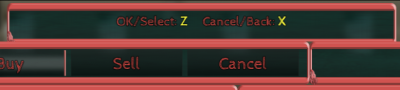
I was going to ask a question about this but I semi figured it out before I posted it.
I wanted to use this for zombie-like creatures (not zombies but they follow basic principles of them) and many of them will move aimlessly. But I just set the Autonomous Movement to Random on the second page so it will wander around aimlessly unless you get close enough to it to trigger it then it chases you. This did everything I wanted it to.
However... they usually aren't alone in the area and trying with two creatures with separate battle processes caused a bit of an issue. They both chased me which made sense however they both collided with me simultaneously. The first battle it started just immediately stated that I was victories, stopped and then the second battle loaded and was fought as expected.
I thought I would post this in case anyone wanted to use a non-stationary enemy. I don't plan on having too many on one map at the same time but this could easily happen. I thought about starting them far enough apart that they could be triggered and ran from without putting you close enough to another to trigger them. But for that I would have to use Custom Movements and have them repeat but the math wouldn't be fun and it would take away from their natural aimless wanderings.
But maybe someone could use the idea I provided if they do not always want to use this with static enemies. The easiest way to use this for multiple instances on a map would be if the enemies were 'posted'...such as standing guard and moving from that spot because you were detected. I will play around with it some more. But thanks for the plugin as it otherwise does exactly what I needed.
Wanted to start of by saying that I really prefer this over the default shop (especially if I can get a couple of things working mentioned below) even though one has to back out of the shop to switch sell/buy modes. But the interface is so much easier to navigate than the default.
Questions:
1. I have added the shopkeeper's "face" image as an additional image which works great (like the one image on Itch.io) but since this plugin only provides support for one instance of the shop..if I want to do this for every shop/shopkeeper in the game (I am looking at about 5 right now) would I have to have five different copies of the plugin changing the name such as "Hendrix_Simple_Scene_Shop_UniqueName" so that each each plugin/shop instance could have the specific shopkeepers face assigned? Then just use that full name in the Plugin Command for that event?
2. Is there any way to put a little space/padding after the icon/numbers in the info and maybe the gold icon/item price in the right window? In my shop the numbers are right next to the icons. Nitpicking a bit perhaps but I think it will look a little cleaner if even there were two non-breaking spaces after the icon before the text starts. I am sure that this is assigned in the js print call or something similar. If it is a very simple change to the plugin JS if you can let me know the line or something that would be great. I get apprehensive about changing core code myself in case I cause any other type of errors that I then have to ask about but the issue wouldn't be in the plugin's initial core code.
3. This isn't entirely about your plugin but I wanted to see if you could point me to the call I would need for Casper Gaming's ControlsWindow which adds a window at the very top of any scene which informs the player of what keys/buttons to use for Select/OK and Back/Cancel. Within that plugin you just have to specify the scene that you want to add the ControlsWindow to. I am supposed to ask for either the Scene and/or the the Scene Constructor Name. I apologize since this isn't strictly about your plugin but I really want to show the Contols Window rather than rely on touch UI being on. I am currently not disabling Touch UI but I do not want to rely on it. And this helps make it work with controllers/game pads as well.
I greatly appreciate any help!
This is actually a very helpful feature as one or two quests which I had already coded events for before adding your quest system have plot twists so this will help not give the away twists by showing those objectives immediately. I figured out the use of stages when I read the text in the stages box. I mistook stages for the order I am suggesting objectives be completed. Fully understood now haha
One more thing I wanted to see if I can make happen in-game with the plugin as is. I keep the tracker window on right now because it keeps people from having to constantly open the Quest Log window to see what the next step is..however..it can take up a good amount of real estate if it is always on. I was wondering if there is a way that we can allow the player to turn the tracker window on and off.
At first I thought of figuring out the JS to put into a button command on Menu Command Window but if I did that (if even possible) it would only show in the menu and I am not sure how it would allow them to turn it back off.
But I figured that an option for them to turn the tracker window on for reference when they need it but then to be able to turn it off when they do not need it. I don't know if something like this could be achieved currently or if something like this could be added. Sorry, not trying to be a pain here haha
Yes! That did it! Clearly I misunderstood the goal of stages. I had set each objective to a separate stage believing that THAT established the order of the objectives when in fact it did the opposite. Thank you so much for the prompt response and that is another reason that I will continue to use/buy your plugins!
Another great plugin of yours I am using and have some more to add! But I do have a question. This is quite possibly due to a setting I am missing (been through your WiKi numerous times and looked at all settings in the plugin) but I am having two 'issues': In the Quest Log when looking at a Quest it shows only one Objective first, then shows the first and second after completing the first objective and then shows all three (there are three objectives in this particular quest) objectives. It does show completed objectives as being complete but I was wondering how to get all of the objectives to show once the quest has been discovered/started. I believe I see that in the second screenshot down on the left on your site.
Secondly, it is showing the objectives in reverse order. Once the first objective is completed and are working on the second it will show the first with the completed icon and the second objective then shows above it. After completing the second objective the first two show as completed with the third above them.
Once I can show all of them upon starting the quest it would be important for them to show in the proper order (first on top then on down) as the events are coded to be done in a certain order and if a player tries to follow the order the objectives show they may get confused because the events won't allow them to proceed without following the proper order.
The only way I could get them to show in order was to reverse the order in the objectives panel of the plugin but since I am auto tracking each objective with a variable then the quest would complete after the first task as it was listed last to get them to show in the proper order.
Greatly appreciate any help. I may even do some kind of in-depth tutorial eventually once I have a better hang of it. But also greatly appreciate your contributions through plugins!