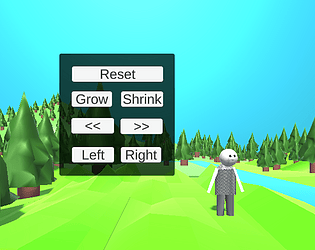
Hi Brendan, great work. I really like the use of colour and graphics. I can see how you did the scaling for your character, so the shrink button works when first pressed. Didn't think of that. When hit shrink twice the character disappears and then flips upside down. This didn't have an impact on my overall user experience, as it was expected. Well done. :)
vvandermeer10
Creator of
Recent community posts
Hi Brendan, thanks for your feedback. I had the buttons the other way, as you suggested originally, though because shrink would be the first button they pressed, the character would turn upside down. So, I decided to switch them around as it is less likely they will hit shrink first. :) I wanted to write an if statement in the code so the user cannot shrink more than 0; the teacher said it was unnecessary. :)
Hi, thank you for sharing your story.
I like this video and the user interface; it is smooth and easy to understand. Very well done. I love your graphics and sprites; it is a clever way to tell the story. :) The colours you here match your theme very well and add mood to your story. Very well done.
See my replies below.
Questions for target and experienced readers:
| Thinking about the eBook, indicate whether you agree or disagree with the following statements:
| Strongly Disagree | Disagree | Slightly Disagree | Neutral | Slightly Agree | Agree | Strongly Agree | Not Applicable |
| Do you think the chosen colours are proper for this type of story? | x | |||||||
| Do you have trouble differentiating between text, background, and UI elements? | x | |||||||
| Do you think the feedback was appropriate when interacting with the eBook elements (sound, hover effect)? | x |