Indie game storeFree gamesFun gamesHorror games
Game developmentAssetsComics
SalesBundles
Jobs
TagsGame Engines

Skynr Labs

4
Posts
2
Topics
A member registered 7 days ago · View creator page →

Creator of

Recent community posts

Thanks for trying WavMasta!

A few tips:
• Start with your final mix peaking around -3 to -6 dB, with no limiter on the master bus. That gives WavMasta room to work.
• Click your song, then Check this song, then Use suggestions. It sets the cleanup for whatever it found: hiss, hum, harsh highs or sharp “s” sounds.
• Use Before and After to compare. Both play at the same loudness, so you’re hearing the actual difference, not just “louder sounds better”.
• Mastering an EP or album? Tick Album mode so the songs match in tone and loudness.
• Your original is never changed. Each master is saved as a new file next to it.

Found a song it doesn’t handle well, or have an idea? Leave a comment here. I read them all, and bug reports are what shape the next update.

(1 edit)

Thanks for trying Stemquill!

A few tips:
• Vocal and bass previews can take a minute on a full-length song, so give them a moment. Clicking Convert afterwards is almost instant.
• Leave Snap to grid off for AI-generated stems (Suno, Udio); their timing drifts a little.
• If your drums land on the wrong sounds, pick the drum map that matches your plugin in the stem’s settings.

Found a stem it gets wrong, or have an idea? Leave a comment here. I read them all, and bug reports are what shape the next update.

Hi everyone! I've just released WavMasta, a free, open-source mastering app for home-studio musicians and anyone making songs with AI tools like Suno.

It takes your finished mix and makes it release-ready. Drop in a song, click Check, and it tells you in plain English what it found: hiss, mains hum, a whine, fizzy or harsh highs, sharp "s" sounds in the vocal, clipping, dead air at the ends, or an ending that stops suddenly. "Use suggestions" sets the cleanup for you.

What it does:

  • Cleans up hiss, hum and whine, harsh highs, and sharp "s" sounds (de-esser)
  • Gentle tone presets, or match the tone and loudness of a song you love
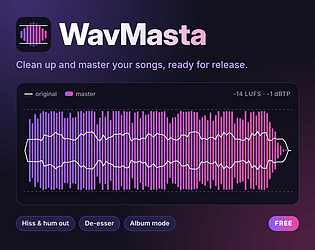
  • Streaming-ready loudness (-14 LUFS for Spotify and YouTube) with a true-peak limiter that never clips
  • Before and After at matched loudness, so you hear the real difference, not just "louder"
  • A waveform of the master drawn over the original
  • Album mode: masters a whole set so the songs match in tone and loudness
  • Trim silence and add a smooth fade-out
  • Saves WAV 24-bit (for DistroKid, CD Baby, TuneCore), WAV 16-bit, FLAC or MP3


It runs entirely on your computer, so nothing gets uploaded and your original file is never changed.

Windows installer here, pay what you want ($0 is fine): https://skynrlabs.itch.io/wavmasta

It's also open source (MIT), and macOS and Linux can run it from source.

It's made by one person at Skynr Labs. If you try it, I'd love to hear how it does on your songs. Thanks for taking a look!

(1 edit)

Hi everyone! I've just released Stemquill, a free desktop tool that turns audio stems into MIDI files you can drop straight into your DAW.

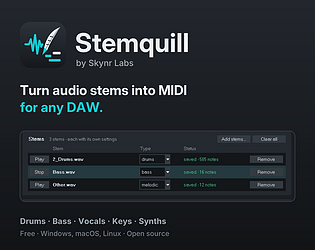
Give it the drum, bass, keys or vocal stems from a stem splitter, Suno, Udio or your own bounces, and it writes one .mid per stem. You can then play the parts with your own drum kit and synths, change the notes, or rebuild the arrangement.

What it does:

  • Drums are split into kick, snare, hi-hats, toms, crash and ride, with maps for General MIDI kits (EZdrummer, Addictive Drums, MT Power Drumkit) or pad samplers (FPC, Drum Rack, MPC)
  • Bass, leads and vocals become single-note lines, and guitar, keys and synths become chords
  • Tempo detection, plus an optional snap to grid
  • Preview each stem with built-in sounds before saving, with the original mixed in to check timing
  • Humanize, per-stem settings, and drag and drop for whole folders
  • Runs 100% offline. Your audio never leaves your computer.

It's transcription, so it isn't perfect. Clean, isolated stems give the best results, and busy ones may need a quick tidy in the piano roll.

Pay what you want, and $0 is fine. It's MIT licensed, and the source is on GitHub.

Download: https://skynrlabs.itch.io/stemquill