Hey this is brilliant! Thank you for this!
Hopefully I'm not asking something super obvious here, but I didn't see any mention of "license" information for normal maps created with this extension. Am I ok to use this extension for (what I hope one day will be) a commercial product (game)?
skeets23
Creator of
Recent community posts
Wow, thanks for the super detailed reply. I never knew color was such a complicated beast!
These concepts seem to be largely unknown to most pixel art artists... I had been researching palette design a bit, but hadn't run into anything even close to this level of detail.
It still seems like it could be helpful if it were possible to toggle the display in this app to see all the colors as they will be exported, as sometimes the exported color isn't quite as I expected... But overall this palette generator is an absolute lifesaver for someone like me that was really struggling to figure out how to select colors for a good palette.
Thanks again for taking the time to explain things... And for this incredible generator 😃

Here's a screenshot to explain the biggest confusion. The color in the palette shown on the left does not match the color that will be exported (the value on the right).
Also, maybe I'm just stupid, but isn't #FFD600 a valid sRGB color? Why is it a "problem" color that needs to be muted to "fit"?
Just to illustrate how different these 2 particular colors are, here's a comparison:
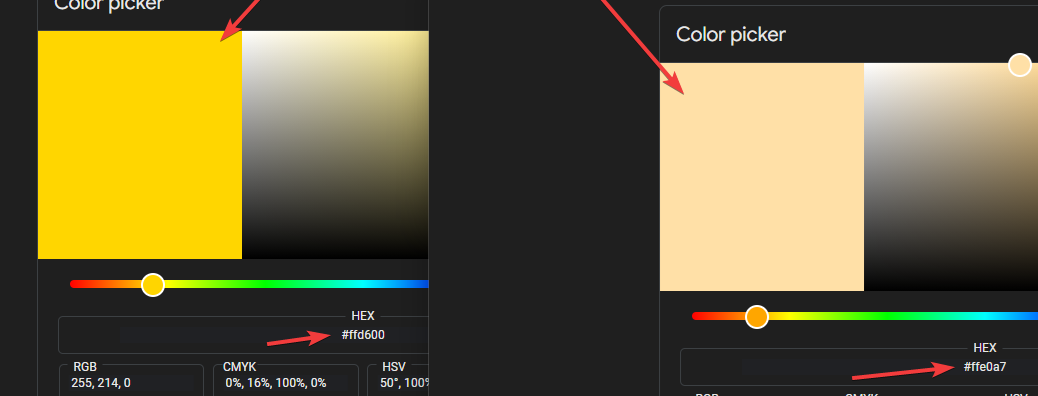
So the color on the left in this screenshot is the color that is displayed in the palette editor, and then when it's exported for use in Aseprite, the color on the right is what comes out... it's pretty different?
I'm finding a few things really confusing about this:
1. The "problem checker"? So if a color is highlighted by this, is that bad? Because it highlights an awfully large number of colors, it's very difficult to make any kind of comprehensive palette that doesn't have 75%+ of colors highlighted?
2. How does one "fix" the problem colors? The "docs" under the tool just say "oh no"... so there's no way to fix them and you're just screwed?
3. Why does it show one color, but then when it's exported it exports a different color? And the ball on the right's color doesn't really match the color in the palette either? Does this have something to do with the "muting to fit sRGB space? That kind of makes sense, but why can't I see the *actual palette that will be exported*? What's the point of looking at the colors *before* they are muted if that's not what they'll be exported as? It makes it super difficult to make any palette since most of the colors don't actually show what they'll be exported as?
I'm a beginner as far as picking colors (or even doing art in general) goes, so I'm probably just not understanding something.