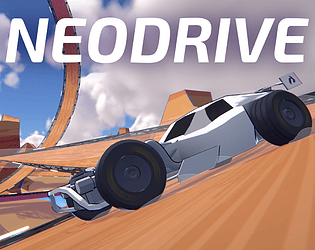
The back wheels are smoking more because they’re being driven by the engine and are spinning against the ground, while the front wheels aren’t doing anything except rolling with the car.
I agree that it’s not super realistic, but the game does have to diverge from reality at some point and this is the point I chose. It’d be much harder to get more realistic looking cartoon smoke that still works with this art style. I also think it’s fine like this because it’s very readable - either the smoke is there or it isn’t, and you know exactly when you’re drifting or not.
I will probably finish VT physics at some point, but it will be a much smaller game than I originally intended (which is to say, still about 6 hours or so)
Hi, EngineSim isn’t my creation. You’ll have to look at the license and usage terms in the repo that I linked.
As far as my own code goes, you’re welcome to use it for whatever. The repo is private right now but I dropped the EngineAudio class into this Github Gist. It’s CC-0 licensed, so you can do whatever you want with it.
After being disappointed with a lot of free spline deformation tools, I bought and have been pretty satisfied with a Unity asset called Spline Architect to basically do what you’ve described. The workflow is:
Make the track spline
Copy the track meshes along it
Play, tweak the shape, repeat
Add scenery
It’s nice because it’s a non-destructive workflow and I can alter the spline and just have the track change to follow it. I don’t have a level editor built into the game yet though, it’s all just in the Unity editor itself. I will probably record a devlog of an end-to-end process of developing a track at some point to show what that’s like and my thought processes while designing it.
Managing DLC for both Steam and non-Steam builds would be kind of a nightmare, unfortunately. I will probably launch in Early Access with 1/3 to 1/2 of the tracks made and have the game heavily discounted until it hits 1.0.
Thanks for the kind words. I do want to come back to VT someday with a more realistic scope.
In the meantime, however, I am working on another smaller game (Neodrive) as well as an unnanounced 2D metroidvania with a group of people. It’s got a cool premise, some sick art, and of course some movement and gameplay programmed by yours truly. We will announce it later this year.
ah got it, thank you. I was actually wishing it would be nice to be able to navigate the UI with the controllers - maybe it was working, but the buttons weren’t changing appearance on hover/select. good luck with development!
Pretty cool, definitely the bones of something good. I played some of the gate race events and the race, which took me a few tries to win.
camera felt a little wonky, would be nice if it was following the car on smoothed axes instead of just being parented to the car
the different handling on mud was cool, and I liked some of the mud placements. like initially I thought the mud on the outside of the mid level of the last turn before the finish line was too much, but if you can thread the needle it’s very satisfying
rally car seems goated
cliffhanger takedowns could really use a camera showing the NPC falling off instead of from the track
respawning needs a gamepad button, I couldn’t find one
some other effects for when you’re on mud would be nice
you need more props for sure, the Godot terrain pop-in is rough
i feel like all the cars could have bouncier suspension too honestly, or if you even fake bounce the wheels up and down to make the ground seem bumpier
cars could use a little more stabilization when hitting the curved edges of bumpy terrain or getting rammed without getting KO’d
getting crushed by a monster truck was cool
despite criticisms it was genuinely fun to play around with and worth trying to get 1st on the race
I think if you’re trying to sell it for money you gotta have a lot more sauce. more explosions and parts and shit flying off. bumping and getting bumped around by other drivers is pretty fun already. cool to see another indie racer in the works
Yo thanks for playing! Unfortunately I haven’t worked on this game in several years and likely won’t for a while. For now, you’ll have to just adjust the global volume. A dialogue volume slider would be a good idea though.
Hmm, weird. I’ll ask a friend with Linux to give it a try before the next demo.
I will also add gold time overrides. I wanted to set a competitive author time for tracks, but that results in a really hard gold time on early tracks where I want to reward the player with an early gold medal.
Also yes. I will fix my tire slip model in the future. Thanks for playing.
oh man, that framerate is ROUGH haha. I’ll make another pass with optimization, at the very least turning down motion blur might help in the future. Thanks for playing!
Paddle shifting mode just uses L1 and R1 to switch gears, without any holding L1 and moving RS. You don’t need to do the Manual tutorial if you have that enabled, but I should definitely make it clearer. Thanks for giving it a try!
My mistake. I accidentally unbound the cycle camera button in the keyboard controls. It’s in Camera > Cycle Camera in the keybind settings.
There are ways to get around the arrow issue that I haven’t implemented. One potential way is to make the steering input “heavy” so you have to hold a direction for half a second or whatever to pull the input all the way left or right.
Another way that I practiced a lot with Trackmania is just rapidly tapping the arrows. But I think Trackmania physics are balanced around that, whereas Neodrive is not.
Much further down the line, I will probably add other cars that are more forgiving to drive on keyboard.
VR Speed Racer sounds sickening. I played BallisticNG in VR with the cockpit view once and got too nauseated to keep playing.
will definitely show all times next update, good call
yes
yeah, ghosts are for down the line if this game actually gets traction somewhere. some of the code already supports multiple ghosts
eh, people like playing the trackmania campaigns even solo. maybe audiences are different now but who knows, this does have the advantage too of not being a subscription model
the speedracer/hot wheels tracks are usually harder but I should make some more forgiving ones that still have loops and shit, yes
there’s a first person camera, it’s up on the d-pad. not sure what I bound it to on keyboard but you can check in the keys menu
steer control as in you needed more when not drifting?
you should boost it’s fun
numpad numbers to shift gear is insane though, if that strat worked for you then hell yeah. especially if you don’t drive you’re a madman
picked up the movement tech very quickly, although I’d suggest adding a fastfall binding like Z or something, it gets awkward having to switch my middle finger up and down like that.
I wish there was more traction on the ground, but I respect it if you want to keep it like that too, it’s definitely doable. the roll especially out of a fastfall bounce felt WAY too fast and hard to control though. still, very charming artstyle
almost completely incomprehensible but vibes are unparalleled. love the art, and I was starting to get the sword swinging/stuck weapon mechanic at the end. cool little touches like the teddy bear pillow attack filling the screen when you get hit by it.
i never figured out the jump mechanic though - is it on a meter that needs to recharge or something? sometimes i was able to jump higher than normal and sometimes I wasn’t able to jump at all.
choosing a faith at the beginning is a really funny touch, I enjoyed that. combat was very slow but didn’t feel terrible to me, at least in third person - the different directional strokes based on where you were aiming was cool, if a bit unintuitive in first person. in first person I feel like a mouse gesture would make more sense, but I realize that’s way harder to code.
cool graphics though, very reminiscent of a certain era. I went into the basement without the torch and opened the door and started falling into the skybox, so I guess that was the end of the level
played fire and earth realms, pretty cool but seemed a little bit grindy without much risk. gameplay loop seemed to be orbiting around things and blipping at them with your primary to get a stat up. the weapon cycling was neat, and having unlimited ammo is nice too. also the special attacks are cool, big fan of the akira orbital laser. i never felt like I had to use the shift dodge except to get somewhere faster.
not sure what the point of pressure was until I realized it seems to just keep you from flying over the entire level at the start
maybe I need to revisit it and do some harder levels
seems like a boomer shooter trying to be an imsim almost. enemy movement is interesting but it doesn’t seem like you have the same kind of strategic tools to deal with the generic ooga booga spearchucking savages. definitely a chudgame in that you get the power fantasy of shooting subhumans with your semiautomatic firearm with a mandatory explicit reload. gun dork stuff fell short though imo because you keep all the bullets left in your magazine if you reload halfway through, and the pistol reload is fast enough that there’s no point in doing anything but reloading after each kill
surprisingly charming. got all bones big and small. I like how some of the last ones felt like you had to push the movement system to its limits, like getting up the pillar with the balcony halfway up and the overhang that made me need to jump to the side of the sloped roof since it was lower.
really cool art, can’t say I care for the darkest dungeon style gameplay that much but some of the visuals are very very polished. definitely needs max hp/mana indicators though.
kinda cool, I liked the assassinations more than anything. there doesn’t seem to be any penalty to running in and killing though since you can just dodge and eat one of your 200 bananas.
one thing that was cool was the enemy in the onsen level that had the frame data to push you back if you spammed attack too much though.
lots of chain lightning and spamming rest in between fights. not sure what the actual gameplay loop was like, but pretty cool. these dungeons are way too big for me to be using graph paper man
really unforgiving indeed, but it’s ok because the controls are for the most part very very tight and polished. i do not like levels with the moving platforms especially if they don’t reset between deaths, it always feels like a gamble.
also I kept getting locked in on a level and then forgetting what the game was like and getting Pussy Jumpscared when I finished. not sure what the target audience is - people who are horny but also want to be pissed off? pretty fun regardless
also, one of the early levels where you have to loop 3 times and jump down through the portal to the top seemed way harder and maybe should be a later level. nice art though
right now there’s not much of a reason to parry if you can just dodge forward and right through everything. I parried a few times and clashed maybe once by accident and managed to just hit them for vitality until I could start doing persistent posture damage and didn’t use any of the gadgets because their startup time was very long. beat all bosses except the last one which I haven’t tried yet. I guess if people start blocking you want to just use gadgets but I didn’t see many downsides to just spamming attack and dodging when necessary early in the fight.
pretty cool though for furry sekiro even if some of the bosses are for coomers. attacks are well telegraphed for the most part too.