
On Sale: GamesAssetsToolsTabletopComics
Indie game storeFree gamesFun gamesHorror games
Game developmentAssetsComics
SalesBundles
Jobs
TagsGame Engines

Sanlo

8
Posts
3
Followers
8
Following
A member registered Sep 17, 2023 · View creator page →

Creator of

Recent community posts

Wow, thanks a lot!

Actually, I really didn't do any sort of research while working on this project. Its actually the first time that I´ve opened the game´s Kickstarter page.
That thing about Al Akibahara is pretty interesting. A while ago I found some scrap of data related to that map and I was able to convert it to Godot. Its not much nor impressive, but its fun to find these things.
I remember looking around TCRF for some info, but I guess I didn't see that. "powerbadboy" is one of my favorite tracks so far, finding an early chiptune version of it is pretty nice.

That BB Tactics game is something I really overlooked, I will take a look at it.

(1 edit)

- If Hoopz chooses to move, does it cost him Action points or anything similar? Does moving limit how much he can fire?

Both 'yes' and 'don´t know yet' actually. Initially, that was the plan.
The combat prototype worked like this: Both weapons and the players have 0 to 100 "action points". Certain actions consume some amount of points (ex.: moving costs 30 points, normal attack costs 60 points, a weapon skill costs 100 points, etc).

On the prototype that worked pretty nice, but when porting that code to B2, I changed my mind because of the ammo costs. Managing both the amount of ammo and action points felt weird... Would a "triple shot" skill cost 90 action points and 12 bullets? It seemed too complex using the current system / gameplay loop.

Having said that, Hoopz still have its own action points that he can use to move, use items (???) and defend. Hoopz action point would affect the speed that the weapons action point would increase (ex.: Hoopz AP is at 50, so the weapon AP would increase at 0.5x speed).

- Also, does Hoopz get the chance to evade enemy fire / strikes in any way?

Yup. From the start, I was think that would be pretty cool for the player to wait an enemy attack, dodge the attack and shoot the enemy at a close range, all using menus to do it. The action points and "Active" battle system was made to do just that.

- Have you thought about "friendly" or "neutral" NPCs participating in battle?

I haven't thought of that, but I think that the current battle system can support that.

- Nothing stops you from having a "party" of people that join you throughout the adventure. Maybe they give passive benefits/skills for use? Or maybe you can deploy them to fight alongside you once a battle starts?

The main issue of having a party is the writing and sprite work necessary to make good characters. Those aren't my strong suits lol.
Between having no party members and having some that say nothing interesting and has bad graphic/sprites, I prefer having no party members. Manly, that why I´m trying so much to use only original assets.

- If a fight starts, do you battle exactly where it started (for example: a cramped corner, or an alleyway), or are you transported to a bigger fictional area to do the battle? The demo you showed seems like a good size for fighting.

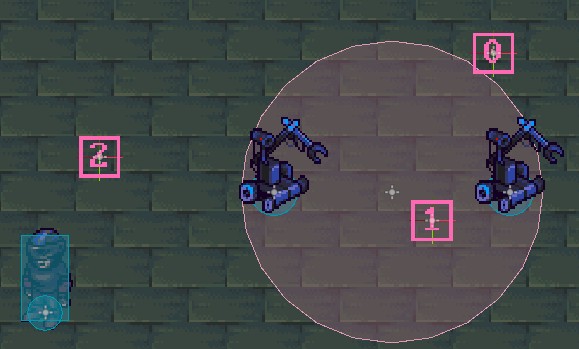
You always stays in the same map, but Hoopz and the enemies can move to a specific place before the fight. In the Demo, for example, the enemies would move to the '0' and '1' spot, while Hoopz  moves to the '2' spot.


With this, we have some control on how battles would look at the start.

Hey there, thank for the support!
Actually, I did think of doing something like that ( Not like Earthbound, but more like a regular RPG combat ), but I really would like to use most (if not all) existing assets. After seeing how many weapons, weapon animations and all different enemy sprites (moving toward 8 directions, all attack animations and such), hiding the player and/or having a static image for a enemy representation feels bad.

About Half year ago I think I made a simple prototype with a final fantasy 6 (minus the action bar) and I found it to be too boring.

With Hoopz being the only "party member", I had to come up with something to make it "fun".

Here is a somewhat old demo for what I came up.

Well, I'm not a experienced gamedev, so its a bit difficult for me. The original system is a little bloated and confusing, but it works great. The main issue is that not only I need to port the cutscene system, but all its actions and dependencies too. The movement speed, animation timing and such are the main hurdle right now. 

Hopefully, It wont take too long to finish this section of the game .

Hey there, thanks for the comment!

For now, the project is still in the proof of concept stage, remaking the whole game is just a fantasy due to game´s the complexity. Truly, I had no idea what I was getting into.

If I'm lucky, I will be able to port the whole tutorial segment and make some tools to convert data from GMX to Godot easily (Only tilemaps and sprites so far). If that works, then porting the rest of the game should be simpler.

I also want to change some thins from the game, but every change made breaks something else. Down the line, I really want to change the combat to turn based, but that would break a lot of things.
Other things I have no choice but to port it as is, like the (bloated) cutscene system. Everything uses this system (dialogs, cutscenes, quest flags) and changing it means changing every interaction and cutscene movement in the game.
I´ve been working on this cutscene system on and off for ~2 months.

Hey there, thanks for making this available to the public.

It´s probably a long show, but do you have any kind of documentation beyond of whats was provided on the Google Drive archive?

For the last few months I´ve been working on the source file and a few scripts / objects are a bit confusing.

Thanks!

I keep coming back to this article everytime I need a refresher on how to handle the Astar2D (instead of AstarGrid2D im used to). thank you very much.

the mouse movement? seems right to me, you click and drag with the middle mouse.