

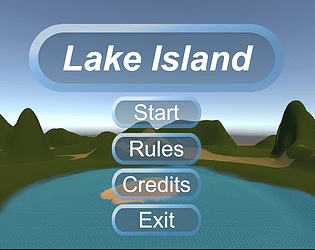
In this adventure game, I was immersed in a rich and colorful visual experience. The game plot was captivating and easy to understand, and the UI interface design was simple and clear, allowing me to experience a unique adventure journey. The first scene - the village scenery is stunning, and the character selection is also very cute. The only drawback is that the scene is slightly narrow. The snow scene in the second scene is also beautiful and realistic, with falling snowflakes giving a sense of realism, and deer is even more likable. The only regret is that deer may be a bit stiff. The operation of the poisoned apple in the third scene made me feel extremely stimulated, but the only drawback was that I did not inform what the poisoned food was. When I was chased by a bear in the fourth scene, I felt an extreme sense of danger. While running, it felt like I was in a real adventure, with the only regret being that the game would lag a bit after running. The fifth scene is both realistic and interesting. The castle scene is full of mystery, but the only drawback is that some levels can be set to enhance the fun of the game
RuiMa
Creator of
Recent community posts
In this adventure game, I was immersed in a rich and colorful visual experience. The game plot was captivating and easy to understand, and the UI interface design was simple and clear, allowing me to experience a unique adventure journey. The first scene - the village scenery is stunning, and the character selection is also very cute. The only drawback is that the scene is slightly narrow. The snow scene in the second scene is also beautiful and realistic, with falling snowflakes giving a sense of realism, and deer is even more likable. The only regret is that deer may be a bit stiff. The operation of the poisoned apple in the third scene made me feel extremely stimulated, but the only drawback was that I did not inform what the poisoned food was. When I was chased by a bear in the fourth scene, I felt an extreme sense of danger. While running, it felt like I was in a real adventure, with the only regret being that the game would lag a bit after running. The fifth scene is both realistic and interesting. The castle scene is full of mystery, but the only drawback is that some levels can be set to enhance the fun of the game
Multiplayer interaction: Consider adding multiplayer interaction features, such as online treasure hunting, friend leaderboards, etc., to make the game more social and fun.
Reward mechanism: Improve the reward mechanism, so that players can get rich rewards after completing the treasure hunt task, improve the enthusiasm of players.
Animation effects: Add animation effects, such as treasure chest opening, treasure digging, etc., so that the player can feel visual pleasure during the operation.
Background music and sound effects: Optimize the background music and sound effects to enhance the atmosphere of the game. You can set different music and sound effects according to different scenes and tasks.
Personalization: allows players to customize the interface theme, character image, etc., to meet the individual needs of different players.
Adaptive design: Make sure the game interface is adaptable across devices, resolutions, and screen proportions to improve the user experience.
In-game prompt system: It is recommended to optimize the in-game prompt system so that players can get appropriate help when they encounter difficulties, so as to improve the game's playability.
Player growth system: Player growth system can be added, such as levels, skill trees, etc., so that players feel their progress and growth during the game.
Interface aesthetics: The interface design of the game is very beautiful, harmonious color matching, in line with the atmosphere of the scavenger hunt. However, the design of some ICONS can be more detailed to improve the overall look.
Fonts and typography: It is recommended to optimize fonts and typography to ensure a good reading experience on different devices. In addition, some dynamic effects can be appropriately added, such as text scrolling, flashing, etc., to attract the player's attention.
Game guide flow: The game guide flow is designed to be very clear, so that players can quickly understand the rules of the game and how to operate. It is recommended to add some interactive teaching sessions in the first game to improve the experience of novice players.
Task difficulty design: The difficulty of the scavenger hunt task should be moderate to maintain the player's desire for challenge. The difficulty of the current missions is a bit high, which may cause some players to feel frustrated early on.
Menu and button design: The menu and button design is concise and easy to operate. However, the size of some buttons can be appropriately increased to improve click accuracy.
Information display: During the game, it is recommended to optimize the way of information display, such as using pop-ups, prompt boxes, etc., to avoid excessive text stacking, so that players can more easily obtain key information.
UI Advantages:
Bright colors and interesting images: Storybook software can use bright and vivid colors that capture the attention of elementary school students, as well as interesting images and illustrations to attract their reading interest.
Easy recognition of ICONS and buttons: For elementary school students, the UI design of storybook software should use intuitive ICONS and buttons that allow them to interact and navigate easily.
UI disadvantages:
Readability and operability: The design of storybook software needs to take into account the reading ability and operation skills of primary school students, and try to avoid problems such as too small fonts and overcrowded content, so as to ensure that they can read and use smoothly.
UX Benefits:
Interactive and multimedia elements: For primary school students, storybook software should have rich interactive elements such as sound, animation and touch feedback to enhance their sense of engagement and reading experience.
Simplified interface and navigation: The interface of storybook software should be simple and clear, and navigation menus and chapter switches should be easy to understand and operate to avoid confusion in the use of primary school students.
UX disadvantages:
Personalization and differentiation: Storybook software can further provide more personalization options, allowing elementary school students to choose different themes, characters or story types according to their preferences to increase their interest and engagement.
Balancing education and entertainment: Storybook software can combine educational and entertainment elements to convey fun and edutainment stories that help elementary school students learn and grow through reading.
1. UI design is gorgeous and unique, giving people a visual impact and highlighting the brand image.
2. The layout of the page is orderly, the function classification is clear, and the navigation process is clear.
3. The color selection of some pages is too bright, which affects the user's reading and attention.
4. The interactive design of the page is not intuitive enough, and users need to click many times to achieve the expected operation effect.
First of all, your UI design is very creative and personal. The color scheme you have chosen is very appealing and gives a modern and stylish feel. I also particularly like the ICONS and illustrations you use, which add some pizzazz and interest to the whole interface.
In addition, your UX design is excellent. Your information architecture and navigation design are clear, and users can easily find the features and content they need. At the same time, you take into account the user's needs and mental model, and provide them with a good experience. I particularly like the interactive elements you've added to make the interface more lively and interesting.
UI aspect:
Aesthetic design: Your UI design is very attractive, and the colors and typography are excellent. They add a sense of professionalism to the work.
Icons and visual elements: The design of icons is straightforward, but in some cases, their size may need to be further optimized to accommodate different screen sizes.
Clarity of navigation: Navigation menus are clearly laid out and labeled, but sometimes they are slightly less consistent across pages.
Responsive design: Your work performs well on a variety of screen sizes, but on some phones it may need further optimization to ensure that the content is not truncated.
UX aspect:
User-friendliness: Users are able to easily find the information and features they need, which enhances the overall user-friendliness.
Page load speed: Works load quickly, but in some cases, the loading process may require better feedback to reduce the user's feeling of waiting.
Interactivity: Interactive elements enable users to engage more deeply, but some transitions and animations can make the user experience more interesting.
Accessibility: Do you consider different types of users, including people with disabilities? Consider further improving accessibility to ensure your work is more friendly to all.
UI: Positive feedback:
1. Suitable font size and style, easy to read.
2. The button design is simple and clear, easy for users to operate.
Negative feedback:
1. Some ICONS are not clear enough, affecting user recognition.
2. Page layout is not flexible enough and lacks variation.
UX: Positive feedback:
1. Page navigation design nice, users can quickly switch functions.
2. Provides a detailed user guide to facilitate users to get started.
Negative feedback:
1. The content of the page is not updated in time and lacks freshness.
2. Lack of user personalization options, poor user experience consistency