Indie game storeFree gamesFun gamesHorror games
Game developmentAssetsComics
SalesBundles
Jobs
TagsGame Engines

Razigo

20
Posts
3
Topics
1
Following
A member registered Jun 06, 2020

Recent community posts
Hey man, no worries, and thank you so much for adding in my suggestion, this plugin is so cool!

Thanks so much, hope you're doing good!

Hey Kadajah, I'm doing great, thanks! Hope you're also doing good.

Hell yeah that sounds awesome! Thanks for adding the float function. I'm also excited to see what more you've done!

Thank you!

Glad to help! I found a workaround for myself and left it on an earlier comment here.
Thanks for this amazing plugin and helping resolve this!

(3 edits)

For anyone else who may stumble across this problem:

  • find ctx.strokeRect(x + 0.5, y + 0.5, w - 1, h - 1); do ctrl+f to find strokeRect and look for this line/very similar.
  • add // before the line to hide it.
  • these outlines vanish for the main menu, status menu, battle, etc

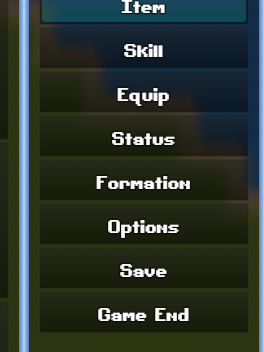
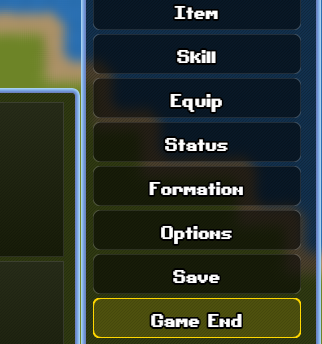
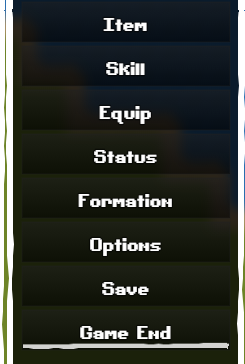
I am still working on the outlines on things like: Item, Skill, Equip, Game End, etc, same for battle commands and such. When I find the lines for those, I will update here.

UPDATE
Search for :

  • let colorBorder = isVisuallySelected ? mainColor : (item ? "#444" : "#333");
  • let colorBorder = isVisuallySelected ? mainColor : "rgba(255, 255, 255, 0.2)";
  • const borderColor = isVisuallySelected ? mainColor : "#444";

Then, change each of these to null like so:

  • const borderColor = isVisuallySelected ? mainColor : null;
  • let colorBorder = isVisuallySelected ? mainColor : null;
  • const borderColor = isVisuallySelected ? mainColor : null;

The lines should be completely gone now. :)

As I said, I turned ALL plugins off, no outlines. I turned ONLY yours on and the outlines came back.

UPDATE:

I'm going through the plugin's code, and I've found a spot that deals with strokeStyle for window selectables.

Changing the color to transparent has fixed the outline issue on the status menus, I'm now working on finding the other spots for the rest.

Thanks for the quick reply! I've tried swapping the windowskin. Turning off your plugin makes the outlines go away entirely.

I have everything else turned off except this plugin and the outlines return.

Love the plugin so far!

Something I have noticed while using it in MZ, Any buttons or certain windows (status windows) have an outline I can't seem to get rid of at all. Is there a setting to fix this, or is this a setting somewhere I can't find?
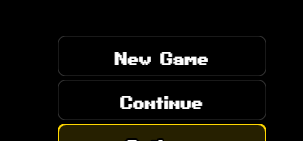
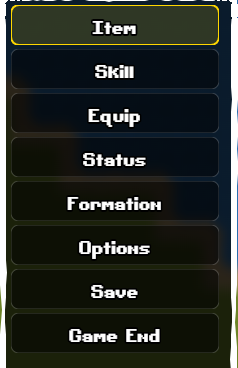

I've double checked my other plugins aren't causing this. I saw in your demo and in the video I did not see this happening. It could be MZ exclusive, but I thought I'd ask and see.
Thanks!

It's going great so far, thanks!

Excited to see what your idea is, I'll eagerly await the surprise! And no worries, I hope your tasks go smoothly for you!

Thanks bro!

Love this plugin! I'm using it combined with your 'FrontViewX' and 'BattleTrigger' plugins and its amazing so far!

I think another  cool plugin would be one that works with the FrontViewX system to add effects like these to the Actor images! Example: Winged Actor has the float effect.

Amazing work as always! I intend to be getting more and more of your plugins.

I'm glad you like the suggestion!

That sounds really cool! I'll keep an eye out for updates!

I like the idea of a command turning it on or off, I think that'd be good for difficulty toggling and/or some things just can't be dodged.

That's fair, and yeah it would be bad for each enemy attack. I was mostly curious if it also did that.

That could be a cool add in, or even just a single 'block' that is timed. Much like paper mario you have a small QTE when the enemy attacks to try and block a small bit of damage.

Just an idea, I like how this looks and will likely grab this plugin as is soon!

This looks awesome
When the enemy attacks, is it possible to use this for QTE's to dodge or block the attacks?

This looks amazing! Curious though, is there a way to have this scale off of a variable instead of the player's level?

Thanks!

Love this system so far it is incredible! As I was playing the demo the child/baby sprite got between me and a wall, trapping me between them. they would not move and I couldn't get through them. Other than that this works beautifully!

Will there be the ability to push, pull, pick up/throw objects? Or other such puzzle elements like hitting buttons with a projectile to open a switch?

Got this and its amazing.... Though I wish I could move the position of the lil mouse icon/menu. Wanted to use this on my other monitor but I can't find any way to move it to display there instead.

I've been using Scrivener for running DnD, but finding THIS is quite exciting!

Going to set up to run Curse of Strahd 5e in this and see how it goes using this. From what I've done so far, it's really handy!

Thanks! Love the amazing work for the sprites and tiles!
Some other animals that may be good:
- Rat -Mouse -Pig -Crow/blackbird -Seagull -Fox -Frog

Wondering if you'd ever do an animals pack? I have pretty much every other pack so far and haven't seen any cats, dogs, birds, mice, etc.
Amazing work!