Indie game storeFree gamesFun gamesHorror games
Game developmentAssetsComics
SalesBundles
Jobs
TagsGame Engines

RazaRizvi

5
Posts
1
Topics
A member registered 80 days ago

Recent community posts

I opened a ticket with them, so if I get an explanation I will let this thread know.

A further update. Despite the text looking good/okay in BookWright which is used by Blurb to print their small-volume book runs, the printed article looked really bad. The proof PDF I checked meant I opened a support ticket with Blurb but they said the PDF proof process was low-res and might not look that good.

I went ahead and did a sample book (albeit in my desired run of 1 book!)

The font shown in the book has jagged edges, the characters don't line up horizontally but go up and down with each character, commas appear as apostrophes... so I have reopened by Blurb ticket.

None of this is the fault of the OpenDyslexic font (which Blurb had said could be used if it was installed on my Mac as I suppose they embed it in the document), but what it does mean is that you will need to be careful if you are planning to do the same thing I was doing. I may have to revert to a built-in font which has dyslexic readability but at least I have the time to do this before I need the book.


(Blurb delivery is at least quick and the article is nice, albeit the text is not)

No problem, in my instance this isn't going to cause a problem - and just having the font available makes it all that more special. Thank you for your work, I appreciate it.

As an update, this is almost certainly an internal Word thing. I will eventually print this poem in a book and if I export it as text from Word and then import into Bookwright and apply the font at that point - no issue. (Well not that I can see with a test couple of paragraphs).

I am using the latest version of OpenDyslexic (the 4.4MB file) which has 4 .otf files which I have installed and see in Word.

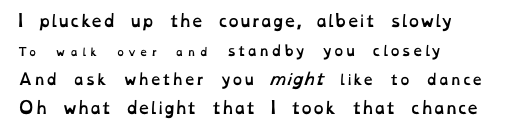
Applying the font to a document with existing text OR exporting the characters as as MacOS .txt file and then importing into a new word document and applying the font gives the same on screen appearance where the lines in a paragraph of poetry do not appear to be the same physical font size, though Word believes they are. If one over-types the smaller characters, their appearance changes to be the 'correct' size. It doesn't seem to be Word kerning or spacing or hidden font nonsense (as clear formatting makes no difference).

I am stumped. Any ideas anyone? I thought I might try and older version of the font but I don't see a separate download link for that and the Download Now file doesn't seem to contain the older variants.

I have attached a screenshot so you can see what I mean - look at line 2, the start and end appear to be different sizes, and neither the same as line 1 or 4. In line 3 the word 'might' is in italics.

This is OSX 12.7.6 if that is relevant.