Indie game storeFree gamesFun gamesHorror games
Game developmentAssetsComics
SalesBundles
Jobs
TagsGame Engines

PsyFrog

5
Posts
5
Topics
1
Followers
A member registered 25 days ago · View creator page →

Creator of

Recent community posts

Beta Chip

Hi everyone! I just released Beta Chip, a real-time AI screen censor for Windows.

Beta Chip runs quietly in the system tray, watches your screen and covers the content you choose, live, on top of anything: browsers, videos, games, images. Everything is analyzed locally on your PC by an AI vision model. No uploads, no accounts, no cloud.

  • Choose exactly what gets covered, with per-category settings
  • Censor styles: black bar, solid color, blur, pixelate, mosaic, image and custom text, with organic shapes
  • Smooth tracking that follows moving content without flicker
  • Custom screen areas, profiles, global hotkeys and multi-monitor support
  • GPU-accelerated when available, 100% offline
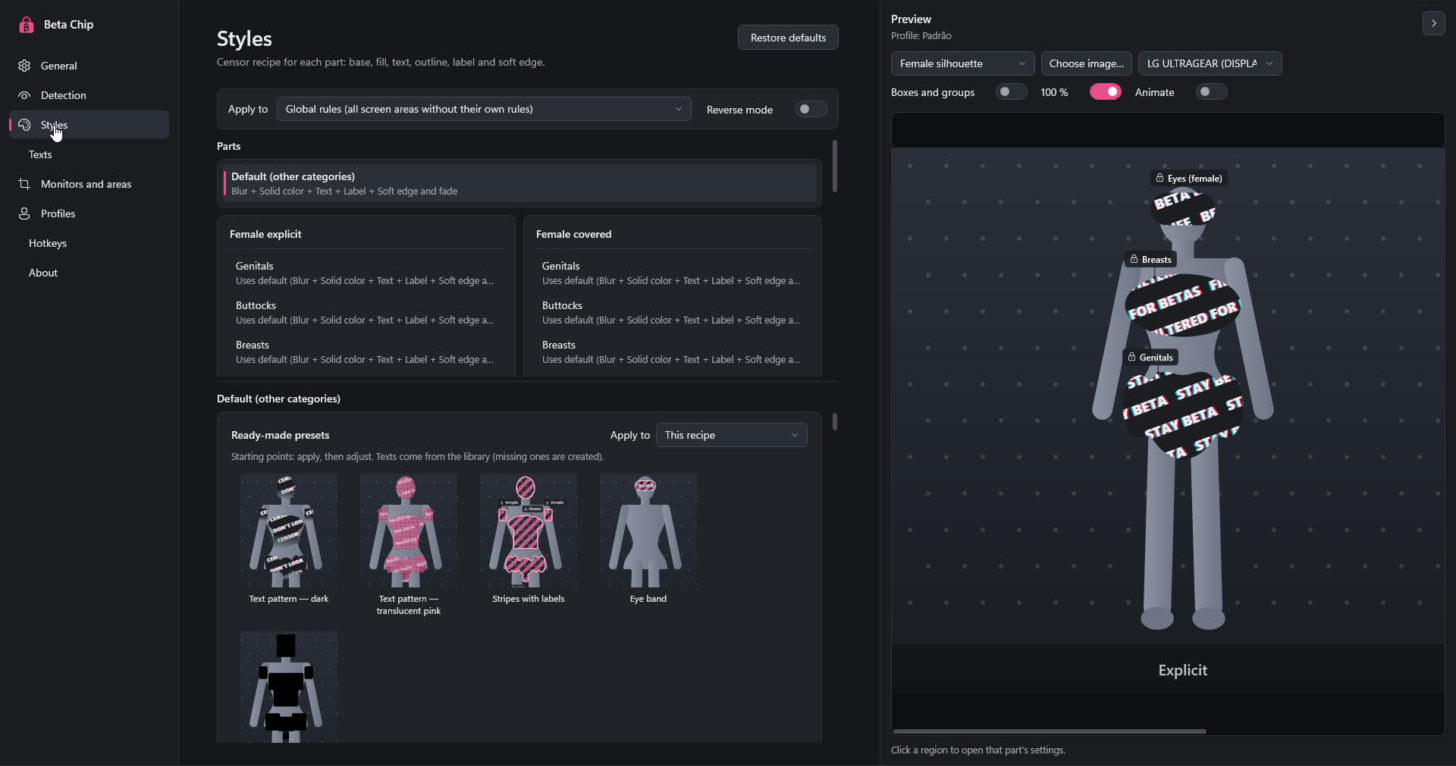
Beta Chip settings

There's a free demo on the page, so you can try it on your own PC before buying. It's my first release, so any feedback, bug report or suggestion is really appreciated!

👉 https://psyfrog.itch.io/betachip

This is the place for general feedback, questions and conversation about Beta Chip.

I'd really like to know:

  • What do you use Beta Chip for?
  • Which censor styles and settings do you like the most?
  • How does it run on your PC? (Your GPU and the performance preset you use help a lot.)
  • Anything confusing, annoying or missing?

Honest feedback, good or bad, is what helps the app grow. Bugs go in Bug Reports and feature ideas in Suggestions, so they don't get lost.

Thanks for trying Beta Chip! 💗

Got an idea that would make Beta Chip better? I'd love to hear it! New censor styles, body parts, shortcuts, profile options, anything goes.

A few tips

  • One suggestion per topic, so each idea can be discussed and voted on separately.
  • Search first. If someone already suggested it, upvote and add your thoughts there.
  • Tell me the why. Describe the problem you want to solve, not just the feature. It helps me find the best way to build it.
  • Mockups and settings screenshots are welcome. No explicit images, please.

I read every suggestion, but I can't promise everything will be added. Popular and well-explained ideas have the best chance. Thanks!

(1 edit)

Hi, and welcome! 👋

Beta Chip is a real-time AI screen censor for Windows. It watches your screen and covers what you don't want to see, on top of any app, browser, video or game. Everything runs 100% offline on your own PC: no uploads, no accounts, no cloud.

This board is where I'll post news, new versions and changelogs. Subscribe to the community to get notified.

Where to post

  • Bug Reports: something isn't working right
  • Suggestions: ideas and features you'd like to see
  • Feedback & General: impressions, questions and anything else

Haven't tried it yet? There's a free demo on the Beta Chip page.

Thanks for being here!
PsyFrog

Thanks for helping make Beta Chip better! Found something that isn't working right? Open a new topic in this board, one bug per topic. Please search first: if someone already reported it, add your details there instead.

Copy this template

  • Version: Full or Demo, and the version number (shown on the About page)
  • Windows: 10 or 11
  • GPU: model, or "CPU only"
  • Monitors: how many, resolution and scaling (e.g. 2 monitors, 1080p at 100% + 1440p at 125%)
  • What happened:
  • What you expected:
  • Steps to reproduce:
  • Happens every time? Yes / Sometimes / Once

Log files help a lot. You can find them in %LOCALAPPDATA%\BetaChip (or %LOCALAPPDATA%\BetaChipDemo for the demo). They never contain screen content.

Please do not post or link explicit images. Describe what you saw, or share a screenshot of the settings window instead.

Known limitations

  • Windows SmartScreen warning: the app is new and unsigned. Click More info, then Run anyway.
  • Black video in some players: DRM-protected content (some streaming services) hides the picture from screen capture, so it can't be analyzed.
  • Exclusive fullscreen games: the overlay may not appear on top. Use borderless windowed mode instead.