Indie game storeFree gamesFun gamesHorror games
Game developmentAssetsComics
SalesBundles
Jobs
TagsGame Engines

Pardok

9
Posts
3
Followers
A member registered Feb 08, 2024 · View creator page →

Creator of

Recent community posts

(2 edits)

Clever use of assets! Minor suggestion I would give is to somehow mark the point where players have to look up (notoriously they often won't do it). Took me a couple of tries to understand what I was supposed to do. Also Lasers at the bottom of pits would give btter idea that you can't jump there

Sadly, GameJam version is broken. Looks like Godot builds game differently on different machines, even though both Windows AMD PCs, just from different eras. Due to rounding error you can't pick up a steak or fish, which are the items to pick after forks to progress. After that you can stick almost anything to yourself, even chairs

Fun game, but camera makes it harder than it should be. Also scale mechanic doesn't affect anything in a meaningful way. But other than that – not bad! Loved pig sounds and music! Completed all 3 levels

Fun and well-polished! But kinda too easy

(1 edit)

For some reason due to work being separated between 2 people (level designer and core dev), build on my PC (core dev) doesn't allow to progress beyond forks. Seems like rounding error, the difference betwean steak being pickupable and not seems to be almost negligeble:

Target volume too small: 0.27354163446082 / 0.2739838725729
Need additional 0.00044223811208

Can I make multiple submissions? I have two kinda opposite ideas. One would be easy to make and if I can finish it in timely matter, I would like to try another one

Hey! Look here: https://docs.godotengine.org/en/stable/tutorials/ui/gui_using_fonts.html#bitmap-...
In short, you could add your image (I guess in any format supported by Godot: png, bmp, jpg) to your Godot project. Then select your file in Godot's file navigator and switch from Scene tab to Import. Here you can follow tutorial by changing Import type from Texture2D to Font Data. You'll find it easier if you put them together in the correct ASCII order, see the article on how to do that. Feel free to ask any questions!

(1 edit)

I am not familiar with GameMaker, but it looks like you don't need to use scaled up sprites. You could just set specific option and your pixel art will be pixel perfect! You need just to "disable interpolation between pixels in the Project Settings in Graphics tab".
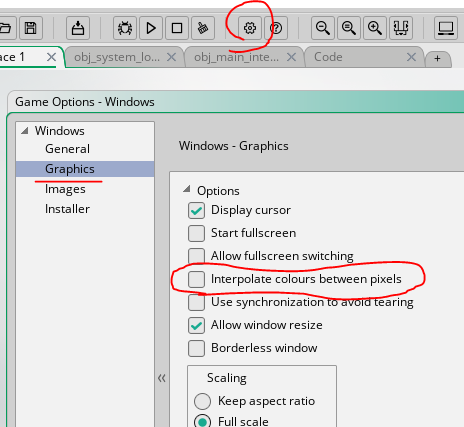
Source: https://forum.gamemaker.io/index.php?threads/blurry-pixel-art-when-setting-viewp...